How to Schedule LinkedIn Posts in 2026 (Step-by-Step Guide)

TL;DR
Learn how to schedule LinkedIn posts in 2026 using three methods: LinkedIn's free native scheduler, third-party tools like Publora, and AI agents via MCP. Includes best posting times, tool comparison, and post type support matrix.
TL;DR
Three ways to schedule LinkedIn posts in 2026: LinkedIn's built-in scheduler (free but limited), third-party tools like Publora (best value — 10 platforms, free Starter plan, Pro from $3.99/account/mo billed yearly), or AI agents via MCP (schedule from your terminal). This guide covers all three methods step-by-step, plus the best posting times, post types, and a free vs. paid tool comparison.
3
Scheduling methods covered in this guide
10
Networks one Publora queue posts to, LinkedIn included
Free
LinkedIn’s native scheduler costs nothing
Why Schedule LinkedIn Posts?
If you're posting on LinkedIn manually — opening the app, writing something on the spot, hoping it's the right time — you're leaving engagement on the table.
Here's what scheduling does for you:
- Consistency without burnout. The LinkedIn algorithm rewards regular posting. Scheduling lets you batch-create content and maintain a steady cadence without logging in every day.
- Hit the optimal window. Your audience checks LinkedIn at predictable times. Scheduling ensures your post goes live exactly when engagement peaks — even if you're asleep or in a meeting.
- Better content quality. Writing in advance gives you time to edit, refine, and review. Posts written under time pressure tend to underperform.
- Cross-platform efficiency. If you're also posting to X, Instagram, or Threads, scheduling tools let you manage everything from one dashboard instead of switching between apps.
Consistency pays: LinkedIn’s own Pages best-practices guide says companies that post weekly see a 2x lift in engagement with their content. Scheduling is how you maintain that cadence without it becoming a second job.
3 Ways to Schedule LinkedIn Posts in 2026
There are three distinct approaches, each suited to different needs. Here's how each one works:
Method 1: LinkedIn's Native Scheduler (Free, Limited)
LinkedIn added a built-in scheduler in 2023. It's free and requires no extra tools — but it comes with significant limitations.
How it works:
- Start creating a post on LinkedIn (desktop or mobile)
- Click the clock icon next to the "Post" button
- Select a date and time (up to 3 months ahead)
- Click "Schedule"
Pros
- Completely free
- No third-party access to your account
- Simple — no setup required
Cons
- No carousel/document post scheduling
- No bulk scheduling
- No analytics on scheduled posts
- No content calendar view
- LinkedIn only — can't cross-post
Native scheduler limitation
LinkedIn's native scheduler doesn't support document posts (carousels), polls, newsletters, or articles. If you rely on these formats, you'll need a third-party tool.
Method 2: Third-Party Scheduling Tools (Recommended)
Third-party tools like Publora, Buffer, and Hootsuite connect to LinkedIn via OAuth and offer significantly more features than the native scheduler.
What you get with a scheduling tool:
- Visual content calendar with drag-and-drop
- Bulk scheduling (upload 50+ posts at once)
- Carousel and document post support
- Best-time-to-post suggestions
- Post analytics and engagement tracking
- Cross-platform posting (LinkedIn + Instagram + X + more)
- Team collaboration and approval workflows
Here's how the most popular tools compare for LinkedIn scheduling specifically:
| Tool | LinkedIn Price | Free Plan | Carousels | AI Features | MCP |
|---|---|---|---|---|---|
| Publora | $5.99/account/mo ($3.99 yearly) | Yes | Yes | AI Editor (Pro) | Yes |
| Buffer | $6/ch/mo | Yes | Yes | AI Assistant | Yes (official) |
| Hootsuite | $99/user/mo | No | Yes | OwlyWriter | Yes (official) |
| Publer | $12/mo | Yes | Yes | GPT-4 | Business & Enterprise |
| Sprout Social | from $79/seat/mo | No | Yes | AI Assist | No |
Method 3: AI Agents via MCP (Advanced)
This is the newest approach: connect a scheduling tool to an AI agent using MCP (Model Context Protocol), and schedule LinkedIn posts using natural language — directly from your terminal or IDE.
Publora includes a production MCP server on every plan, including free. Once connected, you can tell Claude Code or Cursor to schedule posts, check analytics, and manage your content calendar without ever opening a browser.
You: Schedule a LinkedIn post for tomorrow at 9am: "Just shipped a major update to our API. Documentation is live at docs.example.com — built for developers who value clarity over marketing fluff."
Claude: I'll schedule that for you.
Calling tool: list_connections
Calling tool: create_post
Done! Your LinkedIn post is scheduled:
Platform: LinkedIn
Scheduled: Tomorrow at 9:00 AM EST
Post ID: pg_8a2b4c6d
Want to try this?
See our step-by-step guide: How to Connect Publora MCP to Claude Code in 60 Seconds. Works with Claude Code, Cursor, Windsurf, and other MCP clients.
Step-by-Step: Schedule LinkedIn Posts with Publora
Here's the full walkthrough for scheduling a LinkedIn post using Publora — the method we recommend for most users.
Step 1: Create a free Publora account
Go to app.publora.com/register and sign up. No credit card required for the free plan.
Step 2: Connect your LinkedIn account
- In the Publora dashboard, go to Channels
- Click Connect Channel
- Select LinkedIn
- Authorize Publora via LinkedIn OAuth
- Your LinkedIn profile (or company page) now appears in your channel list
Personal profile vs. Company page
Publora supports both. You can connect your personal LinkedIn profile, a company page you admin, or both. Each counts as one channel.
Step 3: Create your post
- Click New Post in the dashboard
- Write your LinkedIn post content
- Add media (images, videos, or documents for carousels)
- Select your LinkedIn channel as the target platform
- Optionally, select additional platforms (X, Instagram, Threads, etc.) for cross-posting
Step 4: Pick the best time and schedule
- Click the calendar icon or Schedule button
- Select a date and time (see our best times to post section below)
- Review the preview
- Click Schedule Post
Your post now appears in the content calendar. Publora will publish it automatically at the scheduled time.
Step 5: Track performance
After the post goes live, open the Published list in Publora to see the post's LinkedIn statistics, such as impressions (Pro plan); the LinkedIn statistics API returns impressions, reach, reactions, comments, and reshares. Use this data to optimize your posting schedule over time.
Best Times to Post on LinkedIn in 2026
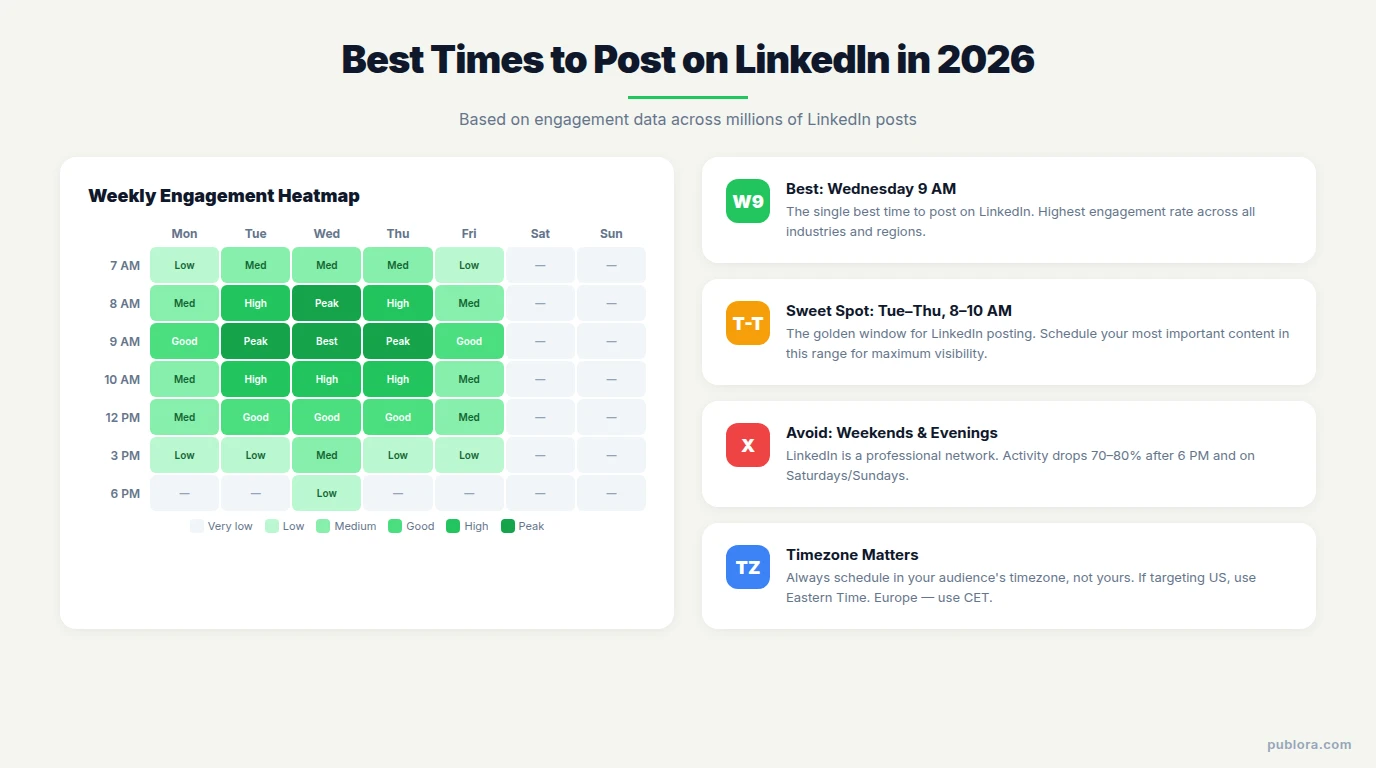
Based on engagement data across millions of LinkedIn posts, here are the optimal posting windows:
Best Days
Tuesday, Wednesday, Thursday — weekdays during business hours consistently outperform weekends. Wednesday is the single best day.
Best Times
8:00–10:00 AM in your audience's timezone. Early morning catches people during their commute and morning LinkedIn check.
Worst Times
Weekends and after 6 PM — LinkedIn is a professional network. Activity drops sharply outside business hours and on Saturdays/Sundays.
Pro Tip
Test your own data. These are averages. Your specific audience may behave differently. Schedule posts at different times for 2-3 weeks and compare engagement in your analytics.
Timezone matters
If your audience is in the US, schedule for 8-10 AM Eastern. If they're in Europe, schedule for 8-10 AM CET. Publora handles timezone conversion automatically — just set your timezone in settings and schedule in your local time.
LinkedIn Post Types You Can Schedule
Not all scheduling tools support all LinkedIn post types. Here's what's available:
| Post Type | LinkedIn Native | Publora | Buffer | Hootsuite |
|---|---|---|---|---|
| Text post | ✓ | ✓ | ✓ | ✓ |
| Image post | ✓ | ✓ | ✓ | ✓ |
| Video post | ✓ | ✓ | ✓ | ✓ |
| Carousel (document) | ✗ | ✓ | ✓ | ✓ |
| Multi-image post | ✓ | ✓ | ✓ | ✓ |
| Poll | ✗ | ✗ | ✗ | ✗ |
| Link post | ✓ | ✓ | ✓ | ✓ |
Free vs. Paid LinkedIn Scheduling: What You Actually Get
You can schedule LinkedIn posts for free — but the experience varies dramatically depending on which tool you use.
Free options
- LinkedIn native — unlimited posts, no extras
- Buffer free — 3 channels, 10 posts/channel queue
- Publora free — LinkedIn + other platforms, 15 posts/month, API & MCP included
Worth paying for
- Bulk scheduling (upload weeks of content at once)
- Advanced analytics and reporting
- Team collaboration and approval workflows
- Unlimited posts and X (Publora Pro)
5 Common Mistakes When Scheduling LinkedIn Posts
Scheduling is powerful, but it's easy to get wrong. Avoid these pitfalls:
1. Scheduling and forgetting
The biggest mistake: scheduling posts and never checking back. LinkedIn rewards engagement in the first 60-90 minutes. If someone comments on your scheduled post and you don't reply for hours, you're killing your reach. Set a reminder to engage when your post goes live.
2. Ignoring timezones
If your audience is in London but you schedule for 9 AM Pacific, your post arrives at 5 PM UK time — when most people have left LinkedIn for the day. Always schedule in your audience's timezone, not yours.
3. Posting the same content everywhere
Cross-posting the exact same text to LinkedIn, X, and Instagram is tempting but ineffective. LinkedIn's culture is different — longer posts, professional tone, no hashtag spam. Tailor your content for the platform, even if the core message is the same.
4. Over-scheduling
More posts ≠ more engagement. LinkedIn's algorithm can throttle accounts that post too frequently. 3-5 posts per week is the sweet spot for most creators. Quality always beats quantity on LinkedIn.
5. Never analyzing results
If you're not reviewing which posts performed best and when, you're just guessing. Use your scheduling tool's analytics to identify patterns: which topics, formats, and times drive the most engagement for your audience.
Frequently Asked Questions
Can you schedule LinkedIn posts for free?
Yes. LinkedIn's native scheduler is completely free but limited — no carousels, no bulk scheduling, no analytics. Third-party tools like Publora and Buffer also offer free plans with more features.
What is the best time to post on LinkedIn in 2026?
Tuesday through Thursday between 8-10 AM in your audience's timezone. Wednesday at 9 AM consistently shows the highest engagement rates. Avoid weekends and evenings.
Does scheduling LinkedIn posts hurt engagement?
No. LinkedIn's algorithm treats scheduled posts identically to manually published ones. The key factors are timing, content quality, and how quickly you respond to comments — not whether the post was scheduled.
Can you schedule LinkedIn carousel posts?
Not with LinkedIn's native scheduler — it doesn't support document posts. But third-party tools like Publora, Buffer, and Hootsuite do support scheduling carousels. Upload your carousel as a PDF (LinkedIn document post), schedule the time, and the tool posts it for you. Multiple images publish as a multi-image grid, not a swipeable carousel.
How many LinkedIn posts should you schedule per week?
LinkedIn recommends 2-5 posts per week. Most successful LinkedIn creators post 3-4 times per week on a consistent schedule. Daily posting can work for active creators, but quality matters more than quantity.
What tools can schedule LinkedIn posts?
Popular options include Publora (free Starter plan; Pro from $3.99/account/mo billed yearly, 10 platforms, MCP support), Buffer (from $6/channel/mo), Hootsuite (from $99/user/mo, billed annually), Later, Publer, and Sprout Social. LinkedIn also has a built-in native scheduler for basic scheduling.
Can I schedule LinkedIn posts from my terminal or IDE?
Yes — with Publora's MCP server. Connect it to Claude Code, Cursor, or any MCP-compatible AI tool, and schedule posts using natural language commands. No browser required.
Start scheduling LinkedIn posts today
Free Starter plan available. No credit card required. Schedule to LinkedIn and 9 other platforms (X is included on Pro).
Get Started FreeFurther Reading
- Best Social Media Scheduling Tools 2026 — Full comparison of 12 tools
- Connect Publora MCP to Claude Code — Schedule posts from your terminal
- Why Thousands Are Leaving Hootsuite — Hootsuite vs. affordable alternatives
- LinkedIn Platform Reference — Publora's LinkedIn-specific docs
- Scheduling Guide — Timezone handling and best practices
Related Articles
LinkedIn Image Size and Specs in 2026
LinkedIn image sizes for 2026: post images, profile banner, company cover, and logo, plus the file-size and media rules that decide whether a post publishes.
Can You Schedule Posts on Instagram? (2026 Guide)
Yes, you can schedule Instagram posts, with limits. What Instagram allows natively, what it doesn't, and how to schedule feed posts, Reels, and Stories properly.
How Do I Schedule Posts on Facebook? (2026 Guide)
How to schedule Facebook posts in 2026: what you can queue on a Page, why personal profiles don't work, and how to schedule several Pages at once or from an API.
The Best Time to Post on X (Twitter) in 2026
Four published studies agree on Tuesday to Thursday mornings for X. The exact windows, the sample sizes behind them, and how to find your own best time.