Use Manus to Research a Topic and Post About It (2026)

· Updated
TL;DR
Tell Manus to research a topic and post about it. The autonomous loop — research, draft, schedule — runs through the Publora skills. Workflows and prompts.
TL;DR
Manus is an autonomous AI agent that searches the web, reads sources, drafts content, and calls external tools — all in one workflow. With the Publora skills package installed, that same workflow can end with the post being scheduled or published. You give Manus a topic and a target platform; it returns a queued post with citations from fresh sources. Setup takes 30 seconds and the loop runs in 3–8 minutes per topic.
Why Research-and-Post Is the Killer Workflow for Manus
Most AI content tools help with drafting. You bring the topic, the angle, the research, and the assistant rewrites your words. That's useful but it doesn't change your bottleneck — you still have to gather the inputs.
The research-and-post workflow flips it. You bring the topic — one sentence — and the agent gathers, drafts, and publishes. The bottleneck isn't your time; it's your judgment about whether the topic is worth posting at all.
This pattern was hard to do well even a year ago. The agent would either return broken citations (fabricated sources), or stop short of publishing because it had no way to call external tools. Manus handles both: it does real web search through grounded queries, and the Publora skills package lets it actually post the result. The full loop runs without you in the middle.
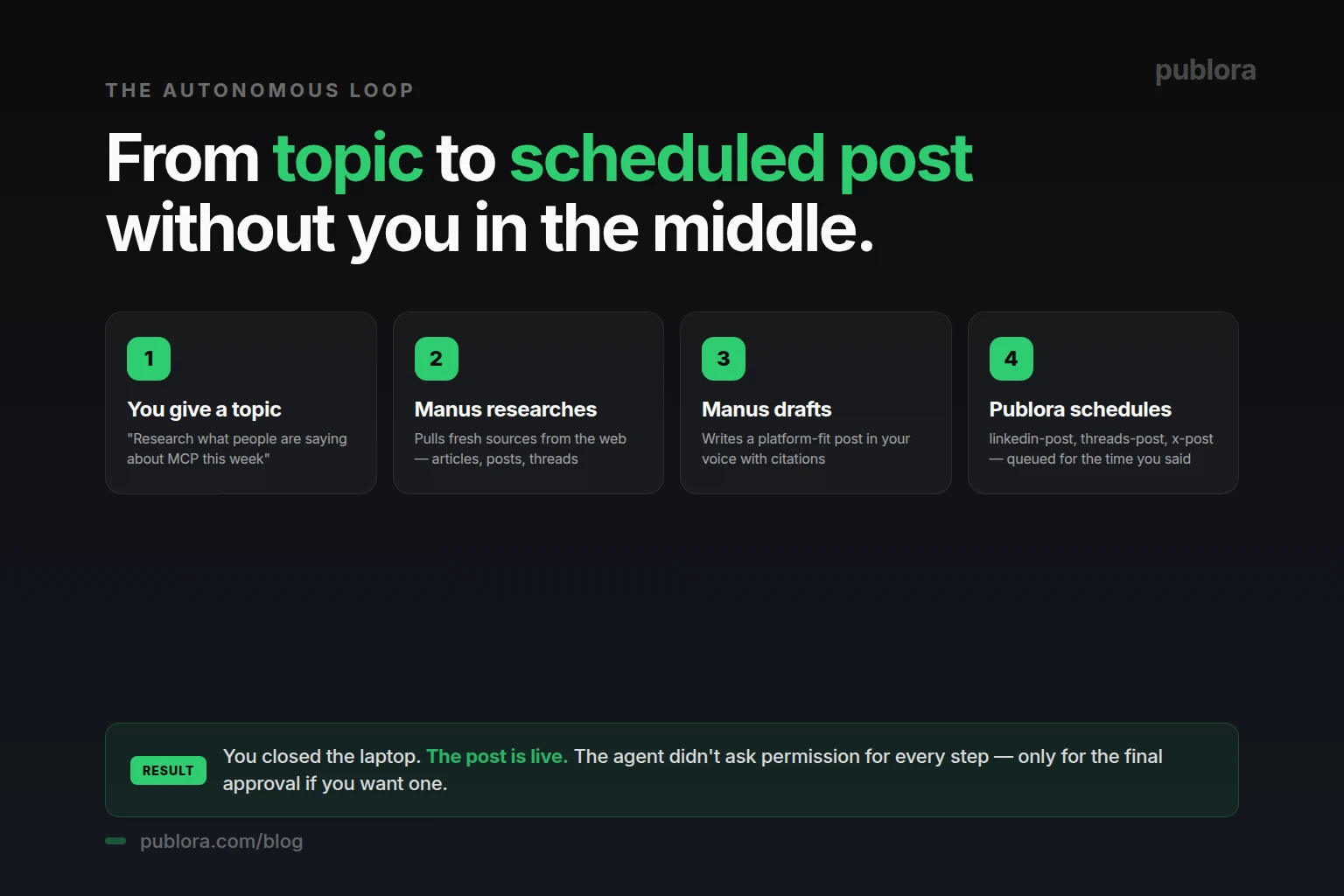
The Four-Step Autonomous Loop
Step 1: You Give a Topic
One sentence. Specific enough to give the agent a direction, broad enough to surface fresh data. "Research what people are saying about MCP this week and post a summary to LinkedIn." That's a complete instruction. Manus knows the topic, the time window, the platform, and the action.
Step 2: Manus Researches
The agent runs web search queries, reads the results, and pulls the substantive sources — recent articles, threads on X, LinkedIn posts, Hacker News discussions, official engineering blogs. The "this week" constraint filters out noise from older content. If you specified sources ("from Stratechery and Lenny's Newsletter only"), it respects the constraint.
Step 3: Manus Drafts
From the gathered sources, Manus drafts a post in your voice. If the platform is LinkedIn, it writes for LinkedIn (longer, professional). If it's X, it writes for X (under 280 characters, punchy, threaded if needed). If it's Threads, conversational. Each platform skill in the Publora package applies the right format. The draft includes specific citations or examples — not generic statements.
Step 4: Publora Schedules
The Publora skills package handles the publishing call. linkedin-post for LinkedIn, threads-post for Threads, x-post for X, etc. Manus passes the drafted content, the target time, and any media. The post is queued. You get a confirmation with the slot and a link to review.
Five Real Research-and-Post Workflows
1. The Weekly "What's New" Post
You: Research what's new in AI agents this week and post a summary to LinkedIn for tomorrow at 9 AM EST.
Manus: Searching for AI agent news from the last 7 days...
Found 14 sources. Top themes: 360Brew adoption (LinkedIn algorithm), Claude Code skills, Anthropic's MCP updates.
Drafting LinkedIn post focused on the 3 most-discussed items...
Calling skill: linkedin-post
Done. Scheduled for tomorrow 9:00 AM EST. Post draws on 3 specific releases with links in the first comment.
This is the format that runs weekly. Manus knows your schedule by Friday afternoon and the post is queued before you log off.
2. The Reaction Post (Trend-Driven)
You: What are people saying about LinkedIn's recent algorithm update? Pull the top 5 takes from creators with 50K+ followers, draft my own perspective for X, and post in 30 minutes.
Manus: Searching for LinkedIn algorithm reactions from creators with 50K+ followers...
Found 5 sources. The dominant take is "saves matter more, comments less" — but Richard van der Blom argues the opposite.
Drafting X version (218 chars, contrarian angle).
Calling skill: x-post
Scheduled for 30 minutes from now. The post takes the contrarian side and cites Richard's analysis.
3. The "From Sources I Trust" Post
You: Pull this week's most interesting essays from Stratechery, Lenny's Newsletter, and First Round Review. Draft a thread for Threads (conversational, my voice) and queue for Saturday morning.
Manus: Reading this week's posts from 3 sources...
3 essays match the "interesting + recent" filter. Top pick: Lenny on PMF dilution at scale.
Drafting 4-post Threads thread (conversational, your voice from past posts)...
Calling skill: threads-post (auto-thread enabled)
Queued for Saturday 9:00 AM. Each post in the thread cites a different source.
4. The "Compare and Contrast" Post
You: Research how Anthropic, OpenAI, and Google are positioning their AI agents this quarter. Draft a LinkedIn post that compares the three angles. Schedule for Wednesday 8 AM EST.
Manus: Pulling positioning from official Anthropic, OpenAI, and Google sources (last 90 days)...
Theme contrast: Anthropic = autonomous skills, OpenAI = persistent memory, Google = enterprise integration.
Drafting LinkedIn comparison post (450 words, neutral tone, your voice)...
Calling skill: linkedin-post
Scheduled Wednesday 8:00 AM EST. Post structures the contrast in three sections, cites direct quotes from each company's recent docs.
5. The "Cross-Post After Research" Loop
You: Research what's trending in social media management this week and post a takeaway to LinkedIn (8 AM Tuesday), Threads (10 AM Tuesday), and X (1 PM Tuesday). Each version should fit the platform.
Manus: Searching social media management trends from the last 7 days...
Top theme: agent-driven publishing tools surpassed scheduler tools in monthly mentions.
Drafting platform-specific versions (LinkedIn 320 words, Threads 4-post thread, X 270 chars)...
Calling skills: linkedin-post (8:00), threads-post (10:00), x-post (13:00)
All 3 scheduled. Each version has the same takeaway, formatted for the platform's audience.
Prompt Patterns That Consistently Work
The quality of the research-and-post output depends heavily on how you frame the topic. A few patterns that produce strong results:
- Time-bound: "this week," "in the last 30 days," "since the launch of X." Without a time bound, Manus pulls evergreen content that's already saturated.
- Source-bound: "from official engineering blogs only," "from creators with 50K+ followers," "from publications I follow." This filters out the SEO content farm that dominates open web search.
- Angle-bound: "from a contrarian perspective," "focused on what surprised you," "with my own opinion at the end." Without an angle, the draft tends toward neutral summary.
- Length-bound: "under 200 words for X," "single thread, no more than 5 posts on Threads," "long-form for LinkedIn." Format constraints sharpen the draft.
- Reference-bound: "in the same voice as my last 5 LinkedIn posts." Manus reads your post history through the analytics skill and matches your style.
Setting Up the Workflow (Once)
Setup is the same as for any Manus + Publora integration. The full version is in how to connect Publora to Manus in 30 seconds. Short version:
- Sign up at Publora. Free at publora.com/register. Get your API key from app.publora.com/dashboard/api.
- Connect your social accounts. In the Publora dashboard, connect each platform you want Manus to post to. The skills package supports LinkedIn, Threads, Instagram, TikTok, Telegram, Bluesky, X (Pro plan), YouTube, Facebook, and Mastodon.
- Install the skills in Manus. One prompt: "Install skills from https://github.com/publora/skills". Manus pulls the package and asks for your API key.
- Run your first research-and-post prompt. Start with a topic you'd want to post about anyway. Use the patterns above. Review the draft before letting Manus publish.
If You Don't Use Manus
The research-and-post pattern requires an agent that can chain multiple tool calls — search → draft → publish. Most modern AI assistants and agents can do this if they support the Publora skills package or the MCP server.
- Claude Desktop or Cursor with MCP. Add
mcp.publora.comto the client config. Claude can search via its built-in web tool and then calllinkedin-postfrom the same session. - Custom agent via REST API. Wire your own agent (LangChain, AutoGen, your code) to call the Publora REST API at
api.publora.com/api/v1/create-post. The autonomous loop pattern is yours to design; Publora is the publishing endpoint. - n8n or Make with web-search nodes. No-code agents that combine an LLM node, a web-search node, and the Publora HTTP node can run the same loop on a schedule. Useful if you want recurring research-and-post without writing code.
The web dashboard at publora.com isn't really the right path for this workflow — it's for manual scheduling, not autonomous content generation.
When the Loop Doesn't Work Well
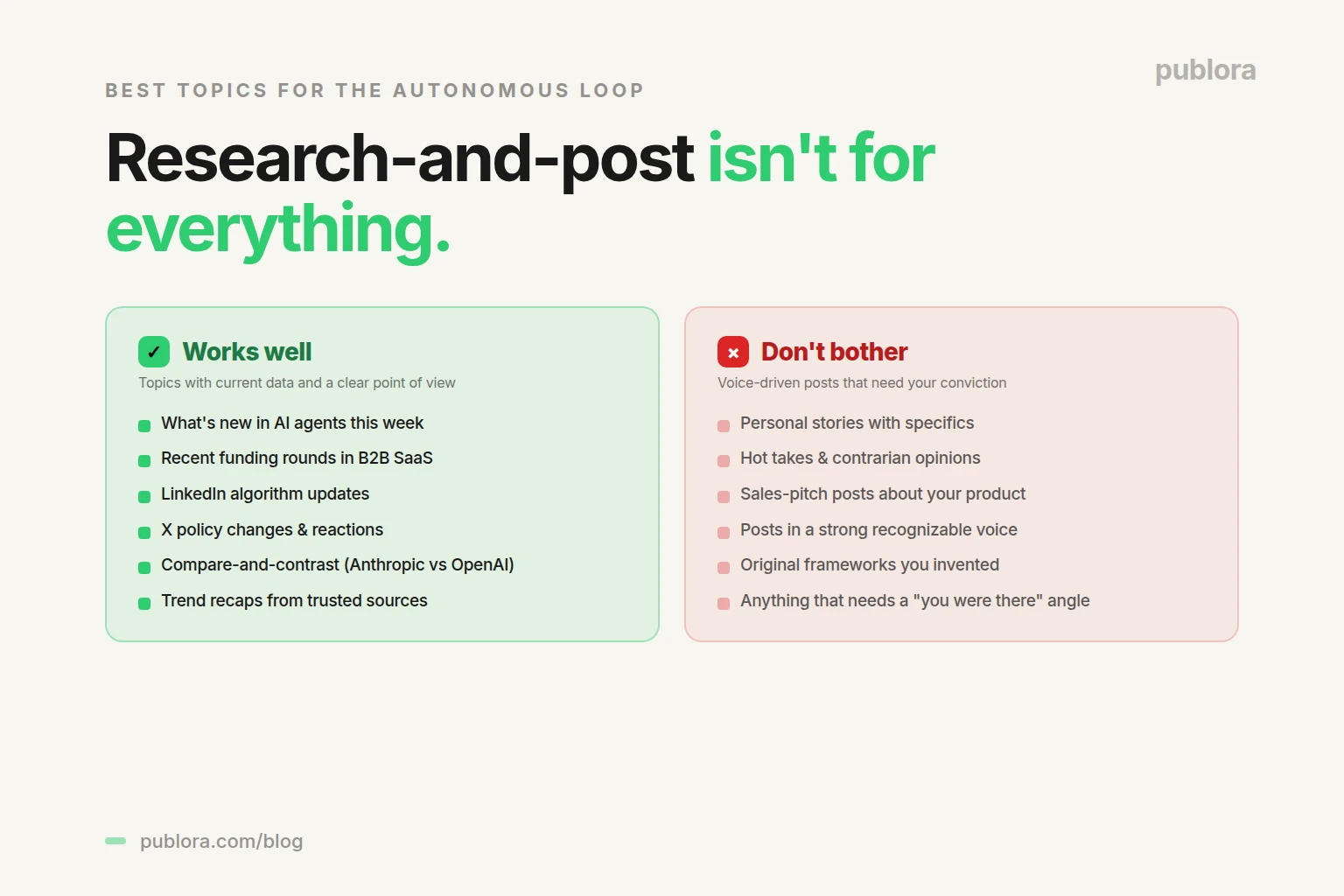
Research-and-post isn't a fit for every kind of post. A few cases where you'll get a stronger result by drafting yourself:
- Personal stories. Manus can draft "10 lessons from launching X," but it can't actually have launched X. Story-driven posts with personal specifics need to come from you.
- Hot takes. A genuine contrarian opinion needs your conviction, not a synthesis of what other people have said. Manus can do "what people are saying about X"; it can't do "here's why I disagree with all of them."
- Sales-pitch posts. Posts about your product, your launch, your milestone are best written by you. The draft will sound generic if Manus writes it.
- Posts in a strong, specific voice. If your readership knows you for a particular cadence or vocabulary, Manus's drafts will average toward neutral. Use it for research-driven posts; write the voice-driven ones yourself.
Frequently Asked Questions
Can Manus research a topic and post about it on its own?
Yes. With the Publora skills package, Manus searches the web, reads sources, drafts the post, and schedules or publishes through the platform skill — all in one workflow. You give it a topic and target platform; it returns a queued post.
How does the research-and-post workflow actually work?
Four steps: you give a topic, Manus researches recent sources, Manus drafts a platform-fit post in your voice, and the Publora skill schedules or publishes. Total time: 3–8 minutes per topic.
Does Manus auto-publish without my review?
By default, Manus shows you the draft and asks for confirmation. For full autonomy say so explicitly: "research, draft, and publish, no review needed." Most creators run with review on for the first week.
What kinds of topics work best for research-and-post?
Topics with current data and a clear point of view. "What's happening in AI agents this week," "recent funding rounds," "new features in the LinkedIn algorithm." Topics with strong opinions and weak data tend to produce thin posts.
Can Manus pull from specific sources I trust?
Yes. Tell Manus which sources to use ("Stratechery, Lenny's Newsletter, Hacker News only"). Manus respects the constraint and reports back if a source has nothing relevant.
How long does the research-and-post loop take?
Typically 3–8 minutes from prompt to scheduled post. Web search 30–60s, drafting 1–2 minutes, Publora skill call near-instant. With manual review, the actual post goes live whenever you approve.
Can I tell Manus to run research-and-post on a recurring schedule?
Yes, if your Manus setup supports recurring tasks. "Every Friday at 3 PM, research what's new in AI agents this week and queue a LinkedIn post for Monday morning." You only review when something looks off.
Do I need Manus, or can I run research-and-post with another agent?
Any agent that supports the Publora skills package or MCP server can do this — Manus, Claude Code, Cursor, Windsurf, OpenClaw. The Publora REST API can also be wired into a custom autonomous loop.
Let Manus do the research and the posting
Free Starter plan covers 9 of the 10 platforms — enough to run the autonomous loop on your main accounts.
Get Started FreeFurther Reading
Related Articles
LinkedIn Image Size and Specs in 2026
LinkedIn image sizes for 2026: post images, profile banner, company cover, and logo, plus the file-size and media rules that decide whether a post publishes.
Can You Schedule Posts on Instagram? (2026 Guide)
Yes, you can schedule Instagram posts, with limits. What Instagram allows natively, what it doesn't, and how to schedule feed posts, Reels, and Stories properly.
How Do I Schedule Posts on Facebook? (2026 Guide)
How to schedule Facebook posts in 2026: what you can queue on a Page, why personal profiles don't work, and how to schedule several Pages at once or from an API.
The Best Time to Post on X (Twitter) in 2026
Four published studies agree on Tuesday to Thursday mornings for X. The exact windows, the sample sizes behind them, and how to find your own best time.