MCP vs REST API: When to Use Each for Social Media Automation

· Updated
TL;DR
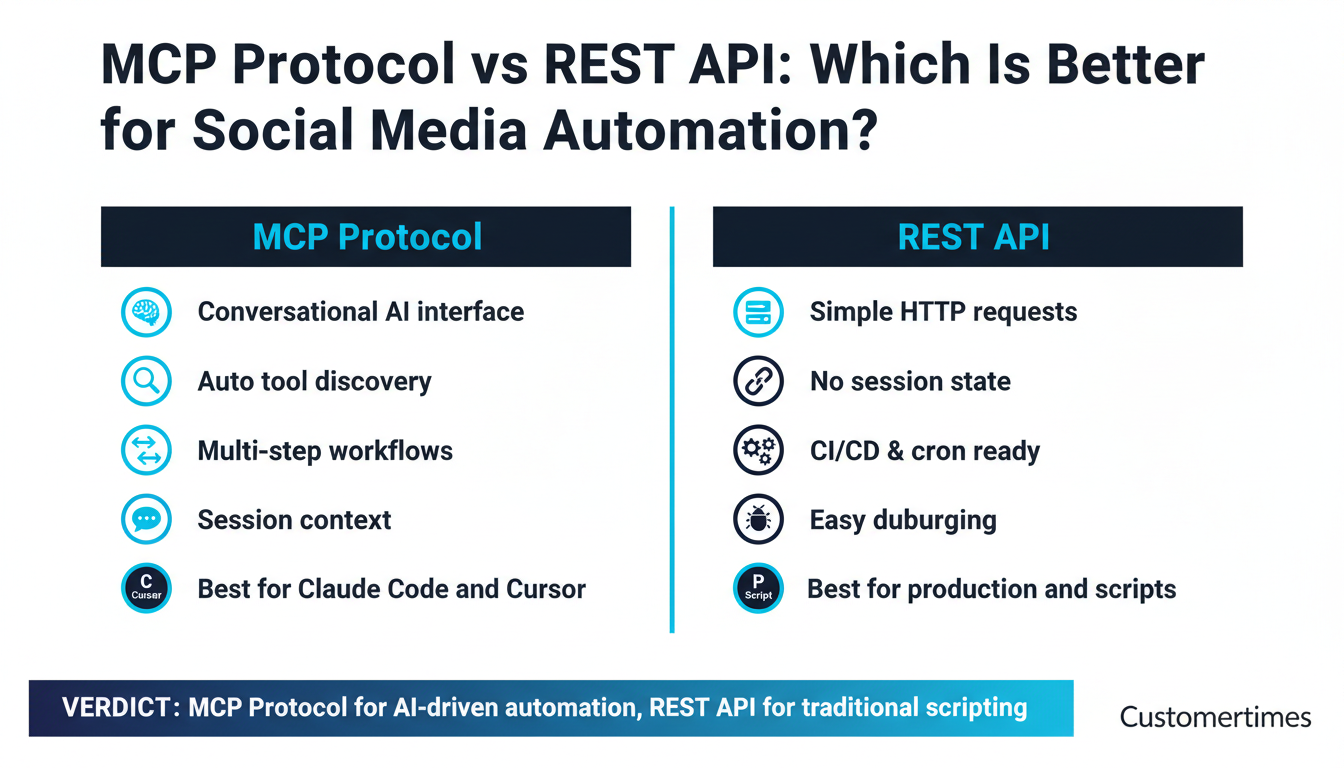
MCP or REST API for social media automation? Compare both approaches side by side with code examples, a decision flowchart, and real use cases. Learn when to use MCP with Claude Code or Cursor, and when REST API is the better choice.
Two Paths to Social Media Automation
If you're building social media automation in 2026, you face a fundamental architectural decision: do you connect via MCP (Model Context Protocol) or a traditional REST API? Both can schedule posts, upload media, and manage multiple platforms — but they serve fundamentally different workflows.
MCP is the new protocol powering AI-native integrations. REST API is the battle-tested standard that runs the internet. Choosing wrong doesn't break anything, but choosing right can save you hours of development time and make your automation dramatically more maintainable.
This guide breaks down exactly when to use each — with real code examples, a side-by-side comparison, and a decision flowchart. We'll use Publora as our reference implementation since it offers both an MCP server (mcp.publora.com) and a REST API (api.publora.com) with identical capabilities.
What you'll learn:
- How MCP and REST API differ in architecture, auth, and developer experience
- When MCP is the right choice — and when it adds unnecessary complexity
- Code examples: the same task done via MCP conversation vs REST API (JavaScript + Python)
- A hybrid approach that combines the best of both for development and production
What Is MCP (Model Context Protocol)?
MCP — Model Context Protocol — is a standardized protocol created by Anthropic that lets AI assistants connect to external services. Think of it as a universal adapter: instead of each AI tool building custom integrations, MCP provides a common interface for tool discovery, invocation, and context sharing.
When you connect an MCP server (like Publora's) to an AI assistant, the assistant automatically discovers what tools are available — creating posts, uploading media, listing connections — and can call them conversationally. You describe what you want in plain English, and the AI translates that into the right sequence of tool calls.
Tool Discovery
The AI client asks the server "what can you do?" and gets a list of available tools with their parameters and descriptions — no documentation reading required.
Session Context
MCP maintains a persistent session. The AI remembers what you did previously and can chain operations — "now schedule that post for tomorrow" without re-specifying everything.
Natural Language Interface
You say "post this to LinkedIn" and the AI figures out the tool call, parameters, and sequencing. No HTTP verbs, no JSON payloads, no status codes.
Multi-Step Orchestration
Complex workflows — create post, upload image, add to multiple platforms, schedule — happen as a single conversation turn. The AI handles the sequencing.
For a deeper dive into MCP architecture and how it works under the hood, see our pillar post on MCP.
What Is a REST API?
REST (Representational State Transfer) is the architectural style behind virtually every web API built in the last two decades. You send HTTP requests — GET, POST, PUT, DELETE — to specific URLs (endpoints), passing data as JSON and receiving JSON responses.
REST APIs are stateless: each request is self-contained. The server doesn't remember your previous calls. You authenticate on every request, specify exactly what you want, and get a predictable response. This simplicity is both its greatest strength and its limitation.
// A typical REST API call — explicit, self-contained, predictable
const response = await fetch('https://api.publora.com/api/v1/create-post', {
  method: 'POST',
  headers: {
    'Content-Type': 'application/json',
    'x-publora-key': 'sk_YOUR_API_KEY'  // Auth on every request
  },
  body: JSON.stringify({
    content: 'Hello from the REST API!',
    platforms: ['linkedin-123456'],
    scheduledTime: '2026-04-10T09:00:00Z'
  })
});

const data = await response.json();
console.log(data.postGroupId);  // "pg_abc123"
REST APIs are the backbone of programmatic automation. Every language has HTTP libraries. Every monitoring tool can track HTTP requests. Every developer understands 200 OK vs 401 Unauthorized.
Side-by-Side Comparison
Here's how MCP and REST API compare across the dimensions that matter most for social media automation:
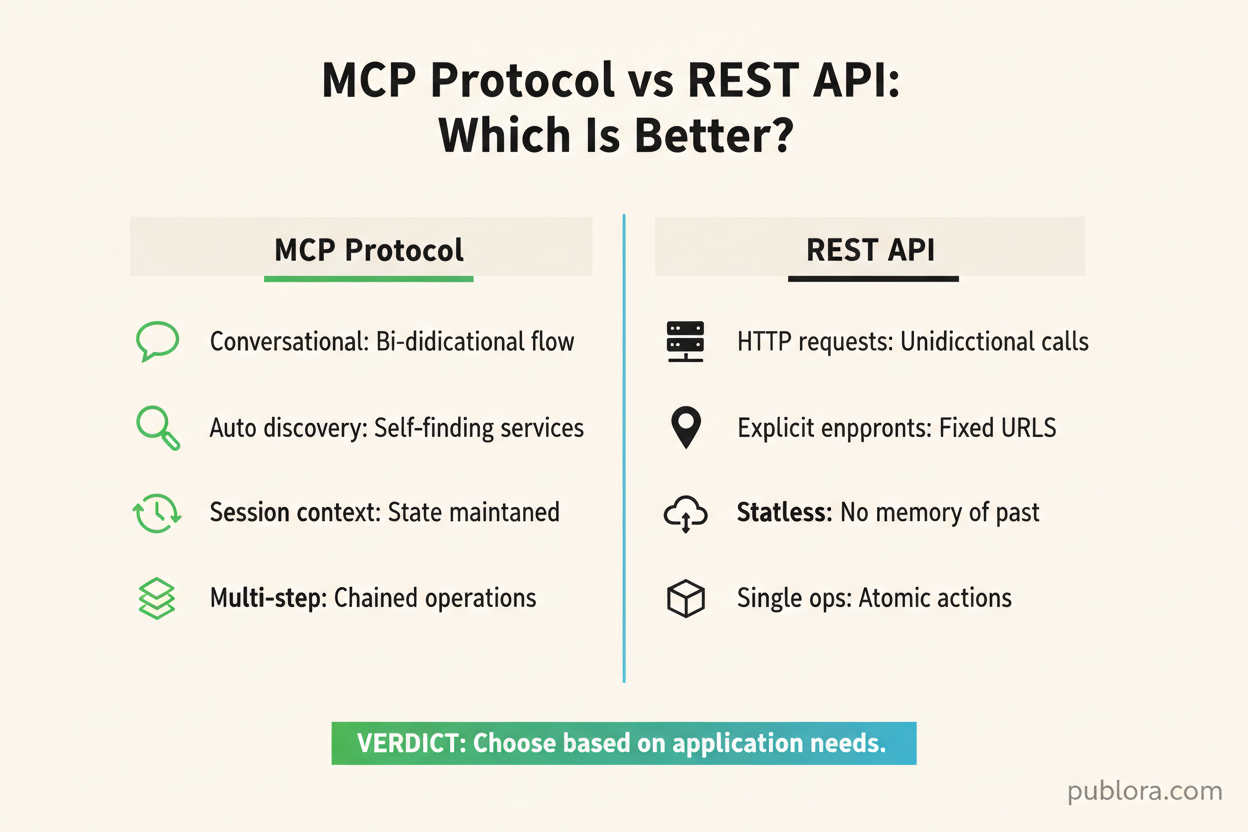
| Dimension | MCP Protocol | REST API |
|---|---|---|
| Authentication | API key in server config (once) | API key in header (every request) |
| Setup complexity | Add server config to AI client | Install HTTP library, write request code |
| Session state | Persistent — AI remembers context | Stateless — each request is independent |
| Debugging | Conversational — ask the AI what happened | HTTP status codes, response bodies, logs |
| Best for | Interactive development, exploration | Production systems, automation pipelines |
| Latency | Higher (protocol overhead + AI reasoning) | Lower (direct HTTP call) |
| Tool discovery | Automatic — AI lists available tools | Manual — read API documentation |
| Error handling | AI interprets and retries automatically | You parse status codes and implement retries |
| Multi-step operations | AI chains calls automatically | You write sequential code |
| Language support | Any MCP-compatible client | Any language with HTTP support |
| Monitoring | Limited — depends on AI client logs | Full observability — request/response logging |
| Rate limit handling | AI can respect and adapt | Implement backoff logic in code |
When to Use MCP
MCP shines in interactive, exploratory, and conversational workflows — situations where a human is in the loop and the workflow isn't predetermined.
Interactive AI Assistants
If you're using Claude Code, Cursor, Windsurf, or Cline, MCP is the natural integration path. These tools are designed around the MCP protocol. Adding Publora as an MCP server gives the AI instant access to all 20 social media tools (32 with an Agency account) without writing a single line of code.
// Claude Code / Cursor MCP config — one-time setup
{
  "mcpServers": {
    "publora": {
      "type": "http",
      "url": "https://mcp.publora.com",
      "headers": {
        "Authorization": "Bearer sk_YOUR_API_KEY"
      }
    }
  }
}
Conversational Workflows
MCP excels when you're thinking out loud. You don't always know the exact API call you need — you want to explore, iterate, and refine.
You: What platforms do I have connected?
Claude: You have 4 connected platforms:
1. LinkedIn — company-page-123
2. X (Twitter) — x-987654
3. Instagram — instagram-17841400123
4. Telegram — telegram-mychannel
You: Draft a LinkedIn post about our new MCP integration. Professional tone, include a call to action.
Claude: Here's a draft:
"We've just launched MCP support for social media automation. Now your AI assistant can schedule posts, upload media, and manage multiple platforms — all through natural conversation.
No more switching between dashboards. No more copy-pasting content. Just tell your AI what to post and when.
Try it free: publora.com"
Shall I schedule this for tomorrow morning?
You: Yes, schedule it for tomorrow at 9am EST. Also post it to X but make it shorter.
Claude: Done! Scheduled two posts:
LinkedIn (full version) — April 8, 9:00 AM EST
X/Twitter (condensed to 280 chars) — April 8, 9:00 AM EST
Post group ID: pg_mcp_demo_456
Notice how the workflow was exploratory: check connections, draft content, iterate, then schedule — all without writing any code or consulting API documentation.
Multi-Step Operations
MCP handles complex, multi-step workflows where the output of one operation feeds into the next. Creating a post with media, scheduling across platforms, and confirming the result would be 4-5 separate REST API calls. With MCP, it's a single conversation turn.
Best MCP Use Cases
Content creation sessions
Drafting, refining, and scheduling posts interactively with an AI assistant in your IDE.
API exploration
Learning what's available, testing endpoints, and prototyping integrations before writing production code.
One-off tasks
Quick ad-hoc operations — "reschedule tomorrow's LinkedIn post to Friday" — without opening a dashboard.
Developer onboarding
New team members can explore the API conversationally before writing integration code.
When to Use REST API
REST API is the right choice for automated, unattended, and production workflows — anywhere you need predictability, observability, and programmatic control.
Autonomous Agents and Cron Jobs
If your automation runs without human interaction — a cron job that posts daily content, a webhook that reposts RSS feeds, or an autonomous agent like OpenClaw — REST API is the clearer choice. There's no conversation to maintain, no session state to manage, and no AI reasoning overhead.
import requests
import schedule
import time

API_KEY = 'sk_YOUR_API_KEY'
BASE = 'https://api.publora.com/api/v1'

def post_daily_update():
    """Runs every day at 9am via cron/scheduler."""
    content = generate_daily_content()  # Your content logic

    resp = requests.post(f'{BASE}/create-post',
        headers={'x-publora-key': API_KEY, 'Content-Type': 'application/json'},
        json={
            'content': content,
            'platforms': ['linkedin-123456', 'x-789012'],
            'scheduledTime': get_next_slot()
        }
    )

    if resp.status_code == 200:
        print(f"Scheduled: {resp.json()['postGroupId']}")
    else:
        print(f"Error {resp.status_code}: {resp.json()}")

# Run every day at 8:00 AM
schedule.every().day.at("08:00").do(post_daily_update)

while True:
    schedule.run_pending()
    time.sleep(60)
CI/CD Pipelines
Want to automatically announce deployments on social media? REST API fits naturally into CI/CD workflows where you need a simple, scriptable HTTP call.
# GitHub Actions example
- name: Announce Release on Social Media
  run: |
    curl -X POST https://api.publora.com/api/v1/create-post \
      -H "x-publora-key: ${{ secrets.PUBLORA_API_KEY }}" \
      -H "Content-Type: application/json" \
      -d '{
        "content": "v${{ github.event.release.tag_name }} is live! ${{ github.event.release.body }}",
        "platforms": ["linkedin-123456", "x-789012"]
      }'
Webhooks and Event-Driven Automation
When an external event triggers a social media post — a new blog published, a product launched, a milestone reached — REST API's stateless nature is exactly what you want. Fire and forget.
Batch Operations
Processing hundreds of posts from a spreadsheet, migrating content between platforms, or running bulk scheduling — REST API gives you explicit control over each operation with clear error handling.
// Batch schedule 30 posts from a content calendar
const posts = await loadContentCalendar('april-2026.csv');

for (const post of posts) {
  try {
    const resp = await fetch('https://api.publora.com/api/v1/create-post', {
      method: 'POST',
      headers: {
        'x-publora-key': process.env.PUBLORA_API_KEY,
        'Content-Type': 'application/json'
      },
      body: JSON.stringify({
        content: post.content,
        platforms: post.platformIds,
        scheduledTime: post.scheduledTime
      })
    });

    if (!resp.ok) {
      console.error(`Failed: ${post.title} — ${resp.status}`);
      continue;
    }

    const { postGroupId } = await resp.json();
    console.log(`Scheduled: ${post.title} → ${postGroupId}`);
  } catch (err) {
    console.error(`Error: ${post.title} — ${err.message}`);
  }
}
Best REST API Use Cases
Production automation
Cron jobs, scheduled tasks, and always-on publishing pipelines that run without human oversight.
Webhook integrations
Event-driven posts triggered by CMS publishes, releases, or external service notifications.
Bulk operations
Scheduling dozens of posts from a CSV, migrating content, or backfilling analytics.
Custom dashboards
Building your own UI on top of the API with full control over error handling and UX.
Code Examples: Same Task, Two Approaches
Let's schedule a LinkedIn post with an image — the same task done via MCP conversation and via REST API in both JavaScript and Python. This makes the difference concrete.
MCP Approach (via Claude Code)
Natural conversation. The AI discovers tools, chains calls, and handles errors automatically.
You: Schedule a LinkedIn post for April 10 at 9am EST: "Excited to share our Q1 results. Revenue up 40% YoY." Attach the image quarterly-results.jpg.
Claude: Done! Post scheduled:
- Platform: LinkedIn
- Time: April 10, 9:00 AM EST
- Image: quarterly-results.jpg (uploaded)
- Post ID: pg_q1results_789
Lines of code: 0
Time: ~10 seconds
API knowledge needed: None
REST API Approach (JavaScript)
Explicit HTTP calls. Full control over every step. Predictable and scriptable.
const API = 'https://api.publora.com/api/v1';
const KEY = 'sk_YOUR_API_KEY';

// 1. Create post
const post = await fetch(`${API}/create-post`, {
  method: 'POST',
  headers: { 'x-publora-key': KEY,
    'Content-Type': 'application/json' },
  body: JSON.stringify({
    content: 'Excited to share our Q1 results.',
    platforms: ['linkedin-123456'],
    scheduledTime: '2026-04-10T13:00:00Z'
  })
}).then(r => r.json());

// 2. Upload image
const { uploadUrl } = await fetch(
  `${API}/upload-media/${post.postGroupId}` +
  `?filename=quarterly-results.jpg`,
  { headers: { 'x-publora-key': KEY } }
).then(r => r.json());

await fetch(uploadUrl, {
  method: 'PUT',
  headers: { 'Content-Type': 'image/jpeg' },
  body: fs.readFileSync('quarterly-results.jpg')
});
Lines of code: ~20
Time: ~5 minutes to write
API knowledge needed: Moderate
REST API — Python Version
The same task in Python, for teams that prefer it:
import requests

API_KEY = 'sk_YOUR_API_KEY'
BASE = 'https://api.publora.com/api/v1'
headers = {'x-publora-key': API_KEY, 'Content-Type': 'application/json'}

# Step 1: Create the post
resp = requests.post(f'{BASE}/create-post', headers=headers, json={
    'content': 'Excited to share our Q1 results. Revenue up 40% YoY.',
    'platforms': ['linkedin-123456'],
    'scheduledTime': '2026-04-10T13:00:00Z'  # 9am EST = 1pm UTC
})
post_group_id = resp.json()['postGroupId']

# Step 2: Get presigned upload URL
upload_resp = requests.get(
    f'{BASE}/upload-media/{post_group_id}?filename=quarterly-results.jpg',
    headers={'x-publora-key': API_KEY}
)
upload_url = upload_resp.json()['uploadUrl']

# Step 3: Upload the image
with open('quarterly-results.jpg', 'rb') as f:
    requests.put(upload_url, headers={'Content-Type': 'image/jpeg'}, data=f)

print(f'Scheduled: {post_group_id}')
The Hybrid Approach: Best of Both Worlds
The smartest strategy isn't choosing one over the other — it's using MCP for development and REST API for production. This hybrid approach leverages each protocol's strengths where they matter most.
Development Phase (MCP)
- Explore available tools and endpoints
- Prototype workflows conversationally
- Test API responses and edge cases
- Draft content and scheduling logic
- Debug issues interactively
Production Phase (REST API)
- Convert MCP workflows into REST API code
- Add error handling and retry logic
- Deploy as cron jobs or serverless functions
- Monitor with standard HTTP observability tools
- Scale with predictable performance
Practical example of the hybrid approach
Use Claude Code + MCP to prototype your content calendar workflow interactively. Once you've nailed the logic — which platforms, what scheduling pattern, how media is handled — translate those MCP tool calls into REST API code and deploy as a daily cron job. You get fast prototyping and reliable production execution.
Why This Works
MCP and REST API aren't competing protocols — they're complementary layers. MCP adds an AI-friendly interface on top of the same underlying API. When you use MCP in Publora, the AI is making the same REST API calls under the hood. The endpoints, parameters, and responses are identical.
This means your MCP exploration directly translates to REST API code. The tool name create_post in MCP maps to POST /api/v1/create-post. The parameters are the same JSON objects. There's no conceptual gap to bridge when moving from development to production.
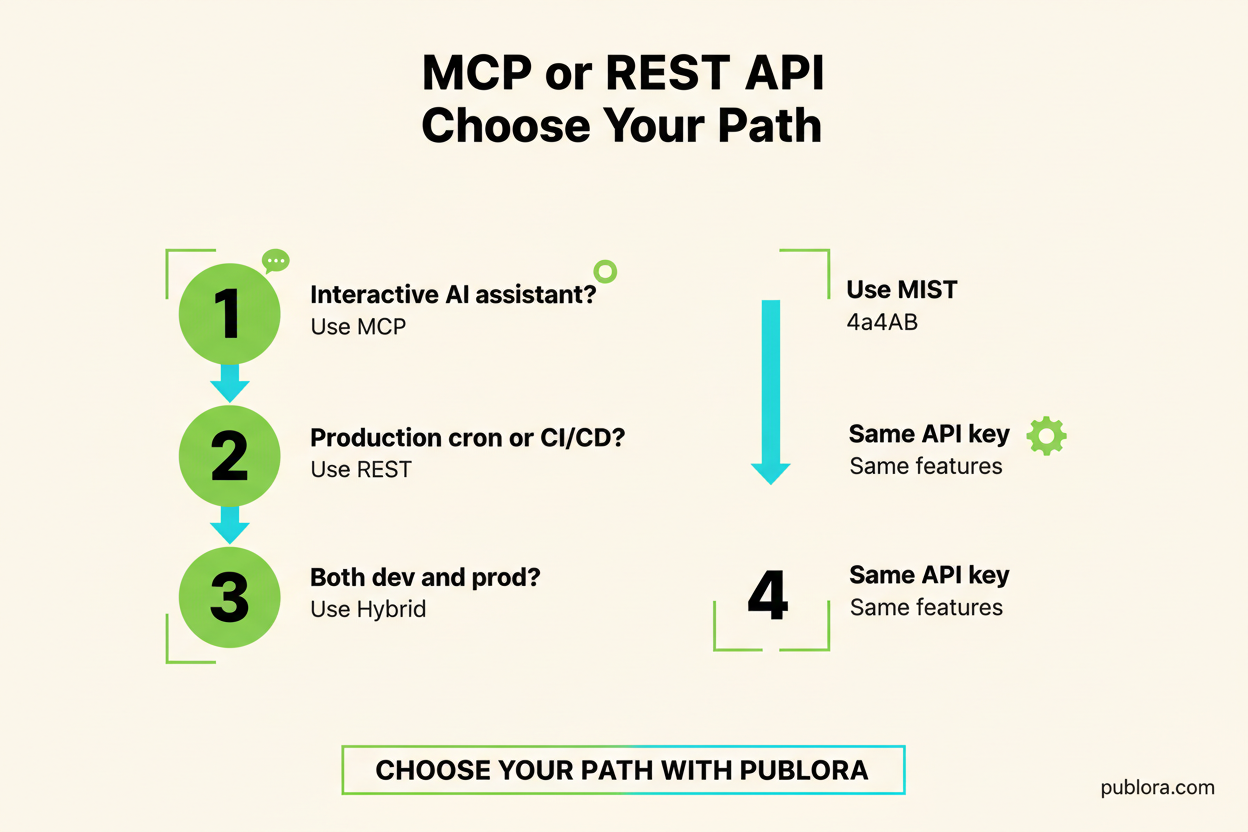
Decision Flowchart
Use this flowchart to quickly determine which approach fits your use case:
Is a human in the loop?
YES
Using an AI IDE?
(Claude Code, Cursor, Windsurf)
YES
Use MCP
NO
Use REST API
(or Dashboard)
NO
Automated system?
(Cron, CI/CD, webhooks)
Always use REST API
Stateless, predictable, monitorable
Rule of thumb
If your automation needs to run while you sleep, use REST API. If it runs while you're thinking, use MCP.
Publora: Both Options, Same Capabilities
Publora offers both MCP and REST API as first-class integration options on every plan, including free. Here's what you need to know:
20
MCP tools on every plan (32 with Agency)
12+
REST API endpoints
1
API key for both
| Feature | MCP Server | REST API |
|---|---|---|
| URL | mcp.publora.com | api.publora.com |
| Auth | Authorization: Bearer sk_... |
x-publora-key: sk_... |
| Create posts | create_post tool | POST /api/v1/create-post |
| Upload media | get_upload_url tool | GET /api/v1/upload-media/:id |
| List posts | list_posts tool | GET /api/v1/list-posts |
| Manage connections | list_connections tool | GET /api/v1/connections |
| Analytics | post_stats tool (Mastodon, Bluesky) | LinkedIn statistics endpoints (POST /api/v1/linkedin-post-statistics and others); POST /api/v1/post-statistics for Mastodon, Bluesky |
| Platforms | All 10 platforms | All 10 platforms |
| Docs | MCP docs | API docs |
The key insight: MCP tools map 1:1 to REST API endpoints. Everything you can do through MCP, you can do through REST — and vice versa. The same API key works for both. You can even use both simultaneously: MCP in your IDE for development and REST API in your production pipeline.
Getting your API key
Generate your API key at app.publora.com under Settings > API Keys. The same key works for both MCP and REST API. See the authentication docs for details.
Error Handling: MCP vs REST API
How each approach handles failures reveals their fundamental design philosophies.
MCP Error Handling
The AI interprets errors and suggests fixes:
Claude: The upload failed — Instagram requires JPEG format, but you provided a PNG. Shall I convert it and retry?
Errors become conversations. The AI adapts and retries. Great for development.
REST API Error Handling
You get structured error codes to handle programmatically:
// 400 Bad Request
{
  "error": "INVALID_MEDIA_TYPE",
  "message": "JPEG required for Instagram"
}
Errors are structured data. Parse, log, retry with backoff. Ideal for production.
Performance Considerations
For latency-sensitive applications, the performance difference between MCP and REST matters:
REST API: ~200-500ms per request
Direct HTTP call. DNS lookup, TLS handshake, request/response. Predictable and cacheable. No AI reasoning overhead.
MCP: ~2-10s per operation
Includes AI reasoning time, tool discovery, parameter construction, and the underlying HTTP call. The AI overhead dominates.
For single operations, this difference is negligible — you're interacting with an AI assistant anyway. For batch operations processing hundreds of items, REST API's raw speed matters. A batch of 100 posts takes ~50 seconds via REST but could take 15+ minutes through MCP conversations.
Security Comparison
Both approaches are secure when configured correctly, but with different security surfaces:
MCP Security
- API key stored in MCP client config file
- Transport-level encryption (HTTPS)
- AI client handles token management
- Session isolation between conversations
- Ensure your MCP config file has restricted permissions
REST API Security
- API key in environment variables or secrets manager
- Transport-level encryption (HTTPS)
- You control token rotation and storage
- Standard OWASP practices apply
- Compatible with API gateways and WAFs
API key safety reminder
Never commit API keys to version control. For MCP, keep your config file in ~/.cursor/ or ~/.claude/ (not in the repo). For REST API, use environment variables (process.env.PUBLORA_API_KEY) or a secrets manager. See the authentication docs for best practices.
Frequently Asked Questions
What is the MCP protocol and how does it differ from a REST API?
MCP (Model Context Protocol) is a standardized protocol that lets AI assistants call external tools conversationally. Unlike REST APIs where you write HTTP requests manually, MCP lets the AI discover available tools, maintain session context, and chain multi-step operations automatically. REST APIs use stateless HTTP requests with explicit authentication on every call. Both can achieve the same outcomes — the difference is in developer experience and automation patterns. See the MCP documentation for details.
Can I use both MCP and REST API with Publora?
Yes. Publora offers both an MCP server at mcp.publora.com and a REST API at api.publora.com. Both provide the same capabilities — creating posts, uploading media, managing connections, and viewing analytics. They use the same API key. Many teams use MCP during development for fast prototyping and REST API in production for reliable automation.
Which is better for production systems — MCP or REST API?
REST API is better for production systems. It's stateless, predictable, easy to monitor with standard tools, and works with any programming language. Use REST for cron jobs, CI/CD pipelines, webhooks, and batch operations. MCP adds AI reasoning overhead and session management that production automation doesn't need.
Do MCP and REST API use the same API key?
Yes. Publora uses the same API key (format: sk_...) for both. For MCP, pass it as a Bearer token in the Authorization header of your server config. For REST API, pass it in the x-publora-key header on each request. Generate your key at app.publora.com under Settings > API Keys.
Can autonomous AI agents like OpenClaw use MCP?
Technically yes, but the REST API is recommended for autonomous agents. Autonomous agents like OpenClaw run without human interaction and benefit from the simplicity and debuggability of direct HTTP requests. MCP's conversational tool discovery and session state add complexity that autonomous agents don't leverage.
What AI tools support MCP for social media automation?
Major AI tools with MCP support include Claude Code (Anthropic's CLI), Cursor IDE, Windsurf IDE, Cline (VS Code extension), and OpenClaw (open-source autonomous agent). Any MCP-compatible client can connect to Publora's MCP server to manage social media posts, upload media, and view analytics.
Is MCP faster than REST API for social media posting?
For single requests, REST API has lower latency (~200-500ms) because it's a direct HTTP call. MCP adds 2-10 seconds due to AI reasoning and protocol overhead. However, for multi-step workflows (create post, upload media, schedule across platforms), MCP can feel faster because the AI handles chaining automatically without you writing sequential API calls.
How do I switch from MCP to REST API or vice versa?
Switching is straightforward because both use the same API key and capabilities. To move from MCP to REST: replace MCP tool calls with equivalent HTTP requests to api.publora.com endpoints. To move from REST to MCP: add the Publora MCP server config to your AI client and use natural language. The Publora documentation maps every MCP tool to its REST API equivalent.
Summary: Choosing the Right Tool
The MCP vs REST API decision isn't about which is "better" — it's about matching the protocol to the workflow. Here's the simplest possible decision framework:
Choose MCP when...
- You're working in an AI IDE (Claude Code, Cursor)
- The workflow is interactive and exploratory
- You need to prototype quickly
- A human is making decisions in the loop
- You're learning the API for the first time
Choose REST API when...
- The automation runs unattended
- You need predictable performance and monitoring
- You're building CI/CD or webhook integrations
- The workflow is defined and repeatable
- You're processing operations in bulk
And remember: you don't have to choose just one. The hybrid approach — MCP for development, REST for production — gives you the fastest path from idea to deployed automation.
Try Both Approaches with Publora
MCP server + REST API, same API key, same capabilities. Start automating your social media today.
Get Started FreeFurther Reading
- MCP Client Setup Guide — Connect Claude Code, Cursor, Windsurf, and more
- REST API Reference — Complete endpoint documentation
- Authentication Guide — API key management for both MCP and REST
- OpenClaw Integration — Autonomous agent setup with Publora
- Scheduling Guide — Timezone handling and best practices
- What Is MCP? — Deep dive into Model Context Protocol
- Instagram Automation with OpenClaw — Step-by-step tutorial
Related Articles
How to Publish to Social Media From Claude
Add the Publora connector from the Claude directory, then ask Claude to draft, schedule or publish to LinkedIn, X, Instagram and seven more networks.
How to Post a Figma Design to Social Media
Send a Figma frame to LinkedIn, Instagram, X and seven more networks without leaving Figma. Free plugin, works in Figma Design and Figma Slides.
How to Publish to Social Media From IFTTT
Connect Publora to IFTTT once, and anything IFTTT watches can go out to LinkedIn, X, Instagram and seven more networks. A feed, a webhook, your own code.
How to Auto-Share WordPress Posts to Social Media
Share every new WordPress post to Instagram, LinkedIn, X, Threads, Bluesky and five more networks automatically. Free plugin, about five minutes to set up.