Publora Workspace: How Agencies Manage Client Accounts

· Updated
TL;DR
How agencies use Publora workspaces to manage many client accounts - separate content and analytics, permission controls, central billing, and per-account pricing.
Agencies have a specific pain that solo creators never feel: the moment you manage more than a few clients, your tools start working against you. Per-seat pricing taxes every teammate you add. Per-channel pricing multiplies with every network each client wants. And keeping ten clients' content, logins, and reports from bleeding into each other becomes its own job. Publora is built to take all three of those off your plate. Here's how agencies set it up.
Why Agencies Outgrow Per-Seat and Per-Channel Tools
The enterprise suites agencies often start on price in ways that punish growth. Hootsuite's entry plan runs around $99/month for 10 accounts and jumps to roughly $249/month for its team tier. Sprout Social charges per user — about $249 per seat per month — so every account manager you add is another full price. The bill climbs with your headcount and your channel count, not with the value you deliver.
Publora prices per connected account instead. On Pro you pay per client account you manage, with volume discounts from the 6th account, and posting is unlimited (fair use). The Agency plan (custom pricing) adds isolated client workspaces and unlimited team members. The cost scales in a straight line with the work, which is exactly what an agency needs. (We wrote up the full reasoning in why we charge $3 per account.)
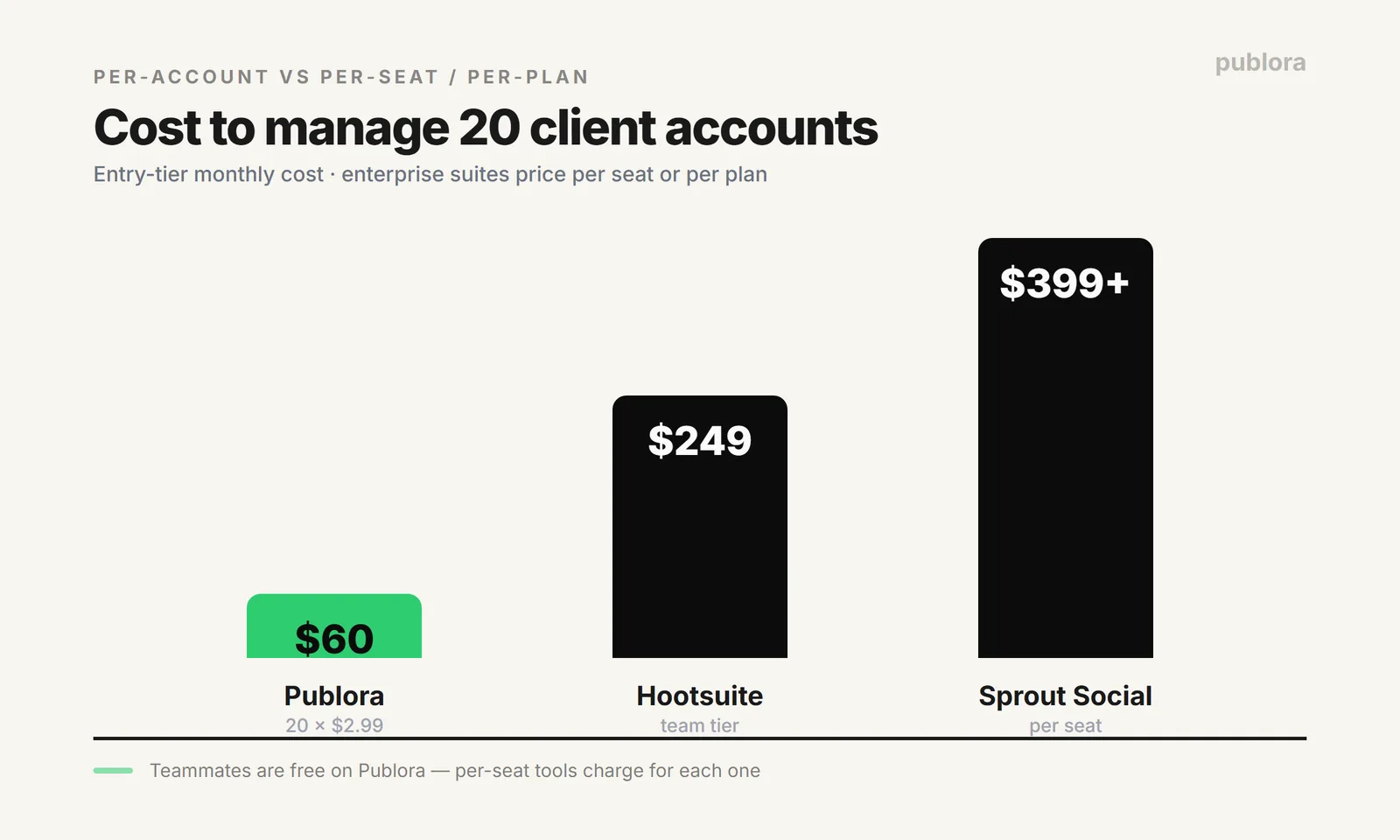
Run the math on 20 client accounts: about $50/month on Publora Pro (5 × $3.99 + 15 × $1.99 billed yearly = $49.80), versus roughly $249/month on Hootsuite's team tier and $399+/seat on Sprout Social. For a growing agency, that gap is real money every month — and it widens as you add clients and account managers.
What Publora Workspaces Give an Agency
The pricing only matters if the tool actually keeps your clients organized. Publora's workspace layer is designed around that.
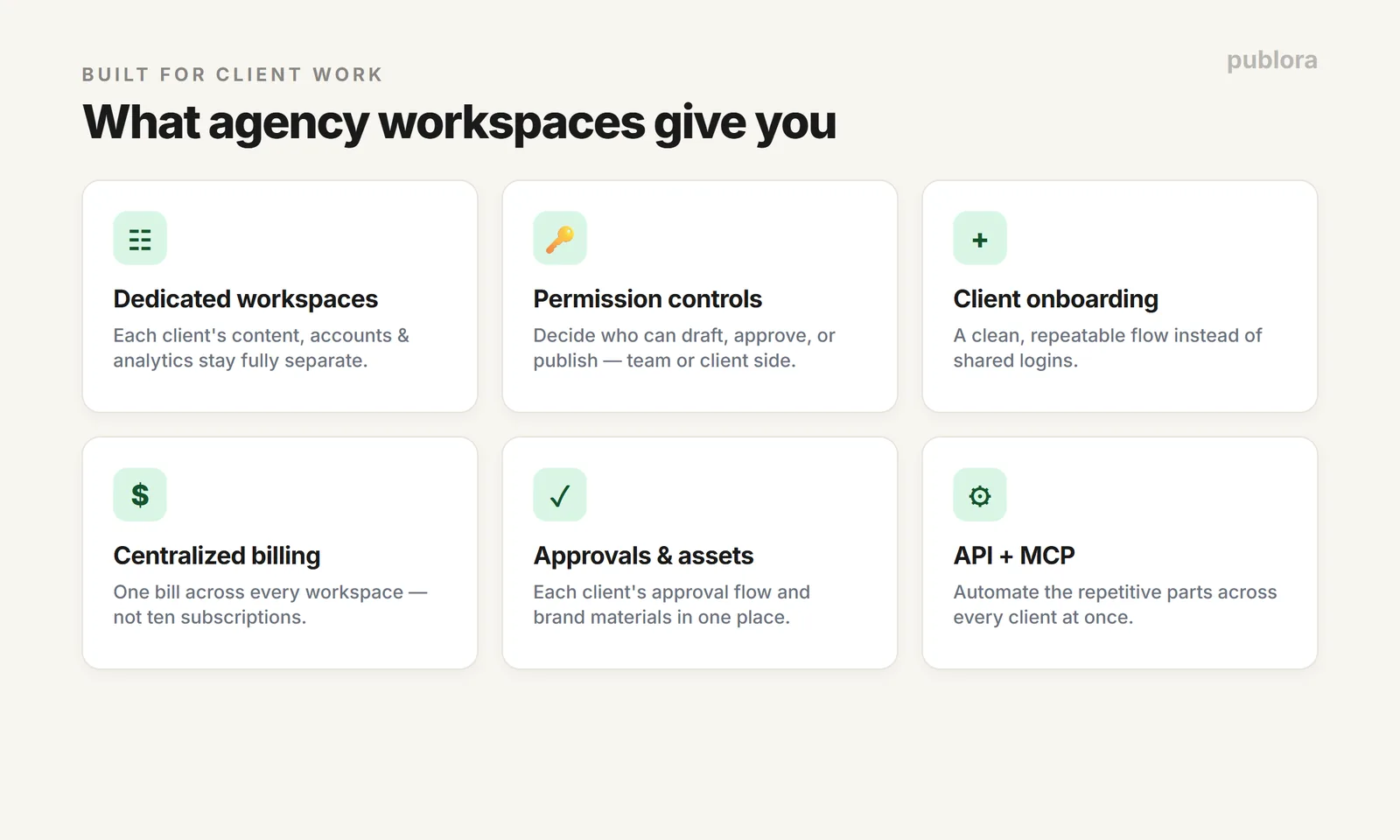
- Dedicated workspaces per client. Each client's content, connected accounts, and analytics stay completely separate. No cross-posting to the wrong brand, no mixed-up reports.
- Permission controls. Decide who on your team — or on the client's side — can draft, approve, or publish. Granular access keeps the right people in the right lane.
- Client onboarding. Bringing a new client in is a clean, repeatable flow rather than a tangle of shared logins.
- Centralized billing. One bill across every workspace, so finance isn't chasing ten separate subscriptions.
- Approvals and brand assets. Keep each client's approval flow and brand materials where they belong.
Setting Up Client Accounts: The Workflow
The setup follows the same shape for every client, which is what makes it scale:
- 1. Create a workspace for the client. This becomes the isolated container for everything that client touches.
- 2. Connect their social accounts. Authorize each network once through its official login. Those connections live inside that client's workspace only.
- 3. Set permissions. Add your account managers and, if you want, client-side reviewers, each with the access they actually need.
- 4. Build the content and approval flow. Draft, route for approval, and schedule — all within that workspace, against that client's calendar.
- 5. Repeat per client. Because the cost is per account and Agency includes unlimited team members, adding the next client is just another workspace, not another tier jump.
Automate the Repetitive Parts
The other agency advantage is that Publora is API-first. Every paid tier includes a public REST API and a first-party MCP server, so the repetitive parts of agency work — pulling a client's connected accounts, scheduling a batch of posts, publishing the same announcement across a client's networks — can run from your own code or an AI agent instead of by hand. One workflow can serve every client. If that's interesting, start with the social media scheduling API guide.
FAQ
Does Publora work for agencies managing multiple clients?
Yes. Dedicated workspaces keep each client's content, accounts, and analytics separate, with client onboarding, permission controls, and centralized billing. Combined with per-account pricing, it's built to manage many clients without the cost spiraling.
How much does Publora cost for an agency?
Per connected account on Pro: $3.99 per account per month billed yearly for the first five accounts, then $1.99 for accounts 6–20. Twenty client accounts is around $50/month, versus roughly $249/month on a per-plan tool like Hootsuite or more on per-seat tools like Sprout. Client workspaces and unlimited team members come with the Agency plan, which is custom-priced.
Can I keep clients separate in Publora?
Yes. Each client gets a dedicated workspace, so content, connected accounts, and analytics stay isolated. Permission controls decide who can see or do what, and billing is centralized across all workspaces.
Run your whole client roster in one place
Dedicated client workspaces and unlimited teammates on Agency, or Pro from $3.99 per account (billed yearly). Start free — no credit card.
Get Started FreeFurther Reading
- Why We Charge $3 Per Account
- Social Media Scheduling API: Post to 10 Platforms with One Call
- Getting Started with Publora
- Publora Pricing
About the author. Written by the Publora team. Workspace features are based on Publora's current product; competitor pricing was checked against vendors' public pages in June 2026 and can change. Confirm exact plan limits on the live pricing pages before deciding.
Related Articles
How to Publish to Social Media From Claude
Add the Publora connector from the Claude directory, then ask Claude to draft, schedule or publish to LinkedIn, X, Instagram and seven more networks.
How to Post a Figma Design to Social Media
Send a Figma frame to LinkedIn, Instagram, X and seven more networks without leaving Figma. Free plugin, works in Figma Design and Figma Slides.
How to Publish to Social Media From IFTTT
Connect Publora to IFTTT once, and anything IFTTT watches can go out to LinkedIn, X, Instagram and seven more networks. A feed, a webhook, your own code.
How to Auto-Share WordPress Posts to Social Media
Share every new WordPress post to Instagram, LinkedIn, X, Threads, Bluesky and five more networks automatically. Free plugin, about five minutes to set up.