Build a Content Bot: RSS to AI Caption to Auto-Publish

· Updated
TL;DR
Build a content bot that reads an RSS feed, writes a caption with AI, and auto-publishes to social media through the Publora API. Full flow, real endpoints.
A content bot is one of the most useful small automations you can build: point it at an RSS feed, and every time something new appears, it writes a caption and posts it to your social accounts. No dashboard, no copy-paste, no forgetting. Here's the whole pipeline, with the real endpoints, and the one detail that quietly breaks most people's first attempt.
The Pipeline in Four Stages
Every RSS-to-social bot, no matter the language, is the same four stages in a loop:
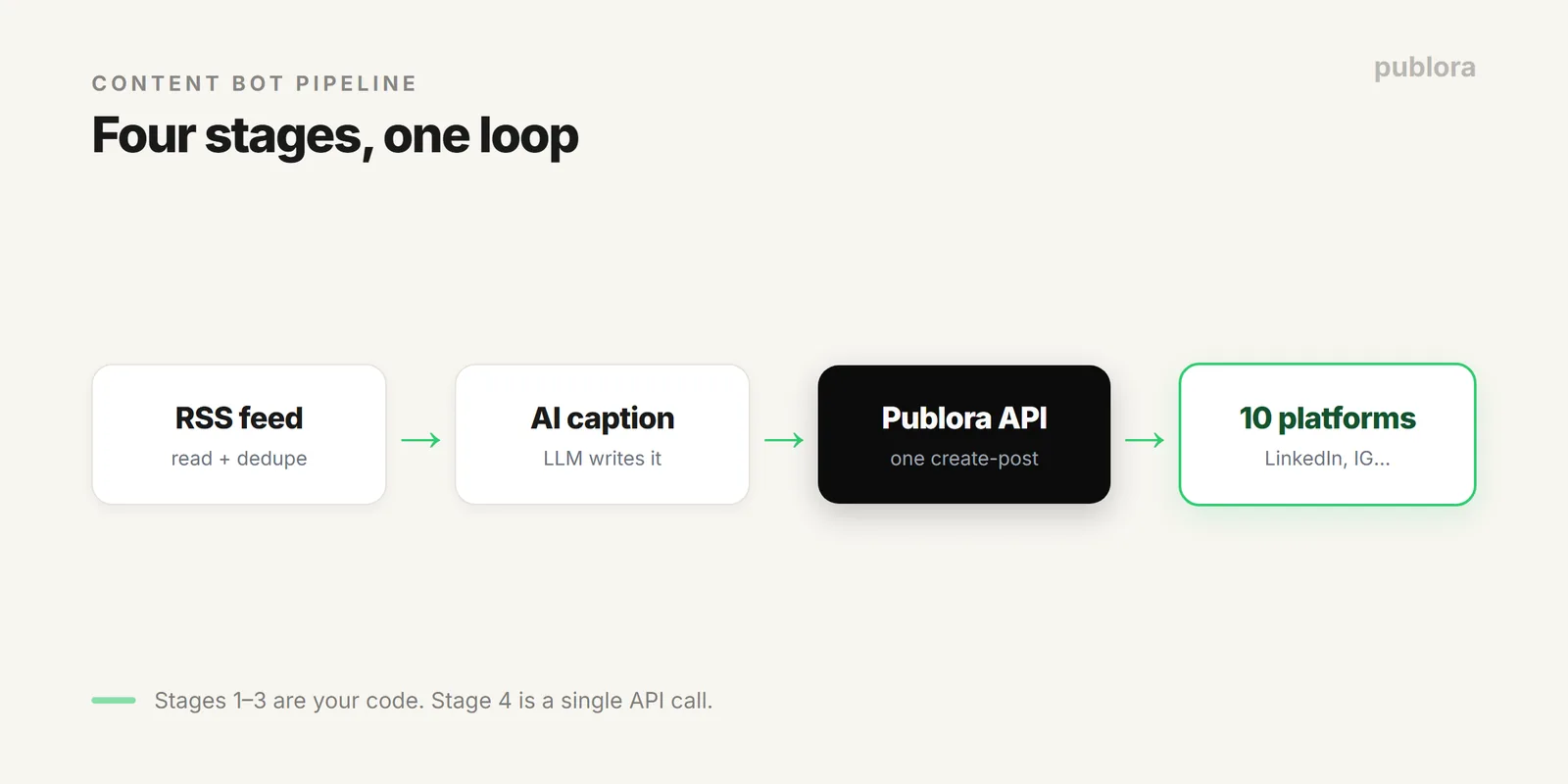
- Read. Fetch the RSS feed and parse out new items.
- Dedupe. Skip anything you've already posted.
- Write. Send each new item to an LLM to draft a caption.
- Publish. POST the caption to Publora, which fans it out to every connected network.
Stages one, two, and three are your code. Stage four is a single API call, because Publora already holds your account connections and handles per-platform formatting.
Stage 1 & 2: Read the Feed, Skip What You've Seen
Deduplication is the part everyone gets wrong on the first try. Without it, the first time the feed updates, your bot re-posts every item in it. Keep a record of published item IDs, use the RSS guid or the item link, and check against it before doing anything else.
import feedparser, json, os

SEEN = "seen.json"
seen = set(json.load(open(SEEN))) if os.path.exists(SEEN) else set()

feed = feedparser.parse("https://example.com/feed.xml")
new_items = [e for e in feed.entries if e.id not in seen]
Stage 3: Turn the Item Into a Caption
Don't post the raw headline. Feed titles are written for a blog index, not a social feed. Hand the title and summary to an LLM with a prompt that carries your voice, and ask for something native to the platform.
# any LLM works; keep the prompt short and opinionated
prompt = f"""Write a one-line social post about this article.
No hashtags, no emoji, sound like a person, not a press release.

Title: {item.title}
Summary: {item.summary}"""

caption = call_your_llm(prompt)
If you want the captions to genuinely not read like a bot, our guide to posts that don't sound like AI is the prompt-shaping checklist we use.
Stage 4: Publish to Every Platform in One Call
This is where a publishing API earns its place. Instead of integrating with LinkedIn's API, then Instagram's, then Threads', you connect each account to Publora once and make one call per post.
import requests

requests.post(
  "https://api.publora.com/api/v1/create-post",
  headers={"x-publora-key": os.environ["PUBLORA_KEY"]},
  json={
    "content": caption,
    "platforms": ["linkedin", "threads"],
    "scheduledTime": "2026-07-01T14:00:00Z"  # omit to post now
  }
)

seen.add(item.id)
json.dump(list(seen), open(SEEN, "w"))
Record the item as seen only after the post succeeds, so a failed request retries next run instead of silently vanishing. For posting images from the feed, request an upload URL first, push the file, then reference it, the same media flow covered in automating social media with Python.
Running It on a Schedule
The loop above runs once. To make it a bot, run it every 15 to 60 minutes. Three common ways:
| Host | How it runs | Good for |
|---|---|---|
| cron on a server | A crontab line calls the script | You already have a box running |
| GitHub Actions | Scheduled workflow, free minutes | No server, code already on GitHub |
| Serverless (Lambda, Cloud Functions) | Timer trigger invokes the function | Zero maintenance, pay per run |
Whichever you pick, keep the seen record somewhere persistent, a small database or object store, not local disk that resets between runs.
Knowing It Worked
A bot you can't see is a bot you don't trust. Two options: poll Publora's list endpoint to confirm a post shipped, or register a webhook so Publora tells your app when a post publishes or fails. Webhooks are the cleaner choice, no polling, and you find out about failures immediately. The mechanics are in rate limits, tokens, and webhooks.
FAQ
How do I auto-publish an RSS feed to social media?
Poll the feed on a schedule, skip items you've already posted, send each new item to an LLM for a caption, and POST that caption to Publora's create-post endpoint with your chosen platforms. A cron job or serverless function runs the loop.
Do I need a separate integration per platform?
No. Connect each account to Publora once, then one create-post call fans the content out to LinkedIn, Threads, Instagram, and the other supported networks.
How do I stop it posting duplicates?
Keep a record of item IDs (the RSS guid or link) you've already published, and skip any item already in it. Store that record somewhere persistent, not disk that resets between runs.
One API for your content bot
Publora's API is free to start, connect your accounts once and publish to 10 platforms from a single call. No per-platform integrations.
Get an API Key FreeFurther Reading
- Automate Social Media Posts with Python + Publora
- What Is a Social Media Scheduling API?
- Write Social Media Posts That Don't Sound Like AI
About this article. Code is illustrative; the Publora endpoints shown reflect the live REST API documented at docs.publora.com.
Related Articles
How to Publish to Social Media From Claude
Add the Publora connector from the Claude directory, then ask Claude to draft, schedule or publish to LinkedIn, X, Instagram and seven more networks.
How to Post a Figma Design to Social Media
Send a Figma frame to LinkedIn, Instagram, X and seven more networks without leaving Figma. Free plugin, works in Figma Design and Figma Slides.
How to Publish to Social Media From IFTTT
Connect Publora to IFTTT once, and anything IFTTT watches can go out to LinkedIn, X, Instagram and seven more networks. A feed, a webhook, your own code.
How to Auto-Share WordPress Posts to Social Media
Share every new WordPress post to Instagram, LinkedIn, X, Threads, Bluesky and five more networks automatically. Free plugin, about five minutes to set up.