Social Media API: Rate Limits, Tokens, and Webhooks Explained

· Updated
TL;DR
A developer reference for the Publora social media API - how API-key auth works, what rate limits actually apply, and how to set up webhooks for post events.
Building on a social media API comes down to three practical questions: how does auth work, what limits will you hit, and how do you find out when something happens? Here's the developer reference for all three on the Publora API. The full docs live at docs.publora.com.
Tokens: API Keys That Don't Expire
Publora authenticates with long-lived API keys, not OAuth tokens. That's a deliberate difference: an API key never expires and needs no refresh flow, so your integration doesn't break at 3 a.m. because a token lapsed.
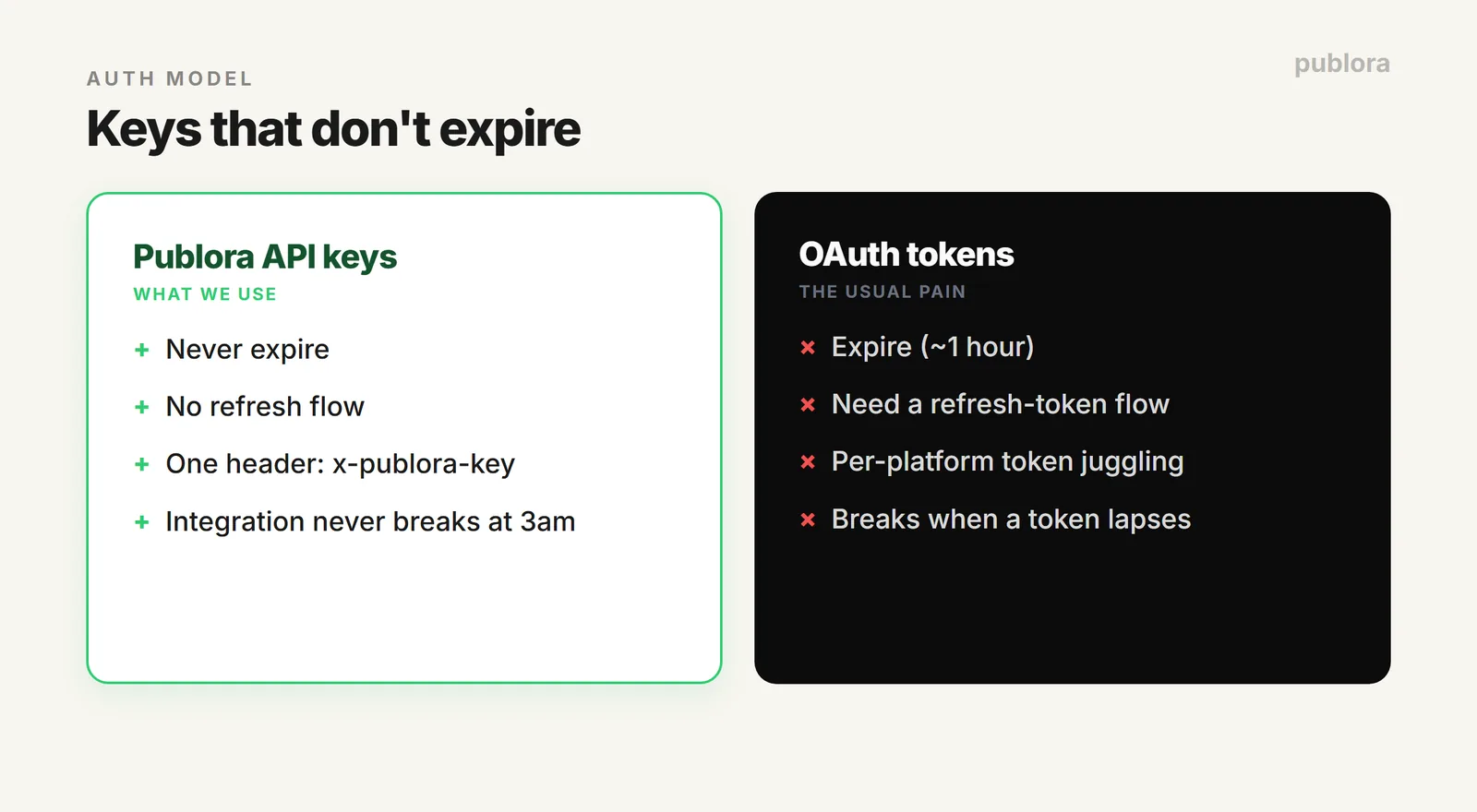
Generate one in the dashboard under API → Generate API Key — it's shown only once, so copy it immediately. It travels in the x-publora-key header on every request:
Because the key is a bearer credential that never rotates, keep it out of client-side code and version control. The API is server-to-server anyway (the key header isn't in the CORS allow-list, so browser requests fail preflight) — call it from a backend, a script, or a serverless function, and store the key in an environment variable.
Rate Limits: The Honest Version
Here's the part most API docs muddy, so let's be straight. Publora does not currently enforce per-request rate limits — no "X requests per minute" ceiling on the API today (it's planned, not live). What actually constrains you is two things.
1. Your plan's monthly post allowance. This is the real, enforced limit:
| Plan | Posts/month | Scheduled at once | Schedule horizon |
|---|---|---|---|
| Starter (free) | 15 (account-wide) | 3 pending | 7 days ahead |
| Pro ($5.99/account, or $3.99 yearly) | Unlimited (fair use) | per-connection | no limit |
| Agency (custom) | Unlimited | per-connection | no limit |
Note that a post group targeting 3 platforms counts as 3 posts toward your limit — the meter is per-platform-post, not per request.
2. The networks' own limits. Even though Publora won't throttle you, X, Instagram, and the rest will if you burst too fast. The docs publish advisory per-platform guidelines — conservative numbers to stay under the networks' radar:
| Platform | Advisory / hour | Advisory / day |
|---|---|---|
| X (Twitter) | 10 | 50 |
| 5 | 20 | |
| 3 | 10 | |
| TikTok / YouTube | 2 | 10 |
| Facebook / Mastodon | 5 | 25–50 |
| Bluesky / Threads | 10 | 50–100 |
| Telegram | 20 | 300 |
These are guidelines, not hard walls — but if you're scheduling hundreds of posts, spacing them within these bounds keeps every platform happy. Publishing itself is handled by the scheduler, which runs every minute.
Webhooks: Know When Something Happens
Polling the API to check whether a post went out is wasteful. Webhooks push the news to you instead: Publora POSTs to a URL you own the moment a post is published, fails, or when a connected account's token is expiring (so you can prompt a reconnect before posts start failing).
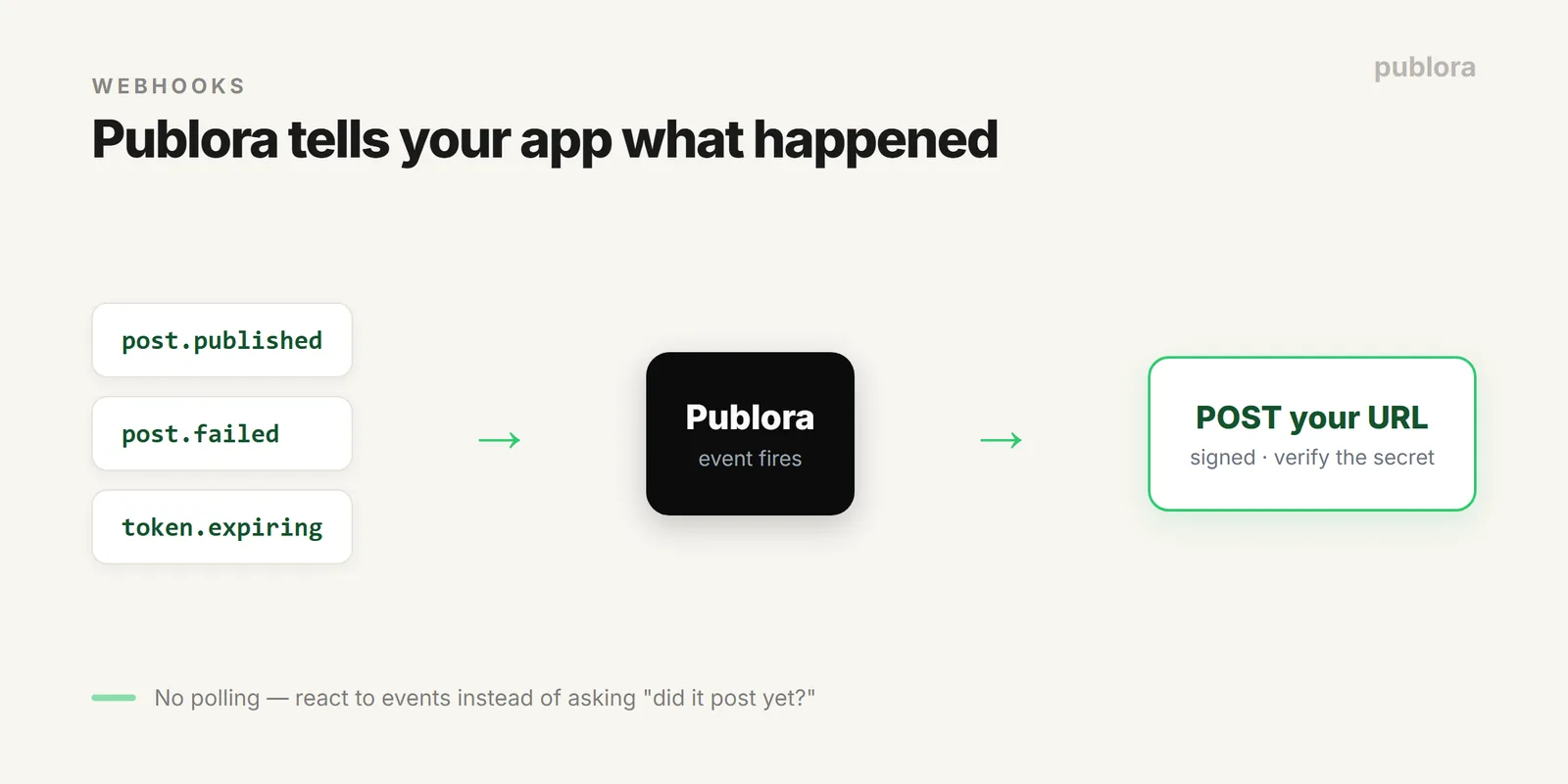
Create one by POSTing your endpoint URL and the events you care about:
The full set of endpoints:
GET /webhooks— list your webhooksPOST /webhooks— create onePATCH /webhooks/:id— update itDELETE /webhooks/:id— remove itPOST /webhooks/:id/regenerate-secret— rotate the signing secret
Each webhook has a signing secret — verify it on incoming requests so you know the call really came from Publora and not a spoofer. Publora also tracks a failureCount and lastTriggeredAt per webhook, so you can spot a dead endpoint.
Putting It Together
A clean production setup looks like this: store your key in an env var, respect your plan's monthly allowance and the advisory platform spacing when you batch, and register a webhook so your app reacts to post.published / post.failed instead of polling. If you want the posting code itself, see automating social media with Python and the scheduling API overview.
FAQ
Do Publora API keys expire?
No — they're long-lived and never expire, unlike OAuth tokens. Generate one in the dashboard under API (shown once), send it in the x-publora-key header, and keep it server-side.
What are the rate limits on the API?
Publora doesn't enforce per-request limits today (planned, not live). The real limits are your plan's monthly posts (15 / 100-per-account / 500-per-account) plus each network's own limits — the docs give advisory per-platform guidelines to avoid throttling.
Does Publora support webhooks?
Yes — webhooks POST to your URL on post.published, post.failed, or token-expiring events. Manage them with GET/POST /webhooks and PATCH/DELETE /webhooks/:id, and verify with the signing secret.
Build on the API free
A key that never expires, webhooks, and full REST + MCP access on the free Starter plan — no credit card.
Get Started FreeFurther Reading
- Automate Social Media Posts with Python + Publora API
- Social Media Scheduling API: Post to 10 Platforms with One Call
- Publora API Reference
About this article. Auth, limits, and webhook details were taken from the live Publora API docs in June 2026; APIs change, so check docs.publora.com for the current reference.
Related Articles
How to Publish to Social Media From Claude
Add the Publora connector from the Claude directory, then ask Claude to draft, schedule or publish to LinkedIn, X, Instagram and seven more networks.
How to Post a Figma Design to Social Media
Send a Figma frame to LinkedIn, Instagram, X and seven more networks without leaving Figma. Free plugin, works in Figma Design and Figma Slides.
How to Publish to Social Media From IFTTT
Connect Publora to IFTTT once, and anything IFTTT watches can go out to LinkedIn, X, Instagram and seven more networks. A feed, a webhook, your own code.
How to Auto-Share WordPress Posts to Social Media
Share every new WordPress post to Instagram, LinkedIn, X, Threads, Bluesky and five more networks automatically. Free plugin, about five minutes to set up.