Getting Started with Publora: From Sign-Up to First Post in 15 Minutes

· Updated
TL;DR
New to Publora? This quick start takes you from sign-up to your first scheduled post in about 15 minutes - connect accounts, write with AI, and schedule everywhere.
Publora is built to get you from "I should post this" to "it's scheduled" fast. If you set aside about fifteen minutes, you can sign up, connect your accounts, write a post, and schedule it across every network — and most of that time is the one-time job of connecting accounts. Here's the whole path.
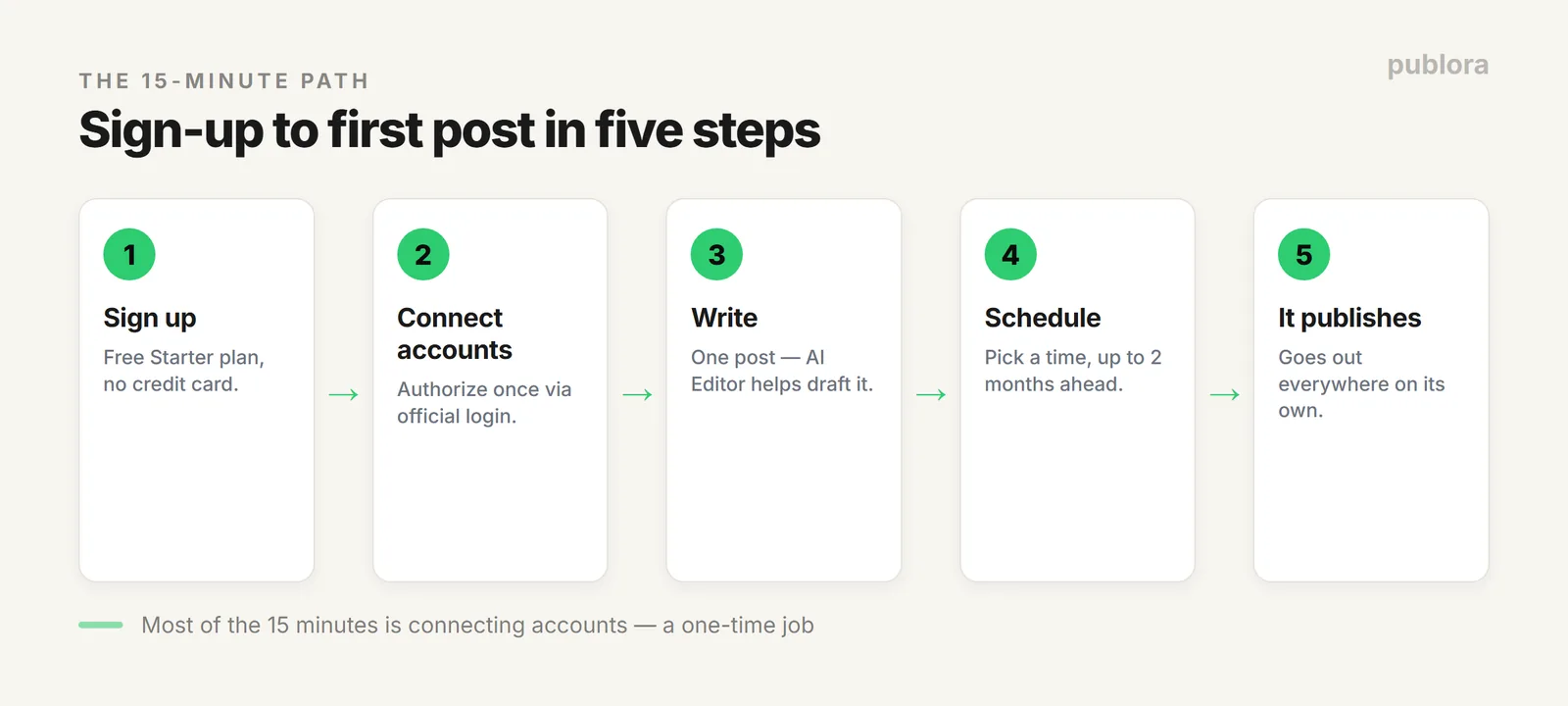
Step 1: Create Your Free Account (1 minute)
Head to publora.com/register and sign up. No credit card — the free Starter plan is permanent and covers 3 connected accounts, 15 posts a month, and every platform except X. That's enough to run a small presence and test everything before you decide to pay.
Step 2: Connect Your Social Accounts (5–10 minutes)
This is the part that takes the longest, and you only do it once. In the dashboard, choose a network and authorize it through its official login — the same OAuth screen you'd see connecting any trusted app. You own those connections, and posts go out through each network's sanctioned API.
You can connect up to 10 networks: X, LinkedIn, Instagram, Threads, TikTok, YouTube, Facebook, Bluesky, Mastodon, and Telegram. Connect just one to start — you can always add the rest later. (X needs a paid plan; everything else works on the free tier.)
Step 3: Write Your First Post (2 minutes)
Open the composer and type your post once. Pick which connected accounts it should go to — one, a few, or all of them. Publora handles the per-platform formatting, so you don't rewrite the same thing ten times.
Stuck on wording? The built-in AI Editor helps you draft and tighten the post, and it's included on every plan, including the free one. Write it yourself or let the AI get you started — either way you're a minute from done.
Step 4: Schedule It (1 minute)
Pick a time and hit schedule — Pro lets you queue posts up to two months ahead — or publish immediately. That's the whole loop: one post, written once, going out everywhere you chose, at the time you set. No tab-hopping, no "did I post that yet?"
Step 5: Build the Habit (ongoing)
The real payoff shows up the second week. Sit down once, load and schedule a week (or a month) of posts, and then get on with your work while they publish on their own. If you want to go further, two paths open up:
- Automate with the API. Every paid tier includes a public REST API — see the social media scheduling API guide to post from your own code or a no-code workflow.
- Let an AI agent post for you. Connect Publora's MCP server to Claude, Cursor, or n8n and schedule posts in plain language. Start with connecting Publora MCP to Claude Code.
What It Costs After the Free Plan
If you outgrow the Starter plan, pricing stays simple: Pro is $5.99 per connected account per month, or $3.99 billed yearly, with volume discounts from the 6th account and unlimited posts (fair use). Teams managing many clients can talk to us about the custom-priced Agency plan. You only pay for accounts you actually connect — more on the thinking behind that in why we charge $3 per account. Full limits are on the pricing page.
FAQ
Do I need a credit card to start?
No. The free Starter plan needs no card — 3 accounts, 15 posts a month, every platform except X. You can publish a real post before paying anything.
How long does it take to schedule a first post?
About 15 minutes: sign up, connect your accounts, write a post (the AI Editor can help), pick a time, schedule. Most of the time is connecting accounts, which you do once.
Which platforms can I connect?
Ten: X, LinkedIn, Instagram, Threads, TikTok, YouTube, Facebook, Bluesky, Mastodon, and Telegram. The free plan covers all except X.
Can Publora write posts for me?
Yes — the built-in AI Editor drafts and refines posts on every plan, including free. And if you use an AI agent, you can connect Publora's MCP server and have it post for you.
Schedule your first post today
Free-forever Starter plan, no credit card. Connect your accounts and publish everywhere in about 15 minutes.
Get Started FreeFurther Reading
- Social Media Scheduling API: Post to 10 Platforms with One Call
- Connect Publora MCP to Claude Code
- Why We Charge $3 Per Account
- Publora Pricing
About the author. Written by the Publora team. Steps, plan limits, and pricing were verified against the live product and publora.com/pricing in June 2026 and can change.
Related Articles
How to Publish to Social Media From Claude
Add the Publora connector from the Claude directory, then ask Claude to draft, schedule or publish to LinkedIn, X, Instagram and seven more networks.
How to Post a Figma Design to Social Media
Send a Figma frame to LinkedIn, Instagram, X and seven more networks without leaving Figma. Free plugin, works in Figma Design and Figma Slides.
How to Publish to Social Media From IFTTT
Connect Publora to IFTTT once, and anything IFTTT watches can go out to LinkedIn, X, Instagram and seven more networks. A feed, a webhook, your own code.
How to Auto-Share WordPress Posts to Social Media
Share every new WordPress post to Instagram, LinkedIn, X, Threads, Bluesky and five more networks automatically. Free plugin, about five minutes to set up.