Headless Social Media Publishing: What It Is and Why It Matters

· Updated
TL;DR
Headless social media publishing means posting through an API instead of a dashboard. Here's what it unlocks, when it's worth it, and how to start with Publora.
Most social media tools assume a person sitting in front of a dashboard, writing a post, picking a time, and clicking publish. Headless publishing removes the person and the dashboard. The post comes from your code, your workflow, or an AI agent, and the platform delivery still happens the same way. If you've ever wanted to schedule a month of content from a script, or let an agent post on its own, that's the headless model.
What "Headless" Actually Means
The term comes from web development, where a "headless CMS" stores and serves content through an API while some other front end renders it. The content management still happens; the built-in front end just isn't the only way in.
Headless social media publishing is the same idea. The scheduling tool still does the hard parts, holding your account connections, hosting media, formatting for each network, retrying failures, but you drive it programmatically instead of through its screens. The "head" (the dashboard UI) becomes optional.
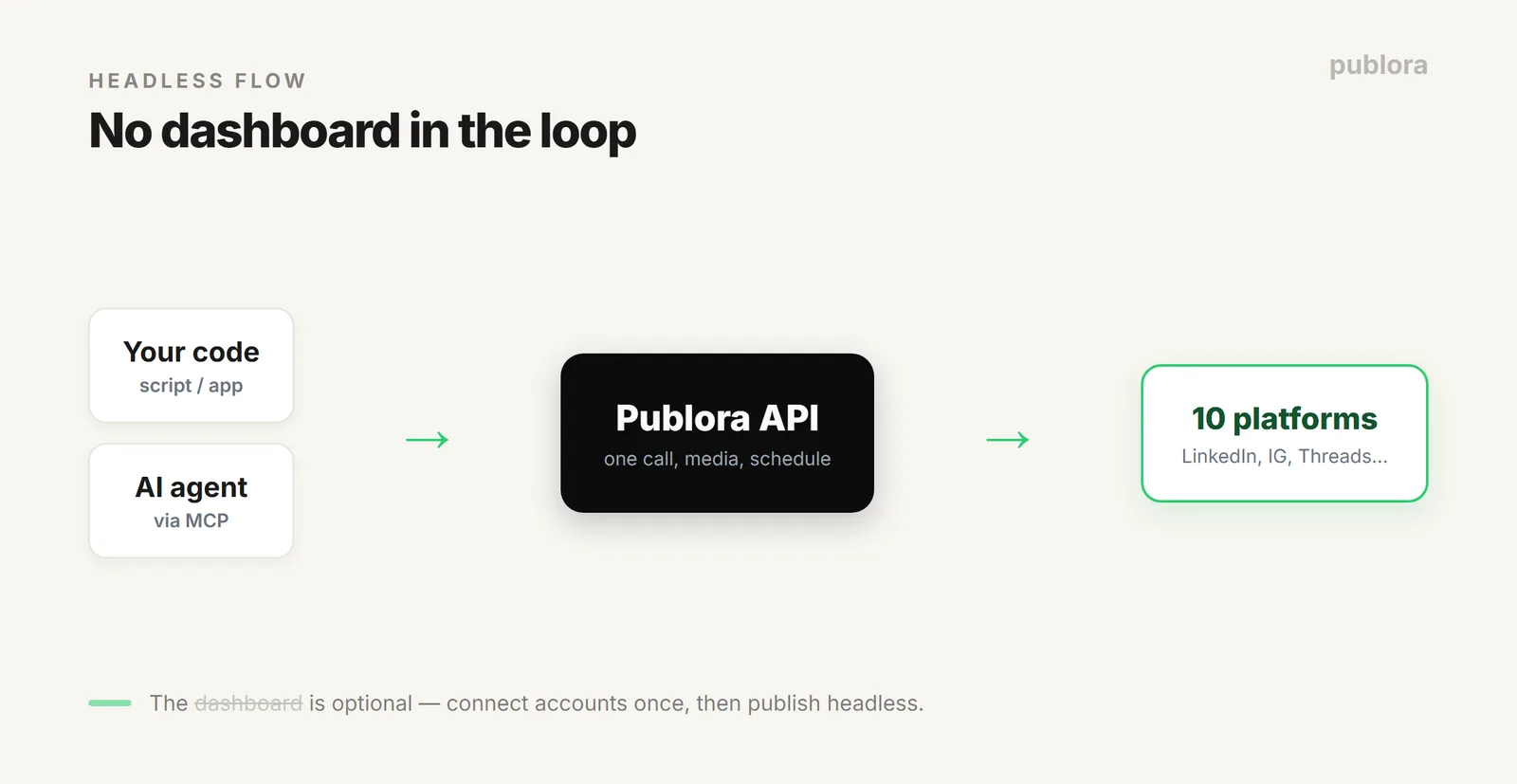
Dashboard vs Headless: The Same Job, Two Front Ends
| Step | Dashboard way | Headless way |
|---|---|---|
| Connect accounts | Click through OAuth in the UI | Click through OAuth once, then never again |
| Write a post | Type into a composer | Your app or agent generates the text |
| Add media | Drag and drop a file | Request an upload URL, push the file |
| Schedule | Pick a time in a calendar | Pass a timestamp in the request |
| Publish to 10 networks | Toggle each account, click post | One API call with a list of accounts |
| Know what happened | Refresh and look | A webhook tells your app |
Nothing about the platforms changes. What changes is who does the clicking, and whether "who" has to be human.
Why It Matters in 2026
Three things make headless publishing more useful now than it was a few years ago.
- AI writes the posts. If a model is drafting captions, the last thing you want is a human copying that text into a dashboard by hand. Headless lets the same pipeline that generated the post also ship it.
- Agents can act. With an API and a protocol like MCP, an AI agent can schedule a post as a tool call, no browser automation, no brittle clicking.
- Volume. Ten accounts, five networks each, a month ahead, that's hundreds of posts. Doing it by hand is the bottleneck. A script does it in one run.
What Headless Publishing Needs From a Tool
Not every scheduler can go headless. To publish without a dashboard, the tool has to expose the whole job through an interface, not just a slice of it. Concretely:
- A real REST API that covers creating posts, scheduling, and listing what's queued, not a read-only reporting endpoint.
- Media upload over the API so images and video don't force you back into the UI. Publora does this with a request-an-upload-URL step, then a direct file push.
- Multi-platform in one call so you send once and Publora fans it out to each connected network.
- Webhooks so your app learns that a post published or failed without polling. (More on the mechanics in rate limits, tokens, and webhooks.)
- An MCP server if you want AI agents to publish as a native tool rather than through generated HTTP code.
Publora was built API-first, so all five are there on every plan, including the free one.
What It Looks Like
Here's the shape of a headless post, one HTTP call that schedules the same content to several platforms:
# Schedule one post to LinkedIn, Threads, and Instagram
POST https://api.publora.com/api/v1/create-post
x-publora-key: your_api_key

{
  "content": "Shipped the headless publishing guide today.",
  "platforms": ["linkedin", "threads", "instagram"],
  "scheduledTime": "2026-07-01T13:00:00Z"
}
No dashboard opened, no buttons clicked. Media follows the same pattern: ask for an upload URL, push the file, reference it in the post. And if you'd rather not write HTTP at all, an AI agent connected over MCP can make that same call as a tool. We walk through the full flow in automating social media with Python.
When Headless Is Overkill
To be fair: if you post twice a week from one account, a dashboard is faster and headless is pointless. The model earns its keep when the work is repetitive, high-volume, generated by something else, or has to run without you. One creator on one account, stay in the UI. A pipeline, an agent, or fifty accounts, go headless.
FAQ
What is headless social media publishing?
Posting to social media through an API or an AI agent instead of a dashboard. The tool still handles connections, media, and delivery; your code or agent decides what and when. Publora exposes this through a REST API and an MCP server.
Do I still need the dashboard?
Only to connect your accounts once through OAuth. After that, creating posts, uploading media, and scheduling all run through the API or MCP with no UI.
Is headless publishing free on Publora?
The API and MCP server are available on every plan, including the free Starter tier, so you can build a headless workflow without paying to start.
Publish without opening a dashboard
Publora's REST API and MCP server are on every plan, including free. Connect once, then let your code or your agent do the posting.
Start FreeFurther Reading
- What Is a Social Media Scheduling API?
- Automate Social Media Posts with Python + Publora
- Rate Limits, Tokens, and Webhooks: A Developer Reference
About this article. API details reflect the live Publora REST API and MCP server as documented at docs.publora.com.
Related Articles
How to Publish to Social Media From Claude
Add the Publora connector from the Claude directory, then ask Claude to draft, schedule or publish to LinkedIn, X, Instagram and seven more networks.
How to Post a Figma Design to Social Media
Send a Figma frame to LinkedIn, Instagram, X and seven more networks without leaving Figma. Free plugin, works in Figma Design and Figma Slides.
How to Publish to Social Media From IFTTT
Connect Publora to IFTTT once, and anything IFTTT watches can go out to LinkedIn, X, Instagram and seven more networks. A feed, a webhook, your own code.
How to Auto-Share WordPress Posts to Social Media
Share every new WordPress post to Instagram, LinkedIn, X, Threads, Bluesky and five more networks automatically. Free plugin, about five minutes to set up.