The Agency Guide to Social Media Scheduling Workflows That Scale

· Updated
TL;DR
The workflows that let a social media agency add clients without adding chaos: intake, drafting, approvals, scheduling, and reporting that actually scale.
An agency's first few clients run on hustle. The tenth runs on a system, or it runs you into the ground. The difference between an agency that adds clients smoothly and one that drowns in them is rarely talent; it's whether the same five-stage workflow repeats for every client, or every client is a fresh scramble. Here's the workflow that scales.
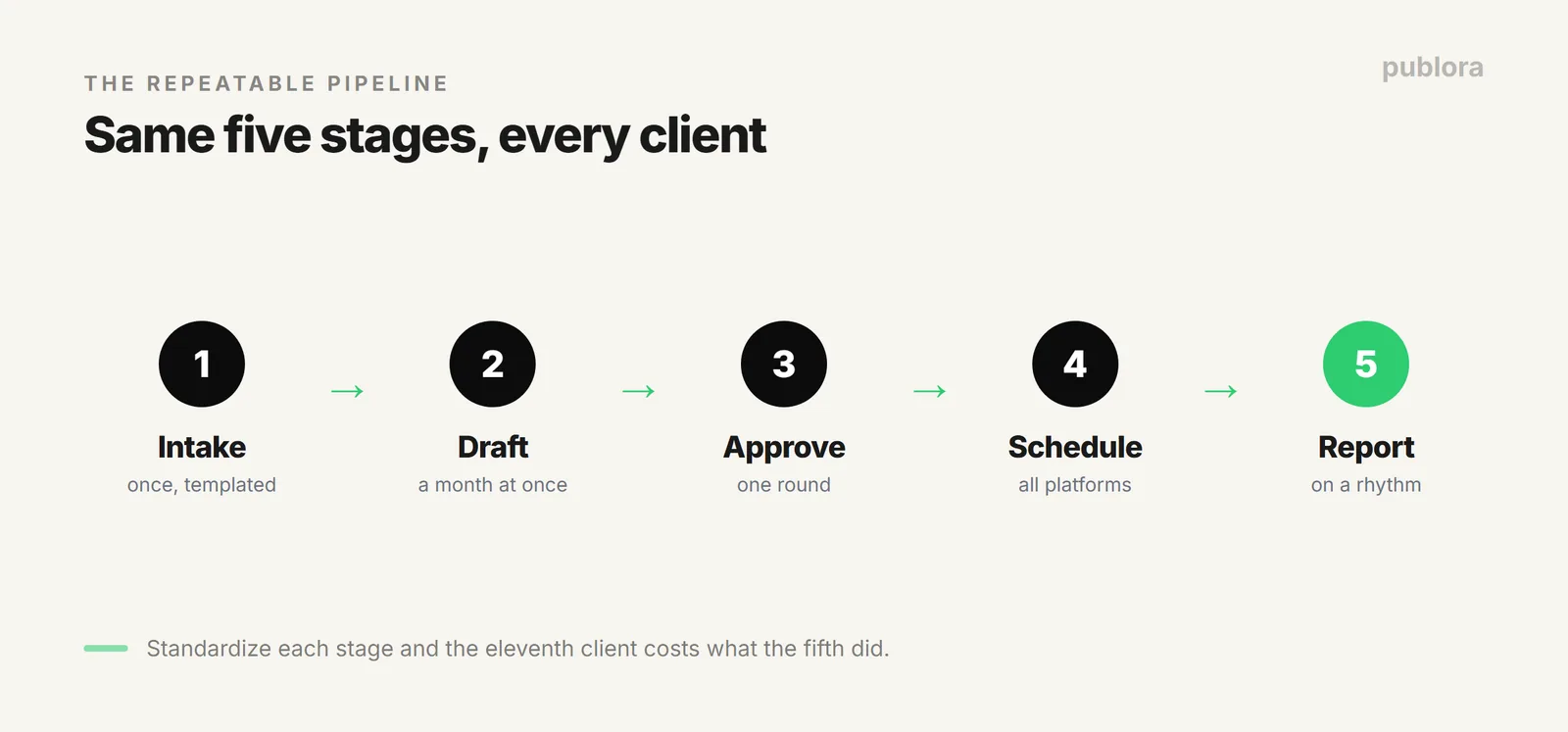
The Five Stages
Every client, no matter the industry, moves through the same pipeline each month. Standardize it once and onboarding a new client becomes a template instead of a project.
Stage 1: Intake, Done Once
The scramble usually starts here. Collect everything you'll ever need from a client on day one: brand voice, the accounts to connect, posting cadence, no-go topics, and who approves. Put it in a template every client fills the same way. The goal is that no one on your team ever has to ask a client "wait, what's your handle again?" mid-month.
Connect the client's accounts once at this stage. With Publora each client's accounts live under your workspace but stay separate, so a post never lands on the wrong brand. The setup mechanics are in the Publora Workspace guide for agencies.
Stage 2: Draft in Batches, Not Dribbles
Drafting one post at a time is the single biggest hidden cost in an agency. Context-switching between clients all day burns hours you can't bill. Instead, batch: set aside a block and write a client's whole month at once, while you're already in their voice. One client, one sitting, thirty posts.
This is also where AI earns its place, drafting first versions you edit rather than writing from scratch, as long as the output doesn't read like a bot. Our guide to posts that don't sound like AI is the editing checklist to keep it human.
Stage 3: One Approval, Not Fifty
Approvals are where scale goes to die. If a client approves post by post across email and chat, every client multiplies your inbox. The fix is structural: one review step per batch, not per post.
| What breaks | What scales | |
|---|---|---|
| Where | Email, chat, spreadsheets | One queue the client views |
| When | Post by post, all week | One round per monthly batch |
| Changes | Trickle in, never final | Collected once, then locked |
Send the client the whole month's queue in one view, collect changes in a single round, then lock it. You've turned fifty approval threads into one.
Stage 4: Schedule Everything at Once
Once a batch is approved, queue it all: every post, every platform, the whole month, in one session. Keep each client's accounts separate but managed from one place, so you're not logging in and out of dashboards. For agencies with heavy volume, this is the stage to automate, script the scheduling through the Publora API so a spreadsheet or content calendar becomes a queued month without manual entry.
What This Looks Like at Real Scale
How many client accounts can one workspace actually carry? From our own data: 17 Publora users run seven or more connected accounts each, and the heaviest runs 45 from a single place. That's the whole multi-account case in one number, one dashboard, one bill, dozens of clients, without a separate login or subscription per brand.
It's also why the five stages matter more as you grow. At three clients you can improvise. At forty-five accounts, the only thing keeping it sane is that every client moves through the identical pipeline.
Stage 5: Report on a Rhythm
Clients renew on results they can see. Don't reinvent the report each month, standardize what you track (reach, engagement, what shipped) and pull it on the same cadence for everyone. A predictable monthly report is both a retention tool and a proof point for raising your rate. The point isn't fancier dashboards; it's the same rhythm for every client so reporting never becomes its own emergency.
Why Standardizing Beats Improvising
The whole argument in one line: an agency scales on sameness. The more identical the workflow across clients, the more clients one person can carry, and the less any single client's chaos can spill onto the others. Improvisation feels like service; it's actually the thing capping your client count. Turn each of the five stages into a template, and your eleventh client costs about what your fifth did.
FAQ
What does a scalable agency workflow look like?
Five repeatable stages, intake, drafting, approval, scheduling, and reporting, run the same way for every client, so onboarding a new one is a template rather than a reinvention.
How do agencies handle client approvals?
One review step per monthly batch, not per post: draft in one place, send the client a single view of the queue, collect changes in one round, then schedule. Scattered approvals across email and chat are what break agencies.
How can an agency schedule for many clients at once?
Keep each client's accounts separate but managed from one place, then batch-schedule a whole month per client in one session. Connect each client once in Publora and automate the repetitive scheduling through the API. For scale: 17 Publora users run 7+ connected accounts each, the heaviest 45, from one workspace.
One workspace for every client
Connect each client once, keep accounts separate, batch-schedule from one place, and automate the repetitive parts through the API. Per-account pricing, no per-seat fees.
Start FreeFurther Reading
- How Agencies Set Up Client Accounts in Publora Workspace
- How Agencies Save $2,000/Year on Their Social Stack
- Build a Social Media Content Calendar
About this article. Based on how agencies actually run their scheduling on Publora Workspace.
Related Articles
How to Publish to Social Media From Claude
Add the Publora connector from the Claude directory, then ask Claude to draft, schedule or publish to LinkedIn, X, Instagram and seven more networks.
How to Post a Figma Design to Social Media
Send a Figma frame to LinkedIn, Instagram, X and seven more networks without leaving Figma. Free plugin, works in Figma Design and Figma Slides.
How to Publish to Social Media From IFTTT
Connect Publora to IFTTT once, and anything IFTTT watches can go out to LinkedIn, X, Instagram and seven more networks. A feed, a webhook, your own code.
How to Auto-Share WordPress Posts to Social Media
Share every new WordPress post to Instagram, LinkedIn, X, Threads, Bluesky and five more networks automatically. Free plugin, about five minutes to set up.