Social Media Management for Small Teams: Tools Under $20/Month
TL;DR
How a small team runs social media for under $20 a month: what to prioritize, why per-account pricing beats per-seat, and the setup that keeps everyone in sync.
A small team, three, five, maybe eight people, runs social media differently from both a solo creator and a big brand. Everyone touches it, the budget is real, and per-seat tools quietly punish exactly that shape. The good news: a small team can run a serious multi-platform presence for under $20 a month, if it picks the right pricing model. Here's how.
The Trap: Per-Seat Pricing
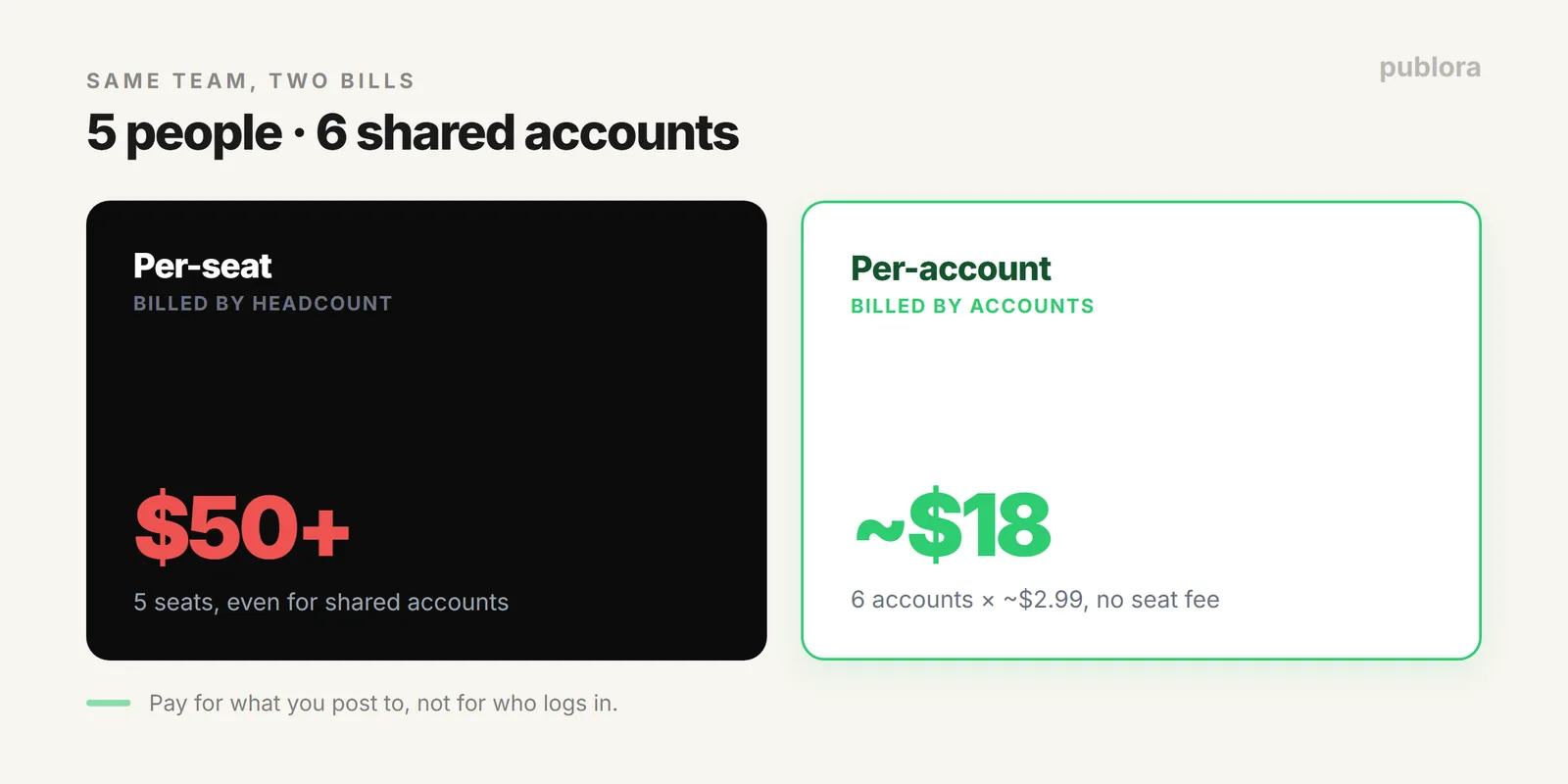
Most tools charge per seat, one fee per person who logs in. That's fine for a company where two marketers own social. It's brutal for a small team where everyone pitches in: five people who share four accounts still pay five subscriptions. You're billed for headcount, not for what you actually post.
The Fix: Pay Per Account
Per-account pricing charges for the accounts you connect, not the people who touch them. A small team can share the whole workspace, and the bill only reflects the networks you post to. At about $2.99 per account, the math stays under $20:
| Setup | Accounts | Monthly |
|---|---|---|
| One brand, core networks | 4 | ~$12 |
| One brand, full presence | 6 | ~$18 |
| Same, on per-seat (5 people) | — | often $50+ |
Same team, same output, a fraction of the cost, because you stopped paying by headcount. (The reasoning behind the model is in why we charge $3 per account.)
What to Prioritize on a Small Budget
Under $20, spend your attention, not just your dollars, on the things that matter for a team:
- One shared queue. Everyone sees the same calendar, so no one double-posts or leaves a gap.
- Broad platform coverage. A small team is usually on several networks; a tool that covers them all avoids a second subscription.
- Batch scheduling. Plan a couple weeks in one session so posting isn't a daily group decision.
- An API, in case you grow. When someone technical wants to automate, it shouldn't require an upgrade. Publora includes it on every plan.
Keeping Everyone in Sync
The hardest part of team social isn't the tool, it's coordination. Three habits fix most of it: work from one shared queue so everyone's looking at the same plan, agree on a simple weekly cadence so no one's guessing, and batch content so the calendar is set before the week starts. A tool where the whole team collaborates on the same connected accounts, rather than each person siloed on their own seat, is what makes those habits stick.
FAQ
What's a good tool for a small team under $20?
One with per-account pricing. At about $2.99 per account, six accounts come to roughly $18 a month with no per-seat fee. Pay for accounts, not for each person who logs in.
Why does per-seat pricing hurt small teams?
It charges for every person with access, so a five-person team pays five times over even when they share a few accounts. Per-account pricing charges only for the accounts.
How does a small team stay in sync?
One shared queue, a simple agreed cadence, and batched content. Working from the same connected accounts, not separate seats, keeps everyone on the same calendar.
Your whole team, under $20
Publora charges per account, not per seat, so a small team shares one workspace and pays only for the accounts it posts to. Start free, scale a few dollars at a time.
Start FreeFurther Reading
- Why We Charge $3 Per Account
- Build a Social Media Content Calendar
- The Real Cost of "Free" Social Media Tools
About the author. Written by the Publora team. Per-account pricing reflects the live Publora plans.
Related Articles
Social Media Manager Salary in 2026 (US Data by Experience)
US social media manager salaries in 2026 range from about $45k entry-level to $95k senior. Figures by experience, why sources disagree, and what moves the number.
From 1 Account to 50: How Publora Scales Without Scaling Your Bill
Most tools make growth expensive with tier jumps and per-seat fees. Here's how per-account pricing lets you go from 1 account to 50 on a straight, predictable line.
Social Media Automation for Startups: What to Automate First
A startup can't automate everything at once. Here's the order that matters: distribution first, then scheduling, then feed-driven posting, then AI drafting.
Social Media Scheduling for Solopreneurs: Do More With Less
How a solopreneur runs consistent social media without it eating the week: batch once, automate with AI, and use a free plan that doesn't cap you too early.