Best Instagram Schedulers in 2026: 13 Tools Compared

Reviewed by Jane Ivanova, CEO, Publora
TL;DR
Compare 13 Instagram schedulers by price, free plan and Reels and Stories support, including Instagram's own scheduler, Meta Business Suite, Later and Publora.
If you post to one Instagram account a few times a week, the scheduler inside the Instagram app is free and may be enough. If you also need Stories or Facebook, Meta Business Suite is free too. If you post to other networks as well, Publora, Publer and Buffer are the cheapest paid options here. If your Instagram grid is the point, look at Preview, Planoly or Later. Sprout Social and Hootsuite suit larger teams that also need an inbox and reporting.
We make Publora, one of the tools on this list, so read this as a vendor's article. We have not run side-by-side tests of these tools. Every price and limit below comes from the vendor's own pricing or help page, checked on November 6, 2026, and prices change, so check again before you buy.
How the 13 Instagram schedulers compare
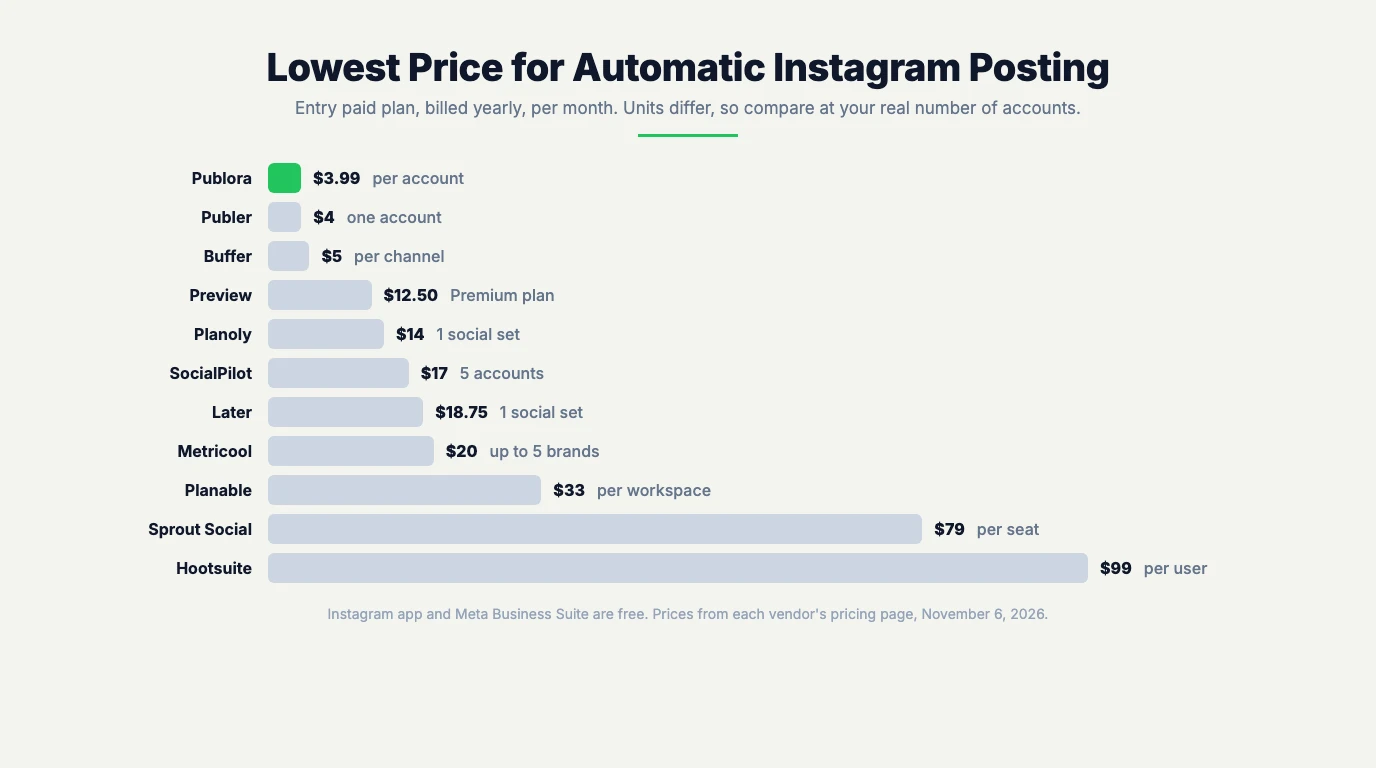
The table is sorted by the lowest listed price that includes automatic posting to Instagram. It is not a ranking.
| Tool | Best for | Free option | Lowest paid price | Posts to other networks |
|---|---|---|---|---|
| Instagram app | One account, occasional posts | Free, built in | None | No |
| Meta Business Suite | Instagram and Facebook together, with Stories | Free | None | Facebook only |
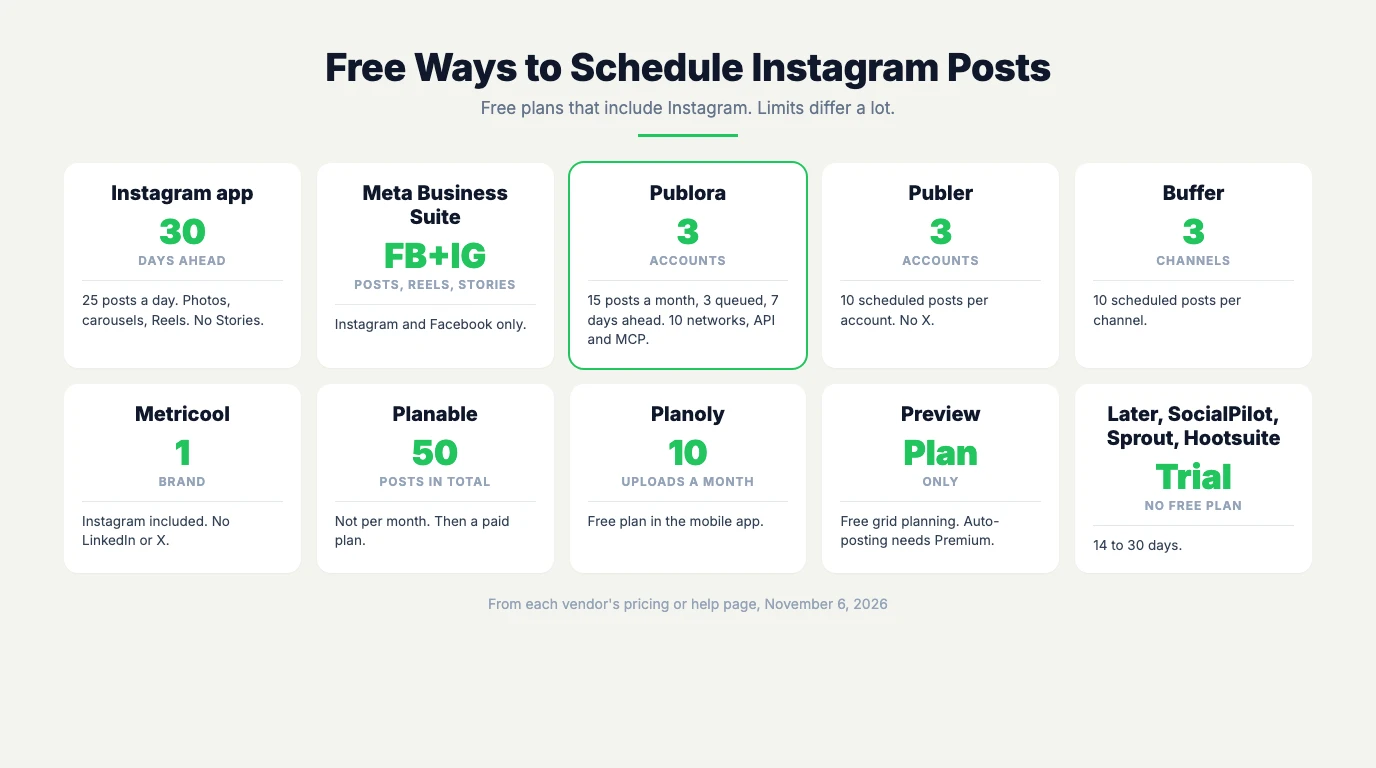
| Publora | Several networks, API or AI agents, low cost | Free plan: 3 accounts, 15 posts a month | $3.99 per account a month, billed yearly | Yes |
| Publer | Low-cost scheduling with first comments | Free plan: 3 accounts, 10 scheduled posts per account | $4 a month for one account, billed yearly | Yes |
| Buffer | Simple scheduling across several networks | Free plan: 3 channels, 10 scheduled posts per channel | $5 per channel a month, billed yearly | Yes |
| Preview | Planning the look of your grid | Free planning app, auto-posting is paid | $12.50 a month for auto-posting, billed yearly | TikTok and Facebook |
| Planoly | Grid planning and link in bio | Free mobile plan, 10 uploads a month | $14 a month, billed yearly | Yes |
| SocialPilot | Small teams and agencies | 14-day trial | $17 a month for 5 accounts, billed yearly | Yes |
| Later | Visual planning with one set of profiles | 14-day trial | $18.75 a month, billed yearly | Yes |
| Metricool | Scheduling with analytics | Free plan for 1 brand, Instagram included | $20 a month for up to 5 brands, billed yearly | Yes |
| Planable | Teams that need approvals | First 50 posts free | $33 per workspace a month, billed yearly | Yes |
| Sprout Social | Teams that need reporting | 30-day trial | $79 per seat a month, billed yearly | Yes |
| Hootsuite | Teams that need an inbox and monitoring | 14-day trial | $99 per user a month, billed yearly | Yes |
Can you schedule posts in the Instagram app?
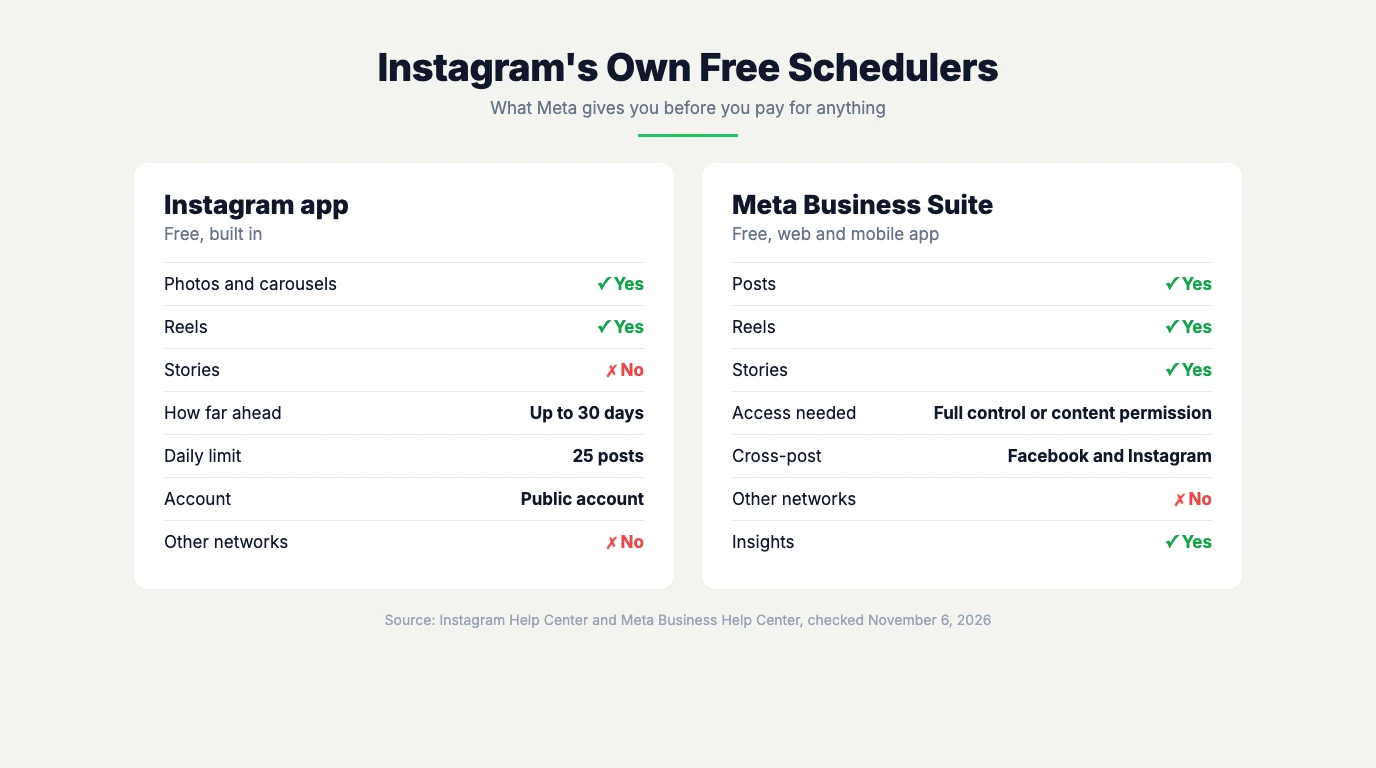
Yes, for free. In the app, tap Create, choose Post or Reel, add your photo or video and caption, tap More options, turn on Schedule this post or Schedule this reel, and pick a date and time. Instagram's help page says you need a public account, and you can schedule up to 25 posts a day, up to 30 days ahead. Product tags, collaborative posts, sponsored posts and fundraisers do not work with scheduled content.
The app schedules photos, carousels and Reels. Stories are not on that list. For Stories, use Meta Business Suite or a third-party tool. We cover the details in can you schedule posts on Instagram.
The 13 tools
1. Instagram's built-in scheduler
- Price: free.
- Good for: one person posting a few times a week.
- Limit: no Stories, no shared calendar, no other networks, and only 30 days ahead.
2. Meta Business Suite
Meta's own free tool for Facebook Pages and Instagram accounts, on the web and as a mobile app. You can schedule posts, Reels and Stories, and post the same content to Facebook and Instagram at once.
- Price: free.
- Good for: a business that posts mostly to Instagram and Facebook and wants Stories on a schedule.
- Limit: no other networks. You need full control or content permission for the Instagram account or Page.
3. Publora
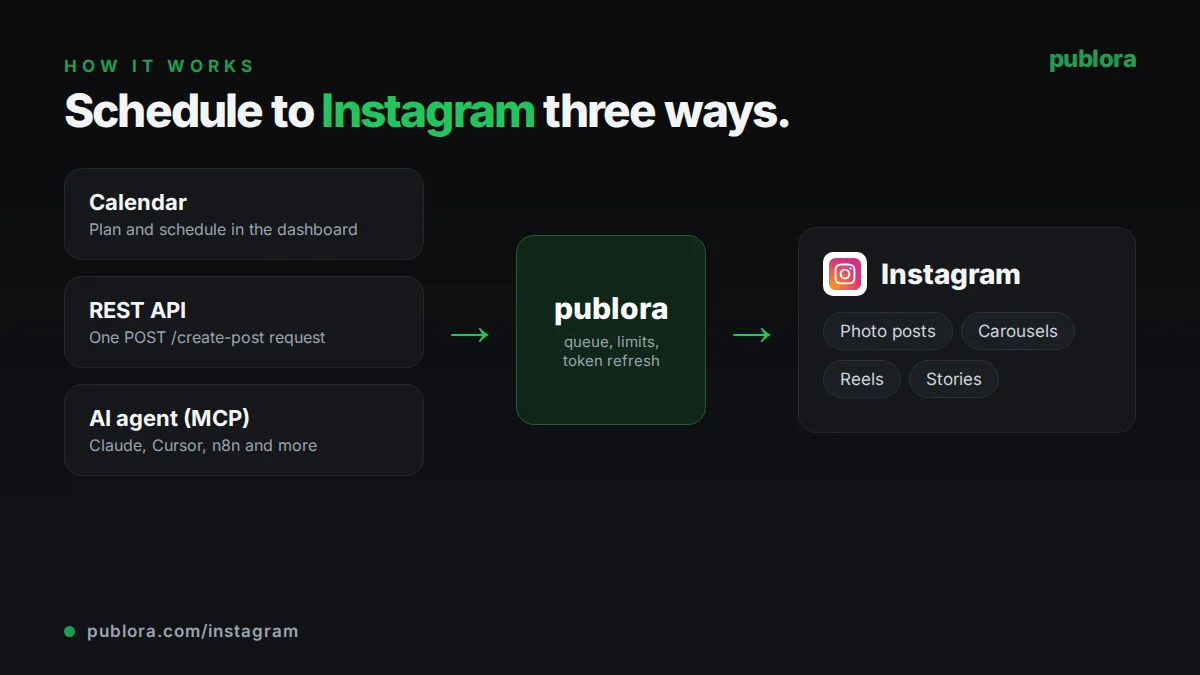
Publora schedules to Instagram and nine other networks from a calendar, a REST API or an AI agent over MCP. All three use the same queue. You can publish photos, carousels of 2 to 10 images, Reels with a custom cover, and Stories. It connects through Instagram Login for Business, so you do not need a Facebook Page. You do need a Business or Creator account, as with every third-party tool that posts for you.
- Price: free Starter plan with 3 accounts, 15 posts a month, up to 3 posts queued at once, up to 7 days ahead. Pro costs $5.99 per account a month, or $3.99 billed yearly, and drops to $2.99 from the 6th account and $0.99 from the 21st ($1.99 and $0.66 billed yearly).
- Good for: people who post to several networks, and anyone who wants to schedule from their own code or from Claude, Cursor or another MCP client. The API and MCP server are on every plan, including free.
- Limits: no Instagram analytics, no grid preview, no first comment on Instagram, and no music or product tags, because Instagram's publishing API does not allow them. Carousels are images only. The free plan's 7-day limit is short if you plan a month ahead. We are also younger than most tools on this list.
See how Publora schedules Instagram posts.
4. Publer
- Price: free for 3 social accounts with 10 scheduled posts per account, X excluded. Professional costs $5 a month for one account, or $4 billed yearly. Business costs $10, or $8 billed yearly. The price grows with the number of accounts, and every 10th account is free.
- Good for: low-cost scheduling with first comments, which start on Professional, and an Instagram and TikTok feed preview.
- Limit: analytics, best times to post and the API start on Business.
5. Buffer
- Price: free for up to 3 channels, with 10 scheduled posts per channel. Essentials costs $5 per channel a month billed yearly, or $6 billed monthly. Team costs $10 billed yearly, or $12 billed monthly.
- Good for: a simple queue across several networks. Paid plans add unlimited scheduled posts and first comment scheduling.
- Limit: cost grows with each channel.
6. Preview
Preview is built around how your Instagram grid looks: you drag posts around in a planner before they go out.
- Price: the free plan covers planning, with unlimited posts on one device. Pro costs $6.67 a month billed yearly and adds filters and an image splitter. Auto-posting to Instagram, Facebook and TikTok, the Story planner and user and location tags start at Premium, $12.50 a month billed yearly.
- Good for: creators who care most about the look of their feed.
- Limit: without Premium, the app plans posts but does not publish them for you.
7. Planoly
Planoly also started as a grid planner for Instagram and now covers Instagram, TikTok, LinkedIn, Facebook, YouTube, Threads and Pinterest.
- Price: a free plan in the mobile app with 10 uploads a month. Starter costs $14 a month billed yearly, or $16 billed monthly, for 1 social set and 1 user. Growth costs $24 billed yearly, or $28 monthly. 14-day free trial.
- Good for: grid planning, link in bio and automated Instagram DMs, all on every plan.
- Limit: Starter cannot add more social sets or users.
8. SocialPilot
- Price: 14-day trial, no credit card. Essentials costs $17 a month billed yearly, or $20 billed monthly, for 5 accounts and 1 user. Standard costs $34 billed yearly for 10 accounts and 3 users.
- Good for: small teams.
- Limit: bulk scheduling and the social inbox start at Standard.
9. Later
- Price: 14-day trial. Starter costs $18.75 a month billed yearly, with one social set, which includes one Instagram profile, and 1 user. Starter allows up to 30 posts per profile.
- Good for: visual planning, link in bio and Instagram Reels audio, all on Starter.
- Limit: extra social sets and users are not available on Starter. The next plan, Growth, costs $37.50 a month billed yearly.
10. Metricool
- Price: the free plan covers 1 brand, Instagram included (LinkedIn and X are not). Starter costs $20 a month billed yearly for up to 5 brands, or $25 billed monthly.
- Good for: people who want analytics next to scheduling.
- Limit: team and client management starts at Advanced, from $53 a month billed yearly.
11. Planable
- Price: the first 50 posts are free, with no time limit. Basic costs $33 per workspace a month billed yearly, or $39 billed monthly, with 60 posts per workspace a month and unlimited users. Pro costs $49 billed yearly, or $59 monthly, and adds the grid view and a public API.
- Good for: teams that need approvals, since every plan includes unlimited users.
- Limit: analytics and the social inbox are paid add-ons on Basic and Pro.
12. Sprout Social
- Price: 30-day trial. Essentials costs $79 per seat a month billed yearly, or $99 billed monthly, for up to 5 profiles. Standard costs $199 per seat a month, billed yearly.
- Good for: teams that need reporting and collaboration.
- Limit: per-seat pricing adds up quickly for a team.
13. Hootsuite
- Price: 14-day trial. Standard costs $99 per user a month, billed yearly, for up to 10 accounts.
- Good for: teams that want a shared inbox, brand and competitor monitoring and scheduling in one place.
- Limit: team approvals start at Advanced, $399 per user a month billed yearly.
How to choose an Instagram scheduler
Four questions will narrow the list quickly:
- Do you post only to Instagram? If yes, start with the Instagram app, then Meta Business Suite if you need Stories or Facebook. If you post elsewhere too, the multi-network tools are a better fit.
- Does the look of your grid matter most? Preview, Planoly and Later are built around a visual planner. Publer and Planable's Pro plan also have a feed or grid view.
- How many accounts do you run? With one or two, per-account pricing stays cheap. With many, compare the bill at your real number of accounts. Publora's rate drops as you add accounts, and Publer gives every 10th account free.
- Do you want to post from code or an AI agent? Publora includes its API and MCP server on every plan. Publer's API and MCP start on Business, and Planable lists an MCP connector on every plan.
Can you schedule Instagram Stories?
Not in the Instagram app. Meta Business Suite schedules Stories for free, and most paid tools on this list do too. Publora publishes Stories through Instagram's API, which does not show a caption on them, so put any text inside the image or video. See how to schedule Instagram Stories for the steps.
Do you need a business account? To schedule in the Instagram app, your account has to be public. Third-party tools that publish for you need a Business or Creator account, because Instagram does not allow third-party publishing to personal accounts.
For timing, see the best time to post on Instagram.