How Do I Schedule Posts on Facebook? (2026 Guide)

Reviewed by Jane Ivanova, CEO, Publora
TL;DR
How to schedule Facebook posts in 2026: what you can queue on a Page, why personal profiles don't work, and how to schedule several Pages at once or from an API.
Scheduling Facebook posts is straightforward once you know the one rule that stops most people on their first try: it works on Pages, not on personal profiles. Past that, you can queue text, photos, carousels, and video, and push the same post to several Pages at once. This is the whole process.
Pages, Not Personal Profiles
Facebook's API doesn't let third-party apps post to personal profiles. That's a platform rule, so no scheduler can work around it. Scheduling happens on a Facebook Page.
If you've been posting from a personal profile, creating a Page takes a couple of minutes and costs nothing. It's also what a business or creator should be posting from anyway, since Pages carry the analytics, the admin roles, and the ability to be managed by a team.
The Four Steps
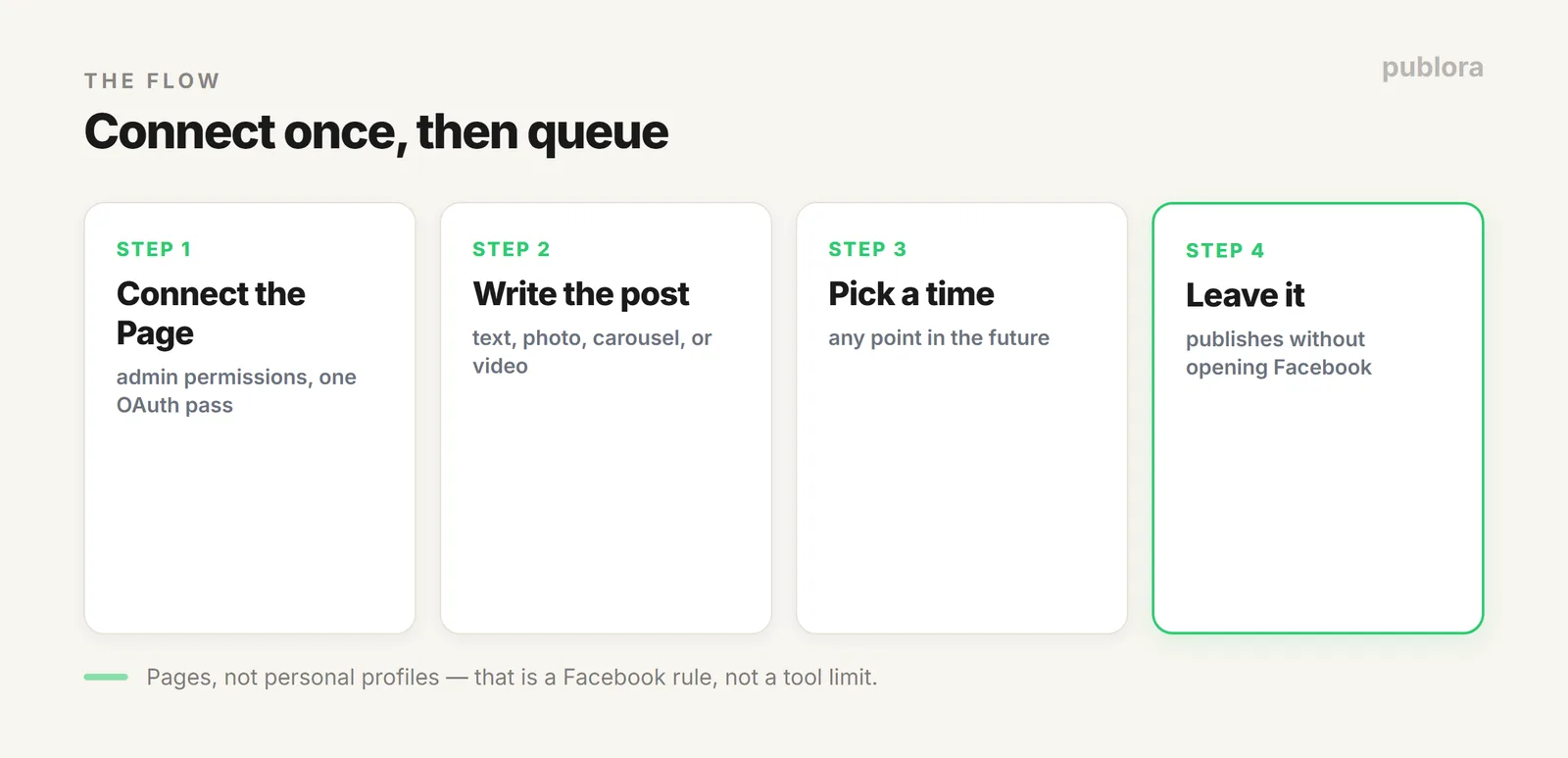
- Connect the Page. Authorize your Page once through OAuth. You need admin permissions on it.
- Write the post. Text, photo, carousel, or video.
- Pick the time. Any point in the future.
- Leave it. The post publishes without you opening Facebook.
What You Can Queue
| Format | Notes |
|---|---|
| Text | Up to 2,200 characters through the Publora editor. Facebook's own ceiling is far higher, at 63,206. |
| Images | Single image, or several as a carousel or album. WebP converts to JPEG automatically. |
| Video | MP4, MOV, AVI, MKV, and WebM. |
| Comments | 8,000 characters, if you're queuing a follow-up. |
On length: short posts tend to do better on Facebook. Posts under 80 characters draw noticeably more engagement, so the 2,200 ceiling is rarely the thing to optimize for.
Scheduling Several Pages at Once
If you run more than one Page, for different brands, locations, or languages, each connects separately and gets its own ID. A single scheduled post can target several of them in one action, so a company-wide announcement doesn't mean repeating yourself five times.
Scheduling Facebook From an API or Agent
Facebook's own tools assume a person at a keyboard. If your posts come from a script, a product feed, or an AI pipeline, an API turns a scheduled Facebook post into a single call, with the Page as the target. The same call can include Instagram, Threads, and the rest, which is usually the real point. More in the social media scheduling API guide.
Don't Schedule Facebook on Its Own
Almost nothing that belongs on a Facebook Page belongs only there. The same announcement usually fits Instagram, Threads, and LinkedIn. Queuing them one platform at a time is where the hours go, not Facebook itself. Writing once and publishing everywhere is covered in posting to every network in one action.
FAQ
How do I schedule posts on Facebook?
Connect your Page to a scheduler, write the post, pick a time, and it publishes automatically. Publora queues text, images, carousels, and video, and can post to several Pages at once.
Can I schedule to a personal profile?
No. Facebook's API blocks third-party posting to personal profiles, so no tool can do it. Use a Page; creating one is free.
Can I schedule to multiple Pages?
Yes. Each connected Page has its own ID, and one scheduled post can target several Pages in a single action.
Queue Facebook, and everywhere else
Publora schedules Facebook Pages alongside Instagram, Threads, LinkedIn, and six more platforms, from one place or one API call. Free to start.
Start FreeFurther Reading
- Can You Schedule Posts on Instagram?
- Post to Every Network in One Action
- What Is a Social Media Scheduling API?
About the author. Written by the Publora team. Page requirements, formats, and token behaviour reflect the live Publora Facebook integration documented at docs.publora.com; Facebook's own features can change.
Related Articles
The Best Time to Post on X (Twitter) in 2026
Four published studies agree on Tuesday to Thursday mornings for X. The exact windows, the sample sizes behind them, and how to find your own best time.
The Best Time to Post on Threads in 2026
Buffer's analysis of 2.5 million Threads posts puts Thursday at 9am on top. The published windows, how much data sits behind them, and how to find your own.
How to Schedule Tweets in 2026 (Posts, Threads, and API)
How to schedule tweets in 2026: queue single posts and threads on X, handle the 280-character limit and image rules, or publish from a script or AI agent.
X (Twitter) Character Limit in 2026: The Complete Reference
The X (Twitter) character limit is 280 characters, but emojis count as two and URLs count in full. Every limit, how counting works, and what happens when you go over.