How to Post Carousels to Threads via API: Complete Guide with Code Examples

· Updated
TL;DR
Learn how to programmatically post image carousels to Threads using the Publora REST API. Step-by-step guide with Python, JavaScript, and cURL examples.
Threads by Meta has quickly become one of the most popular platforms for sharing content, especially for brands and creators who want to engage with their audience through visual storytelling. Carousels — posts with multiple images that users can swipe through — are particularly effective for tutorials, product showcases, and storytelling.
In this guide, we'll show you how to programmatically post carousels to Threads using the Publora API. Whether you're building a social media automation tool, a content management system, or just want to streamline your posting workflow, this tutorial has you covered.
What You'll Learn
- How Threads carousels work
- Setting up your Publora API access
- Step-by-step carousel posting workflow
- Complete code examples in Python, JavaScript, and cURL
- Best practices and troubleshooting tips
Prerequisites
Before you begin, you'll need:
- A Publora account — Sign up at publora.com
- A connected Threads account — Connect via Meta OAuth in the Publora dashboard
- Your API key — Generate one in the Publora dashboard under Settings → API Keys
- Your Threads platform ID — Format:
threads-{accountId}(find this in your connected accounts)
Understanding the Carousel Workflow
Posting a carousel to Threads via API requires a three-step process:
- Create a draft post — Initialize the post without scheduling
- Upload images — Upload 2–20 images to the draft
- Schedule the post — Set status to "scheduled" to publish
This workflow ensures all media is properly uploaded before the post goes live.
Real-World Example
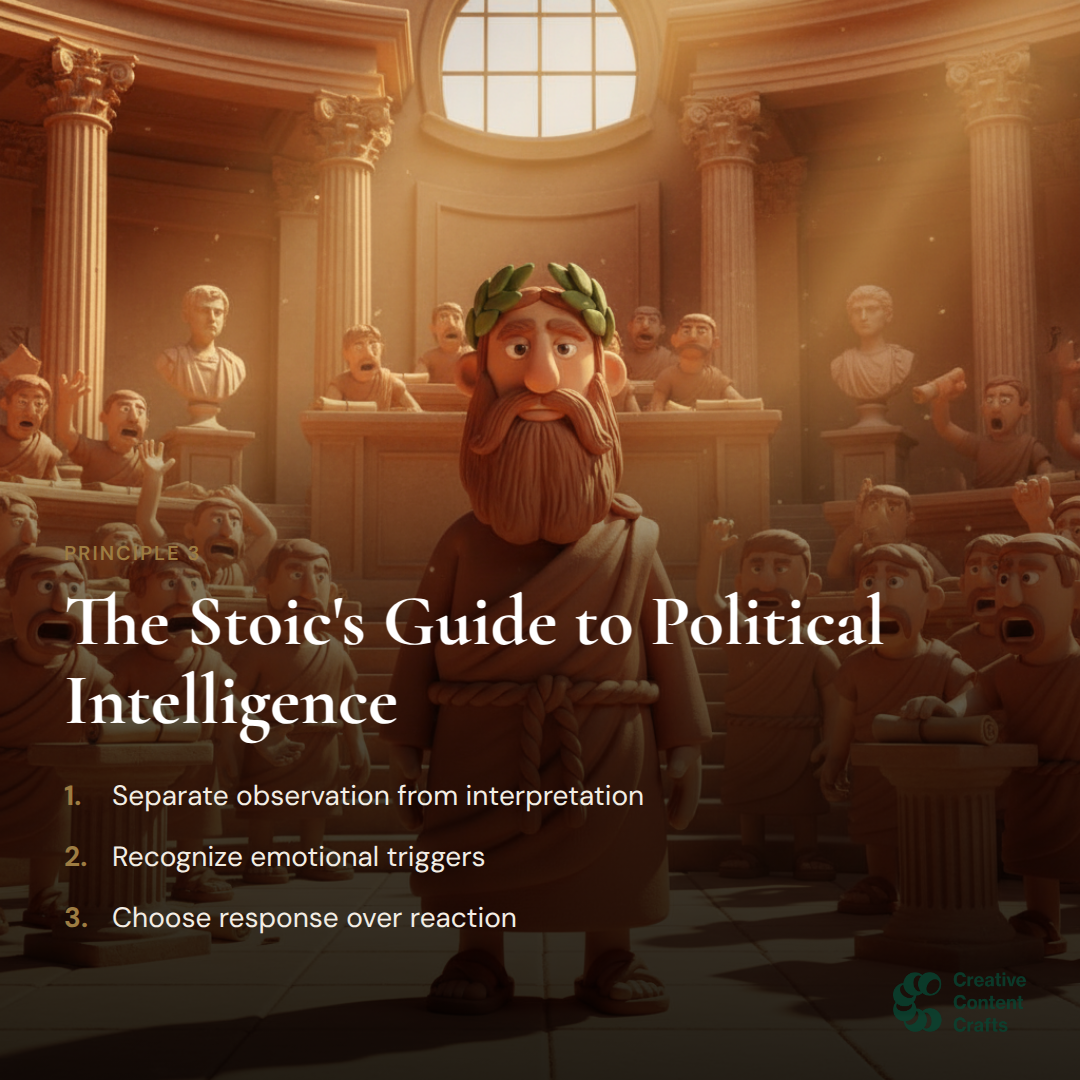
Let's post a carousel with motivational quotes from Marcus Aurelius. Here are the slides we'll use:





Code Examples
Python Implementation
import requests
import time
from pathlib import Path

# Configuration
API_KEY = "your_publora_api_key"
BASE_URL = "https://api.publora.com/api/v1"
THREADS_ACCOUNT = "threads-25885768771065298"  # Your Threads platform ID

HEADERS = {
    "Content-Type": "application/json",
    "x-publora-key": API_KEY
}

def post_carousel(content: str, image_paths: list[str]) -> dict:
    """
    Post a carousel to Threads.

    Args:
        content: The text caption for the carousel
        image_paths: List of local image file paths (2-20 images)

    Returns:
        API response with post details
    """

    # Step 1: Create a draft post (no scheduledTime = draft)
    print("Creating draft post...")
    post_response = requests.post(
        f"{BASE_URL}/create-post",
        headers=HEADERS,
        json={
            "content": content,
            "platforms": [THREADS_ACCOUNT]
            # No scheduledTime = creates as draft
        }
    )
    post_response.raise_for_status()
    post_group_id = post_response.json()["postGroupId"]
    print(f"Draft created: {post_group_id}")

    # Step 2: Upload each image
    for i, image_path in enumerate(image_paths, 1):
        print(f"Uploading image {i}/{len(image_paths)}: {image_path}")

        path = Path(image_path)
        content_type = "image/png" if path.suffix == ".png" else "image/jpeg"

        # Get presigned upload URL
        upload_response = requests.post(
            f"{BASE_URL}/get-upload-url",
            headers=HEADERS,
            json={
                "fileName": path.name,
                "contentType": content_type,
                "type": "image",
                "postGroupId": post_group_id
            }
        )
        upload_response.raise_for_status()
        upload_url = upload_response.json()["uploadUrl"]

        # Upload file to S3
        with open(image_path, "rb") as f:
            put_response = requests.put(
                upload_url,
                headers={"Content-Type": content_type},
                data=f.read()
            )
            put_response.raise_for_status()

        print(f"  Uploaded successfully")

    # Step 3: Schedule the post (set status to "scheduled")
    print("Scheduling post...")
    schedule_response = requests.put(
        f"{BASE_URL}/update-post/{post_group_id}",
        headers=HEADERS,
        json={
            "status": "scheduled",
            "scheduledTime": get_publish_time()
        }
    )
    schedule_response.raise_for_status()

    print(f"Carousel scheduled successfully!")
    return {"postGroupId": post_group_id, "status": "scheduled"}


def get_publish_time() -> str:
    """Return ISO timestamp 90 seconds in the future."""
    from datetime import datetime, timezone, timedelta
    publish_time = datetime.now(timezone.utc) + timedelta(seconds=90)
    return publish_time.isoformat()


# Example usage
if __name__ == "__main__":
    carousel_images = [
        "./slides/slide-01.png",
        "./slides/slide-02.png",
        "./slides/slide-03.png",
        "./slides/slide-04.png",
        "./slides/slide-05.png",
        "./slides/slide-06.png",
    ]

    result = post_carousel(
        content="Your principles are not what you preach. "
                "They are what you practice when no one is watching. "
                "— Marcus Aurelius",
        image_paths=carousel_images
    )

    print(f"Post ID: {result['postGroupId']}")
JavaScript / Node.js Implementation
const fs = require('fs');
const path = require('path');

const API_KEY = 'your_publora_api_key';
const BASE_URL = 'https://api.publora.com/api/v1';
const THREADS_ACCOUNT = 'threads-25885768771065298';

const headers = {
  'Content-Type': 'application/json',
  'x-publora-key': API_KEY
};

async function postCarousel(content, imagePaths) {
  // Step 1: Create a draft post
  console.log('Creating draft post...');
  const postResponse = await fetch(`${BASE_URL}/create-post`, {
    method: 'POST',
    headers,
    body: JSON.stringify({
      content,
      platforms: [THREADS_ACCOUNT]
    })
  });

  const { postGroupId } = await postResponse.json();
  console.log(`Draft created: ${postGroupId}`);

  // Step 2: Upload each image
  for (let i = 0; i < imagePaths.length; i++) {
    const imagePath = imagePaths[i];
    const fileName = path.basename(imagePath);
    const contentType = imagePath.endsWith('.png')
      ? 'image/png' : 'image/jpeg';

    console.log(`Uploading image ${i + 1}/${imagePaths.length}: ${fileName}`);

    // Get presigned upload URL
    const uploadResponse = await fetch(`${BASE_URL}/get-upload-url`, {
      method: 'POST',
      headers,
      body: JSON.stringify({
        fileName,
        contentType,
        type: 'image',
        postGroupId
      })
    });

    const { uploadUrl } = await uploadResponse.json();

    // Upload file to S3
    const fileBuffer = fs.readFileSync(imagePath);
    await fetch(uploadUrl, {
      method: 'PUT',
      headers: { 'Content-Type': contentType },
      body: fileBuffer
    });

    console.log('  Uploaded successfully');
  }

  // Step 3: Schedule the post
  console.log('Scheduling post...');
  const publishTime = new Date(Date.now() + 90000).toISOString();

  await fetch(`${BASE_URL}/update-post/${postGroupId}`, {
    method: 'PUT',
    headers,
    body: JSON.stringify({
      status: 'scheduled',
      scheduledTime: publishTime
    })
  });

  console.log('Carousel scheduled successfully!');
  return { postGroupId, status: 'scheduled' };
}

// Example usage
const images = [
  './slides/slide-01.png',
  './slides/slide-02.png',
  './slides/slide-03.png',
  './slides/slide-04.png',
  './slides/slide-05.png',
  './slides/slide-06.png'
];

postCarousel(
  'Your principles are not what you preach. '
  + 'They are what you practice when no one is watching. '
  + '— Marcus Aurelius',
  images
).then(result => {
  console.log(`Post ID: ${result.postGroupId}`);
});
cURL Implementation
#!/bin/bash

API_KEY="your_publora_api_key"
BASE_URL="https://api.publora.com/api/v1"
THREADS_ACCOUNT="threads-25885768771065298"

CONTENT="Your principles are not what you preach. They are what you practice when no one is watching. — Marcus Aurelius"

# Step 1: Create a draft post
echo "Creating draft post..."
POST_RESPONSE=$(curl -s -X POST "${BASE_URL}/create-post" \
  -H "Content-Type: application/json" \
  -H "x-publora-key: ${API_KEY}" \
  -d "{
    \"content\": \"${CONTENT}\",
    \"platforms\": [\"${THREADS_ACCOUNT}\"]
  }")

POST_GROUP_ID=$(echo "$POST_RESPONSE" | jq -r '.postGroupId')
echo "Draft created: ${POST_GROUP_ID}"

# Step 2: Upload each image
IMAGES=("slide-01.png" "slide-02.png" "slide-03.png" \
        "slide-04.png" "slide-05.png" "slide-06.png")

for FILE in "${IMAGES[@]}"; do
  echo "Uploading: ${FILE}"

  # Get presigned upload URL
  UPLOAD_RESPONSE=$(curl -s -X POST "${BASE_URL}/get-upload-url" \
    -H "Content-Type: application/json" \
    -H "x-publora-key: ${API_KEY}" \
    -d "{
      \"fileName\": \"${FILE}\",
      \"contentType\": \"image/png\",
      \"type\": \"image\",
      \"postGroupId\": \"${POST_GROUP_ID}\"
    }")

  UPLOAD_URL=$(echo "$UPLOAD_RESPONSE" | jq -r '.uploadUrl')

  # Upload to S3
  curl -s -X PUT "${UPLOAD_URL}" \
    -H "Content-Type: image/png" \
    --data-binary "@./slides/${FILE}"

  echo "  Done"
done

# Step 3: Schedule the post
PUBLISH_TIME=$(date -u -d '+90 seconds' +%Y-%m-%dT%H:%M:%SZ)

echo "Scheduling post..."
curl -s -X PUT "${BASE_URL}/update-post/${POST_GROUP_ID}" \
  -H "Content-Type: application/json" \
  -H "x-publora-key: ${API_KEY}" \
  -d "{
    \"status\": \"scheduled\",
    \"scheduledTime\": \"${PUBLISH_TIME}\"
  }"

echo ""
echo "Carousel scheduled successfully!"
echo "Post ID: ${POST_GROUP_ID}"
Posting from URLs (Without Local Files)
If your images are already hosted online, you can download and upload them in one flow:
import requests

def post_carousel_from_urls(content: str, image_urls: list[str]) -> dict:
    """Post a carousel using images from URLs."""

    # Step 1: Create draft
    post_response = requests.post(
        f"{BASE_URL}/create-post",
        headers=HEADERS,
        json={"content": content, "platforms": [THREADS_ACCOUNT]}
    )
    post_group_id = post_response.json()["postGroupId"]

    # Step 2: Download and upload each image
    for i, url in enumerate(image_urls, 1):
        print(f"Processing image {i}/{len(image_urls)}")

        # Download image
        img_response = requests.get(url, timeout=60)
        content_type = img_response.headers.get(
            "Content-Type", "image/jpeg"
        )

        # Determine filename with extension
        ext = ".jpg" if "jpeg" in content_type else ".png"
        file_name = f"image-{i}{ext}"

        # Get upload URL
        upload_response = requests.post(
            f"{BASE_URL}/get-upload-url",
            headers=HEADERS,
            json={
                "fileName": file_name,
                "contentType": content_type,
                "type": "image",
                "postGroupId": post_group_id
            }
        )
        upload_url = upload_response.json()["uploadUrl"]

        # Upload to S3
        requests.put(
            upload_url,
            headers={"Content-Type": content_type},
            data=img_response.content
        )

    # Step 3: Schedule
    publish_time = get_publish_time()
    requests.put(
        f"{BASE_URL}/update-post/{post_group_id}",
        headers=HEADERS,
        json={"status": "scheduled", "scheduledTime": publish_time}
    )

    return {"postGroupId": post_group_id}


# Example: Post Marcus Aurelius carousel from URLs
image_urls = [
    "https://brandcraft-media.s3.amazonaws.com/images/1772403140402-slide-01.png",
    "https://brandcraft-media.s3.amazonaws.com/images/1772403147373-slide-02.png",
    "https://brandcraft-media.s3.amazonaws.com/images/1772403152825-slide-03.png",
    "https://brandcraft-media.s3.amazonaws.com/images/1772403156842-slide-04.png",
    "https://brandcraft-media.s3.amazonaws.com/images/1772403164556-slide-05.png",
    "https://brandcraft-media.s3.amazonaws.com/images/1772403168348-slide-06.png",
]

result = post_carousel_from_urls(
    "Your principles are not what you preach. "
    "They are what you practice when no one is watching.",
    image_urls
)
Checking Post Status
After scheduling, you can check if your post was published successfully:
def check_post_status(post_group_id: str) -> dict:
    """Check the status of a scheduled post."""
    response = requests.get(
        f"{BASE_URL}/get-post/{post_group_id}",
        headers=HEADERS
    )
    return response.json()

# Example
status = check_post_status("69a4b9bf1edfe0a656412427")
print(f"Status: {status['posts'][0]['status']}")
# Output: Status: published
Best Practices
Image Requirements
| Requirement | Value |
|---|---|
| Minimum images | 2 |
| Maximum images | 20 |
| Supported formats | JPEG, PNG (WebP auto-converted) |
| Recommended size | 1080×1080 or 1080×1350 |
| Max file size | 8 MB per image |
Tips for Success
- Use consistent image dimensions — All carousel images should have the same aspect ratio for best visual results.
- Include file extensions — Always include
.jpgor.pngin your filenames. Some platforms require this. - Handle rate limits — Threads allows ~250 posts per 24 hours. Build in delays for bulk posting.
- Verify before scaling — Test with a single carousel before automating hundreds of posts.
- Use meaningful captions — The first 125 characters appear in the preview, so front-load your message.
Troubleshooting
Common Errors
| Error | Cause | Solution |
|---|---|---|
| "Invalid parameter" | Media not ready | Publora handles this automatically |
| "Resource does not exist" | Container expired | Retry the upload |
| 403 Forbidden | Invalid API key | Check your API key |
| 400 Bad Request | Missing required field | Verify all fields are present |
Debugging
Enable verbose output to debug issues:
import logging
logging.basicConfig(level=logging.DEBUG)

# Your code here — will show all HTTP requests/responses
Conclusion
Posting carousels to Threads via the Publora API is straightforward once you understand the three-step workflow: create draft, upload images, and schedule. This approach works for any programming language that can make HTTP requests.
Ready to automate your Threads posting? Sign up for Publora and get your API key today.
Related Resources
Related Articles
LinkedIn Image Size and Specs in 2026
LinkedIn image sizes for 2026: post images, profile banner, company cover, and logo, plus the file-size and media rules that decide whether a post publishes.
Can You Schedule Posts on Instagram? (2026 Guide)
Yes, you can schedule Instagram posts, with limits. What Instagram allows natively, what it doesn't, and how to schedule feed posts, Reels, and Stories properly.
How Do I Schedule Posts on Facebook? (2026 Guide)
How to schedule Facebook posts in 2026: what you can queue on a Page, why personal profiles don't work, and how to schedule several Pages at once or from an API.
The Best Time to Post on X (Twitter) in 2026
Four published studies agree on Tuesday to Thursday mornings for X. The exact windows, the sample sizes behind them, and how to find your own best time.