How to Post to Social Media From Codex (Plugin or MCP)

Reviewed by Jane Ivanova, CEO, Publora
TL;DR
Connect Publora to Codex with the plugin or codex mcp add, then draft, schedule and publish to LinkedIn, X, Instagram and seven more networks.
Codex can post to social media once you connect a publishing service to it. With Publora connected, you ask for a post in the same session where you finished the work, and it goes to LinkedIn, X, Instagram or seven other networks. You can connect it through the plugin directory or with one terminal command.
- In the terminal, run
codex mcp add publora --url https://mcp.publora.com/mcp, then press Approve on Publora's page. This also works in the IDE extension. - ChatGPT and Codex share one plugin directory, so you can also look for Publora under Plugins.
- Ask in plain language. Say "draft" when you mean draft, because "post" can arrive with
publishNow: true. - Test the whole path on
publora-playground. Nothing reaches a real network.
I ran the terminal route end to end for this guide on Codex CLI 0.162.1. The video and screenshots are real sessions against our production server.
What you need before you start
You need Codex, a Publora account, and at least one social account connected inside Publora. Codex publishes through the connections you already made there. The Publora free plan covers 15 posts a month and three accounts, on every network except X.
Codex plugin or MCP server: which to use
MCP (Model Context Protocol) is the standard Codex uses to call outside tools. The plugin and the direct connection both reach the same Publora server, so the difference is only in setup and where they work.
| Plugin | MCP server | |
|---|---|---|
| ChatGPT desktop app (Codex) | Yes | Yes |
| Codex CLI | Yes | Yes |
| IDE extension | No | Yes |
Runs without a person (codex exec) | Not tested | Yes, with an API key |
| Setup | Install from the directory | One command or a settings form |
ChatGPT and Codex share one plugin directory. OpenAI's docs say plugins aren't supported in the IDE extension. The MCP configuration is shared across the desktop app, the CLI and the extension, so you only set it up once.
Install the Publora plugin in Codex
In the ChatGPT desktop app, open Plugins, search for Publora, open the listing and press the plus button.
In the CLI, start codex and type /plugins. The browser groups plugins by marketplace, so if Publora isn't in your list, use the MCP route below. OpenAI also notes that some OAuth plugins aren't available if you signed in to Codex with an API key, and Publora signs in with OAuth.
Approve access when Publora's sign-in page opens, then start a new chat or CLI session. A session that was already open won't have the plugin's tools.
Add the Publora MCP server to Codex
In the terminal: codex mcp add
Run one command:
codex mcp add publora --url https://mcp.publora.com/mcpCodex notices that the server supports OAuth and starts sign-in straight away:
Added global MCP server 'publora'.
Detected OAuth support. Starting OAuth flow…
Authorize `publora` by opening this URL in your browser:
Sign in to Publora and press Approve.
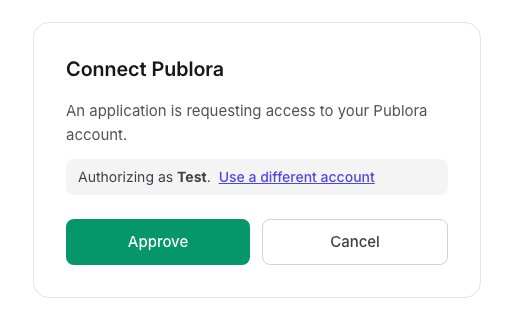
Then check the connection:
codex mcp list
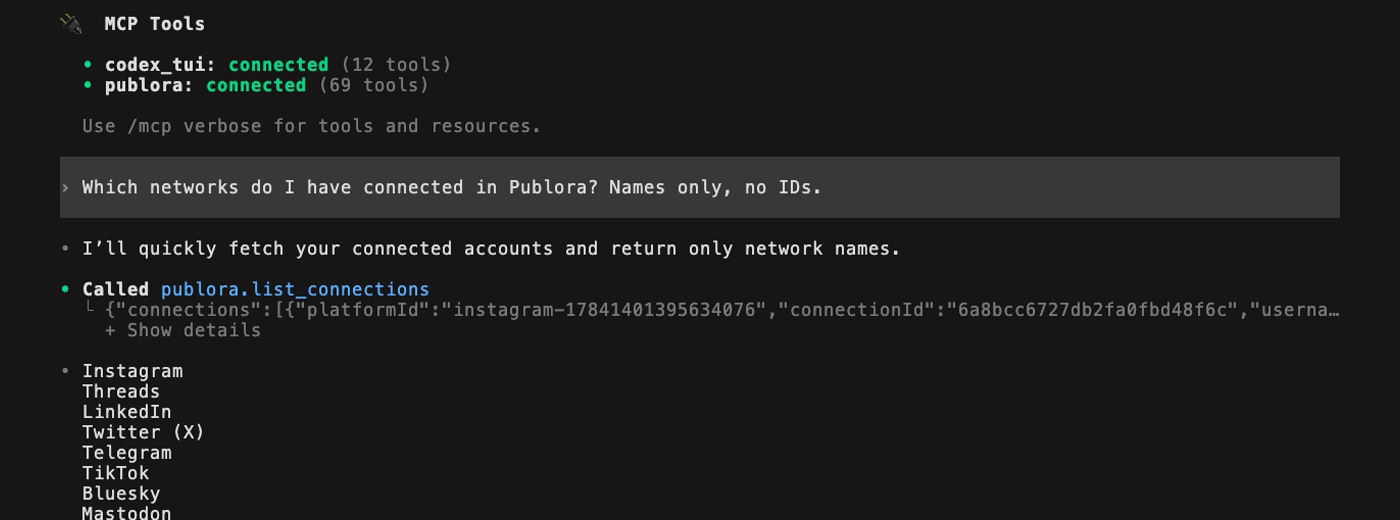
Inside a session, /mcp shows the same thing from the other side:

If the sign-in gets interrupted or expires, run codex mcp login publora. On a machine without a browser, add --no-browser, open the printed link anywhere, and paste the address you land on back into the terminal.
In the desktop app
Go to Settings → MCP servers → Add server, enter the name publora, choose Streamable HTTP, and paste https://mcp.publora.com/mcp. Save, press Restart, then Authenticate.
In the IDE extension
Open the gear menu and select MCP servers, then fill in the same form. Save, press Restart extension, then Authenticate.
In config.toml
The command above writes this to ~/.codex/config.toml, and you can add it by hand instead:
[mcp_servers.publora]
url = "https://mcp.publora.com/mcp"
With codex exec, CI or anything unattended
Nobody can press Approve there, so this route takes two changes. Sign-in moves to an API key, which you get under API in the Publora sidebar. Writes also need permission in advance, because without it codex exec stops with MCP tool call requires approval, but approval policy is never.
[mcp_servers.publora]
url = "https://mcp.publora.com/mcp"
bearer_token_env_var = "PUBLORA_API_KEY"

[mcp_servers.publora.tools.create_post]
approval_mode = "approve"
export PUBLORA_API_KEY=sk_...
codex exec "Using Publora, post 'hello from codex exec' to publora-playground only."The config stores the variable's name, not the key, so don't paste the key into a prompt or the file. With this setting, create_post runs without asking anyone. Point the first runs at publora-playground, and approve only the tools the job needs.
What to ask Codex
Plain language works. Name the network and say what should happen to the post. To point at the plugin explicitly, type @ and pick Publora.
See what's connected
Which networks do I have connected in Publora? Names only, no IDs.
Write a draft
Draft a Mastodon post saying our changelog page is live. Save it as a draft in Publora, do not schedule it.
In my runs, creating and deleting posts stopped and asked first, with the exact arguments on screen:
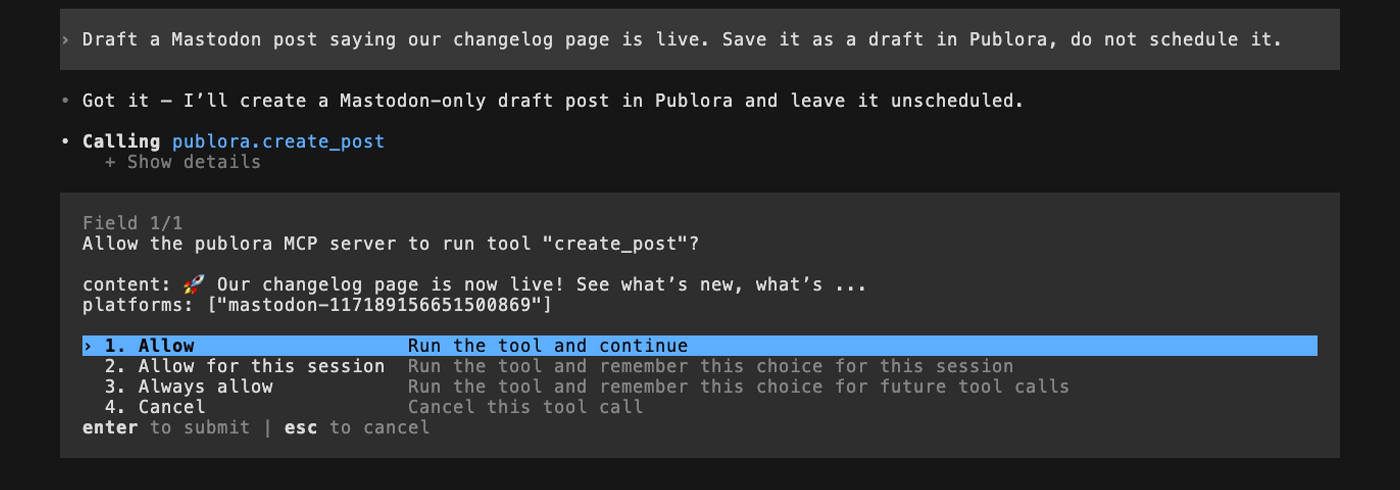
Press Allow, and the draft lands in Publora:
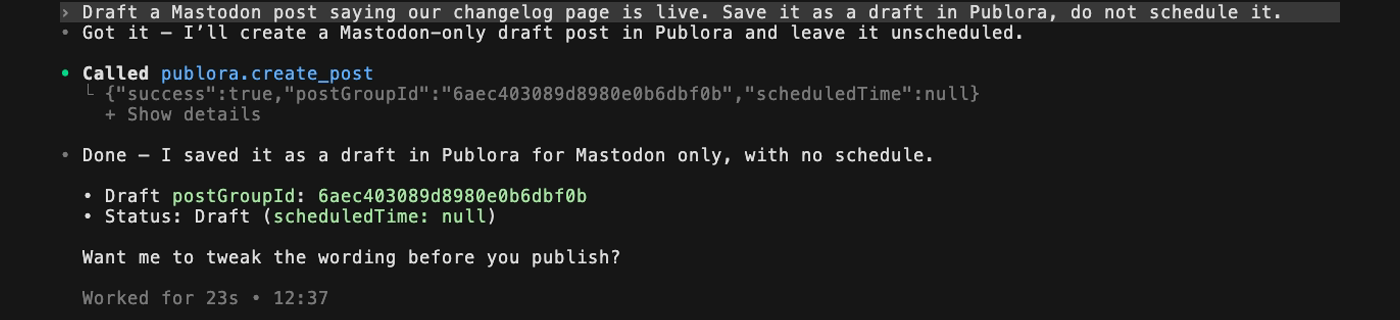
scheduledTime: null means it isn't queued. It waits in Publora until you do something with it.
Schedule a post
Schedule that draft for tomorrow at 9:00 UTC.
Give the time in UTC or with an explicit offset, so nobody has to guess your timezone.
Attach an image
Post this image to Instagram and Threads with a caption, Friday 6pm UTC: https://example.com/launch.png
The image needs a public https link. Instagram, TikTok and YouTube need an image or video, so a text-only post to them won't go through.
Delete a post
Delete the Mastodon draft you just created.
This also goes through the permission box.
When "post" means "publish now"
In my test run, "Post 'hello from Codex' to publora-playground" reached the permission box with publishNow: true. Codex took "post" literally, which is fair. On a real account, that would have gone out as soon as I pressed Allow.
So say "draft" when you mean draft, and check the permission box for publishNow. Allow approves one call. Allow for this session and Always allow skip the box later on, and I'd keep the box for anything that publishes.
Test Codex without publishing anything
publora-playground is a reserved target. A post sent there comes back with a normal success response, then gets thrown away:
Post 'hello from Codex' to publora-playground.
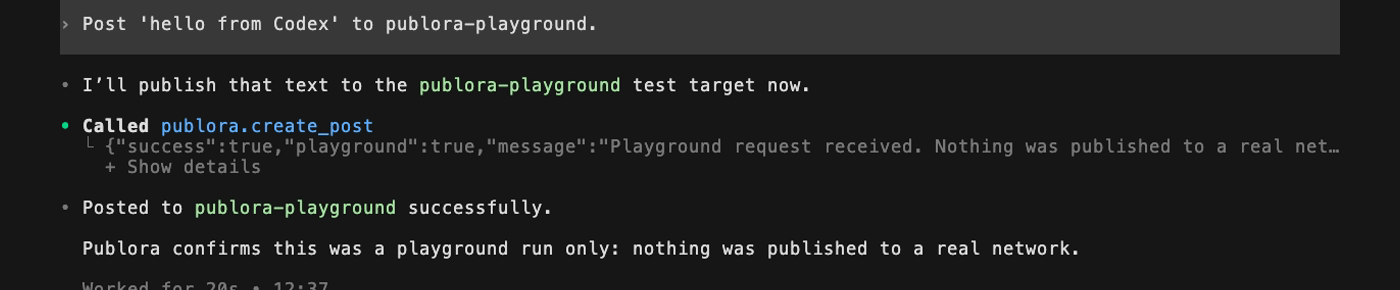
Use it to test the whole path before you point Codex at an audience. It's also a safe way to see the permission box.
What Codex won't do through Publora
- It only sees what you connected. Codex reads your channels from Publora and copies their IDs from that list.
- Pinterest is connect-only. It appears among your accounts, but you can't publish to it.
How to disconnect Publora from Codex
For the MCP server:
codex mcp logout publora   # removes the sign-in, keeps the server
codex mcp remove publora   # removes the server
To keep the server but disable it, set enabled = false under [mcp_servers.publora] in ~/.codex/config.toml.
For the plugin, open it in the plugin browser and choose Uninstall plugin. OpenAI notes that the connection stays active in ChatGPT until you disconnect it there. In the CLI, pressing Space on an installed plugin turns it off without removing it.
Connect Publora to Codex
One command in the terminal, or the plugin directory. The free plan covers three accounts and 15 posts a month, on every network except X.
Get Started FreeFAQ
Can Codex post to social media?
Yes, once a publishing service is connected. Codex has no social accounts of its own. With Publora connected as a plugin or MCP server, Codex can draft, schedule and publish posts through the accounts you connected in Publora.
Should I use the Publora plugin or the MCP server in Codex?
Use the MCP server if you work in the IDE extension, sign in to Codex with an API key, or run Codex without a person present. Otherwise either route works, and the plugin needs no configuration.
Does the Codex plugin work in the IDE extension?
No. OpenAI's docs say plugins aren't supported in the IDE extension. Add Publora as an MCP server instead, using the gear menu and MCP servers.
Can Codex publish without asking me?
Only if you allow it. In interactive sessions, creating and deleting posts stopped at a permission box in my tests. Choosing Allow for this session or Always allow skips that box later on. In codex exec, the create_post call fails until you set approval_mode to approve for that tool.
Does Codex get my social media passwords?
No. You approve access on Publora's own page, and Codex gets a token for your Publora account. Your social logins stay out of it.
Is Publora free to use with Codex?
Publora's free Starter plan covers 15 posts a month and three accounts, on every network except X. You also need your own access to Codex.
Which social networks can Codex post to through Publora?
Ten: LinkedIn, X, Instagram, Threads, TikTok, YouTube, Facebook, Bluesky, Mastodon and Telegram. Pinterest can be connected but not published to.
Further Reading
- How to publish to social media from ChatGPT
- How to connect Publora MCP to Claude Code
- How to post to LinkedIn from Cursor
- MCP vs REST API for social media automation
- Publora MCP client setup docs
About this article. Based on a live run in Codex CLI 0.162.1 and OpenAI's Codex documentation, November 2026. The plugin, desktop app and IDE steps come from OpenAI's documentation. The channel rules were read from the live Publora server.