Bluesky Scheduler: How to Schedule Bluesky Posts in 2026

Reviewed by Jane Ivanova, CEO, Publora
TL;DR
How to schedule Bluesky posts in 2026: the 300-character limit, automatic links and hashtags, image rules, and posting to Bluesky alongside your other networks.
Bluesky doesn't ship with a scheduler. If you want posts to go out while you're asleep, or you want Bluesky to receive the same content as your other networks without pasting it a fourth time, you need a tool on top. This covers how that works and the two limits that shape what you can queue.
Scheduling Bluesky in Four Steps
- Connect your Bluesky account to Publora, once.
- Write the post, under 300 characters.
- Pick a time.
- Leave it. It publishes on its own.
The 300-Character Limit
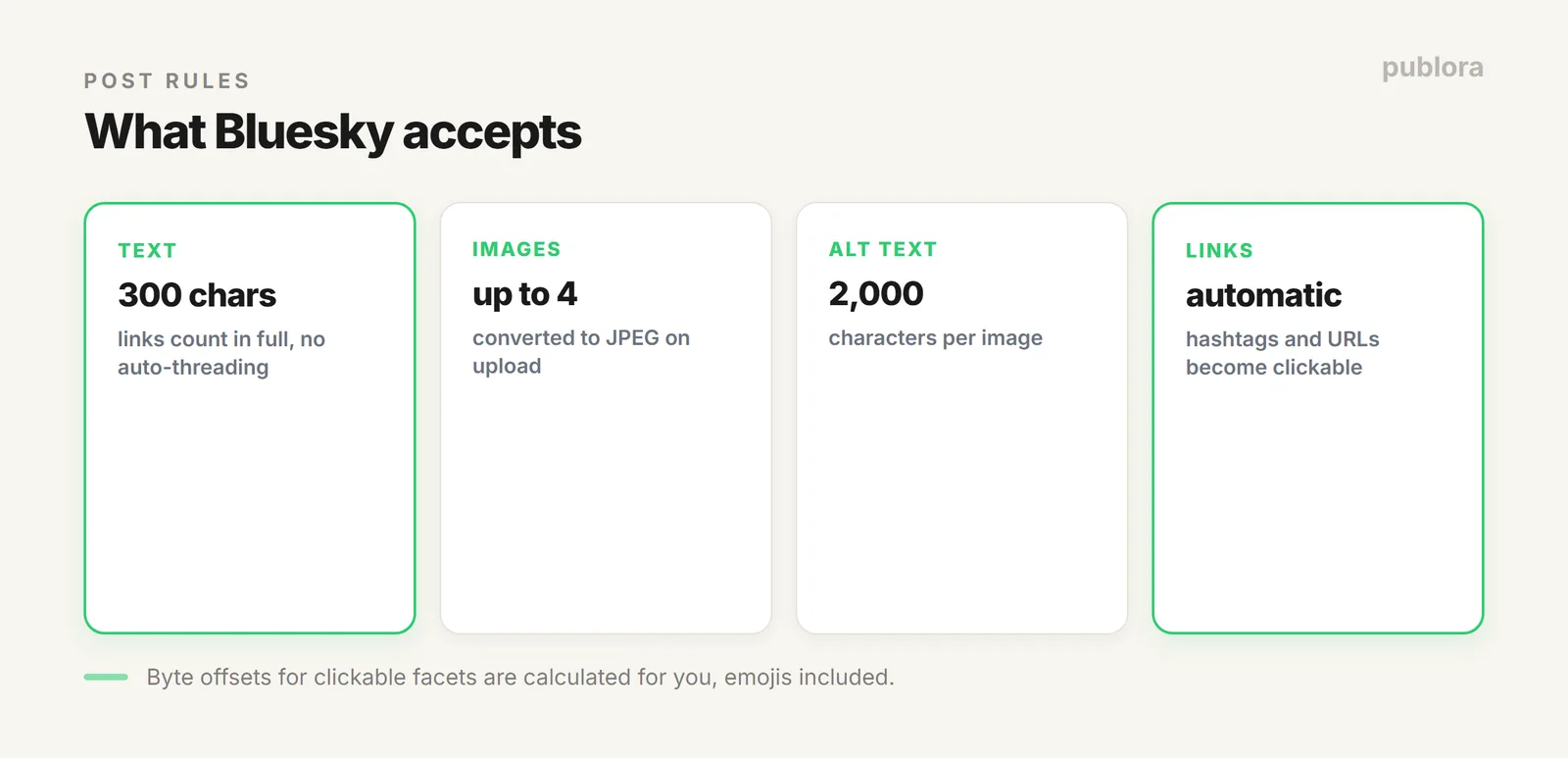
Bluesky allows 300 characters per post, tighter than X's 280 feels because there's a difference in behaviour: X splits overflow into a thread, Bluesky does not. Content over the limit returns a validation error instead of posting.
Links count in full toward that 300 in Publora, so a long tracking URL takes a real bite out of the post. Shorten links before scheduling.
Hashtags and Links Handle Themselves
Bluesky uses a rich-text system called facets to make hashtags and URLs clickable, and it's stricter than it looks: facets need precise byte offsets, not character positions. That distinction matters the moment your post contains an emoji or non-Latin text, because those are multi-byte.
Publora calculates the offsets for you. Write #hashtag or paste a URL normally and the clickable version appears correctly, emojis and all.
Media Limits
| Format | Limit |
|---|---|
| Images | Up to 4 per post, converted to JPEG on upload |
| Video | MP4 |
| Alt text | Supported, up to 2,000 characters per image |
| Post body | 300 characters |
The Real Reason to Schedule Bluesky
Bluesky is rarely somebody's only network. It usually sits alongside X, Threads, and Mastodon, carrying much the same content. Posting to each one separately is the actual chore. Connect them all once and a single scheduled post reaches every one of them, formatted for each. That's covered in posting to every network in one action.
FAQ
Can you schedule posts on Bluesky?
Not natively; Bluesky has no built-in scheduler. Connect it to Publora, write the post, pick a time, and it publishes automatically, alongside your other networks if you want.
What's the Bluesky character limit?
300 characters. Links count in full, and unlike X there's no automatic thread splitting, so longer content returns an error rather than posting.
Do hashtags and links work?
Yes, automatically. Bluesky needs precise byte offsets for clickable facets; Publora calculates them, including for emojis and non-Latin scripts.
Schedule Bluesky with everything else
Publora publishes to Bluesky, X, Threads, Mastodon, and six more platforms from one place. Free to start.
Start FreeFurther Reading
About the author. Written by the Publora team. Character limits, facet handling, and media rules reflect the live Publora Bluesky integration documented at docs.publora.com.
Related Articles
LinkedIn Character Limit in 2026 (Posts, Comments, Profile)
The LinkedIn post character limit is 3,000, but only the first 210 characters show before 'see more'. Every limit that matters, and how to write for the cut-off.
Instagram Post Size and Dimensions in 2026 (Every Format)
Every Instagram post size and dimension in 2026 - feed photos, carousels, Stories, and Reels - with exact pixels, aspect ratios, and the specs to upload in.
LinkedIn Image Size and Specs in 2026
LinkedIn image sizes for 2026: post images, profile banner, company cover, and logo, plus the file-size and media rules that decide whether a post publishes.
Can You Schedule Posts on Instagram? (2026 Guide)
Yes, you can schedule Instagram posts, with limits. What Instagram allows natively, what it doesn't, and how to schedule feed posts, Reels, and Stories properly.