Instagram Post Size and Dimensions in 2026 (Every Format)

TL;DR
Every Instagram post size and dimension in 2026 - feed photos, carousels, Stories, and Reels - with exact pixels, aspect ratios, and the specs to upload in.
Getting the Instagram post size right is the difference between a crisp image that fills the feed and a blurry one that gets cropped in half. Instagram supports a handful of formats, each with its own pixels and aspect ratio, and it quietly crops or compresses anything that doesn't fit. This is the full reference for 2026: every format, its exact size, and what to upload.
Instagram Sizes at a Glance
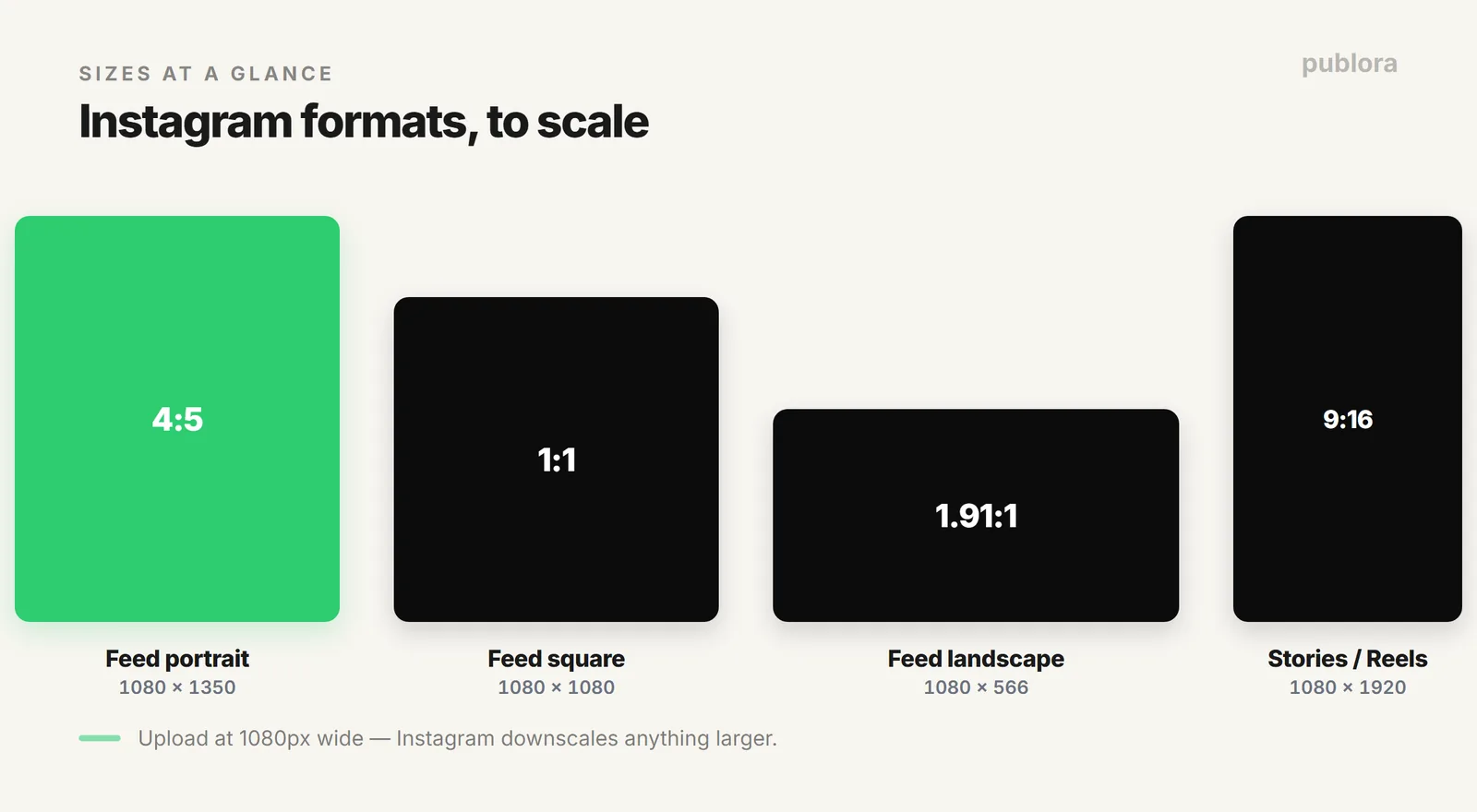
The quick answer, then the detail. These are the sizes to upload for each Instagram format.
| Format | Size (px) | Ratio |
|---|---|---|
| Feed, portrait (recommended) | 1080 x 1350 | 4:5 |
| Feed, square | 1080 x 1080 | 1:1 |
| Feed, landscape | 1080 x 566 | 1.91:1 |
| Carousel (per slide) | 1080 x 1350 | 4:5 |
| Stories | 1080 x 1920 | 9:16 |
| Reels | 1080 x 1920 | 9:16 |
| Profile photo | 320 x 320 | 1:1 |
Feed Posts: Portrait, Square, Landscape
Instagram feed photos support three shapes, and the one you pick changes how much of the screen you own.
- Portrait, 1080 x 1350 (4:5). The tallest a feed post can go, and the one to default to. It takes the most vertical space, so it stands out as someone scrolls.
- Square, 1080 x 1080 (1:1). The classic Instagram shape. Safe, balanced, and never cropped in the grid.
- Landscape, 1080 x 566 (1.91:1). Widescreen. Fine for scenery or graphics, but it's the smallest footprint in a vertical feed.
Whatever the shape, upload at 1080 pixels on the wide edge. Instagram displays up to 1080px wide and downscales anything larger, so a huge file gains you nothing. Avoid going below 320px wide, where the image gets upscaled and looks soft.
Carousels: Match the Ratio Across Slides
A carousel uses the same sizes as a single feed post, with one rule: every slide should share the same aspect ratio. Instagram applies the first slide's ratio to the whole set, so a square first slide will crop your portrait slides. Pick 4:5 or 1:1 and keep it consistent. Via the API, a carousel holds 2 to 10 items, and you can't mix images and video in the same one.
Stories and Reels: Full-Screen Vertical
Stories and Reels both fill the phone screen at 1080 x 1920 (9:16). Two things to keep in mind:
- Keep key content centered. Instagram overlays the profile icon, caption, and buttons near the top and bottom, so leave roughly the top and bottom 250px clear of anything important.
- The Reels grid thumbnail is square. On your profile grid, a Reel is cropped to 1:1, so make sure the center of the frame reads well on its own.
File Specs
| Spec | Recommendation |
|---|---|
| Photo format | JPEG or PNG (WebP also works through many schedulers) |
| Upload width | 1080px; larger is downscaled, below 320px is upscaled |
| Video format | MP4 or MOV |
| Reels length | Up to 3 minutes via the API; 5 to 90 seconds are eligible for the Reels tab |
Scheduling These Formats
Knowing the sizes is half the job; posting them consistently is the other half. If you schedule Instagram through Publora, the same formats apply: images go up as JPEG, PNG, or WebP (WebP auto-converts to JPEG), carousels take 2 to 10 items, and a video defaults to a Reel or publishes as a Story with a single setting. The full walkthrough is in how to post to Instagram via API, and for the timing side, see the best time to post on Instagram.
FAQ
What's the best Instagram post size?
For feed photos, 1080 x 1350 (4:5 portrait) takes the most vertical space and stands out most. Square is 1080 x 1080, landscape is 1080 x 566. Upload at 1080px wide.
What aspect ratios does Instagram support?
Feed posts run from 1.91:1 (landscape) to 4:5 (portrait), with 1:1 square in between. Stories and Reels are 9:16. Outside that range, Instagram crops to fit.
What size should a carousel be?
The same as a feed post (1080 x 1350, 1080 x 1080, or 1080 x 566), with every slide on the same ratio since Instagram applies the first slide's ratio to all of them.
Schedule Instagram in the right size, every time
Publora publishes feed posts, carousels, Stories, and Reels to Instagram, and nine other platforms, from one place. Free to start.
Start FreeFurther Reading
About the author. Written by the Publora team. Sizes reflect Instagram's supported formats as of 2026; Publora media specs come from the live Instagram integration documented at docs.publora.com.
Related Articles
The Best Time to Post on X (Twitter) in 2026
Four published studies agree on Tuesday to Thursday mornings for X. The exact windows, the sample sizes behind them, and how to find your own best time.
The Best Time to Post on Threads in 2026
Buffer's analysis of 2.5 million Threads posts puts Thursday at 9am on top. The published windows, how much data sits behind them, and how to find your own.
How to Schedule Tweets in 2026 (Posts, Threads, and API)
How to schedule tweets in 2026: queue single posts and threads on X, handle the 280-character limit and image rules, or publish from a script or AI agent.
X (Twitter) Character Limit in 2026: The Complete Reference
The X (Twitter) character limit is 280 characters, but emojis count as two and URLs count in full. Every limit, how counting works, and what happens when you go over.